Top Choices for the Best Workforce Management Software
Choosing the best workforce management software isn't just about picking a tool; it's about finding a platform that truly masters scheduling, time tracking, analytics, and compliance all in one place. Top-tier solutions create a central hub to manage remote, hybrid, and in-office teams seamlessly, turning messy operational headaches into real strategic advantages.
Navigating the New World of Work
Let's be honest: the traditional 9-to-5 office is a thing of the past. Today's businesses are a dynamic mix of remote workers, hybrid schedules, and globally scattered teams. This new reality makes simple coordination a monumental task.
Managing this modern workforce requires more than a glorified digital time clock. You need a strategic tool that acts as the central nervous system for your entire operation. This is exactly where workforce management (WFM) software steps in, bringing order to the chaos and turning logistical nightmares into opportunities for growth.
The Modern Workforce Challenge
Trying to coordinate schedules across different time zones, ensure workloads are fair, and stay compliant without everyone under one roof is a massive headache. Without a unified system, many businesses find themselves stuck dealing with:
- Inefficient Scheduling: Relying on spreadsheets is slow and full of errors. You end up with too few people during a rush or too many sitting around when it's quiet.
- Productivity Gaps: It's tough to spot performance issues or bottlenecks when your team is spread out. How can you support employees who are struggling if you can't see the problem?
- Compliance Risks: Labor laws are a minefield, and they're always changing. Manually tracking hours, breaks, and overtime for a distributed team is a recipe for costly mistakes.
The growing demand for remote working flexibility has put these issues under a microscope, forcing businesses to find smarter ways to operate. A solid WFM platform tackles these pain points head-on, offering a clear, automated path to getting things done right. You can see how other companies are successfully adapting to the future of work to stay ahead of the curve.
A Growing Market for a Critical Need
The explosive demand for these tools tells a story. The global workforce management software market was valued at around USD 8.07 billion in 2022 and is expected to more than double, hitting USD 19.35 billion by 2030. This isn't just a trend; it's a fundamental shift in how successful businesses are run.
Thinking of workforce management software as a core solution empowers your entire organization. It's not just about tracking people—it's about building a resilient, productive, and fair work environment that can succeed from anywhere. This guide will show you how to choose the right system that fits your goals like a glove.
What Workforce Management Software Actually Does
So, what exactly is workforce management (WFM) software? Let’s cut through the jargon.
Think of it as the air traffic control tower for your business. An air traffic controller doesn’t just watch planes fly by; they coordinate every single takeoff, flight path, and landing. Their job is to make sure the entire system runs smoothly, safely, and on time.
WFM software does the same for your team. Its main goal is to put the right people, with the right skills, in the right place at the right time—all while keeping an eye on your budget. It helps you ditch the messy spreadsheets and disconnected departments for a single, unified way of operating.
This software connects functions that used to live in their own little worlds, like time tracking, scheduling, and leave management. By pulling everything together, it turns a flood of data into clear insights you can actually use, helping you make smarter decisions about your most important asset: your people.
From Manual Chaos to Automated Clarity
Without a proper system, managing a team can feel like a constant juggling act. Managers burn hours building schedules, digging through email chains to approve time off, and chasing down employees for timesheet corrections. It's slow, tedious, and packed with opportunities for human error.
The best workforce management software cuts through that chaos with automation. It becomes the one place everyone can trust for all information related to your team’s time and tasks.
For example, instead of a manager guessing who can cover a Saturday shift, the software instantly shows who’s qualified, available, and won't tip into overtime. This shift from putting out fires to planning ahead is a massive win for any business.
Core Functions Working in Unison
To really get what WFM software does, you have to see how its core parts work together. They aren't just separate tools thrown into one box; they constantly share data to give you a complete picture of your operations.
- Time and Attendance: This is much more than a digital punch clock. It accurately logs when people start and stop work, tracks their breaks, and automatically flags attendance issues. This ensures everyone is paid fairly and keeps you compliant with labor laws.
- Scheduling and Forecasting: The software can look at historical data—like past sales numbers or call volumes—to predict how many staff members you'll need in the future. This helps you build schedules that avoid being short-staffed during a rush or overstaffed during quiet periods.
- Absence and Leave Management: Employees can request time off through their own portal. Once a manager approves it, the system automatically updates the schedule and payroll, which means no more manual calendar updates.
- Workforce Analytics: This is the brains of the operation. It pulls data from all the other functions to give you a deep dive into things like labor costs, team productivity, and attendance patterns. This helps leadership spot trends and make decisions based on real numbers, not guesswork.
The real power of WFM software lies in its integration. An approved leave request instantly blocks that employee from being scheduled, and every hour tracked feeds directly into labor cost analytics, giving you a live, accurate view of your business performance at all times.
The Must-Have Features of Any Good WFM Platform
When you start looking at workforce management software, it's easy to get lost in the marketing jargon. To pick the right tool, you need to ignore the flashy sales pitches and look under the hood at the core features that actually make a difference.
Not all WFM platforms are created equal. The best ones are built on a handful of non-negotiable capabilities that work together to make your life easier. Think of these as the foundation—without them, the whole thing falls apart.
The image below gives a great snapshot of the real-world benefits you can expect when you implement a system that gets these fundamentals right.
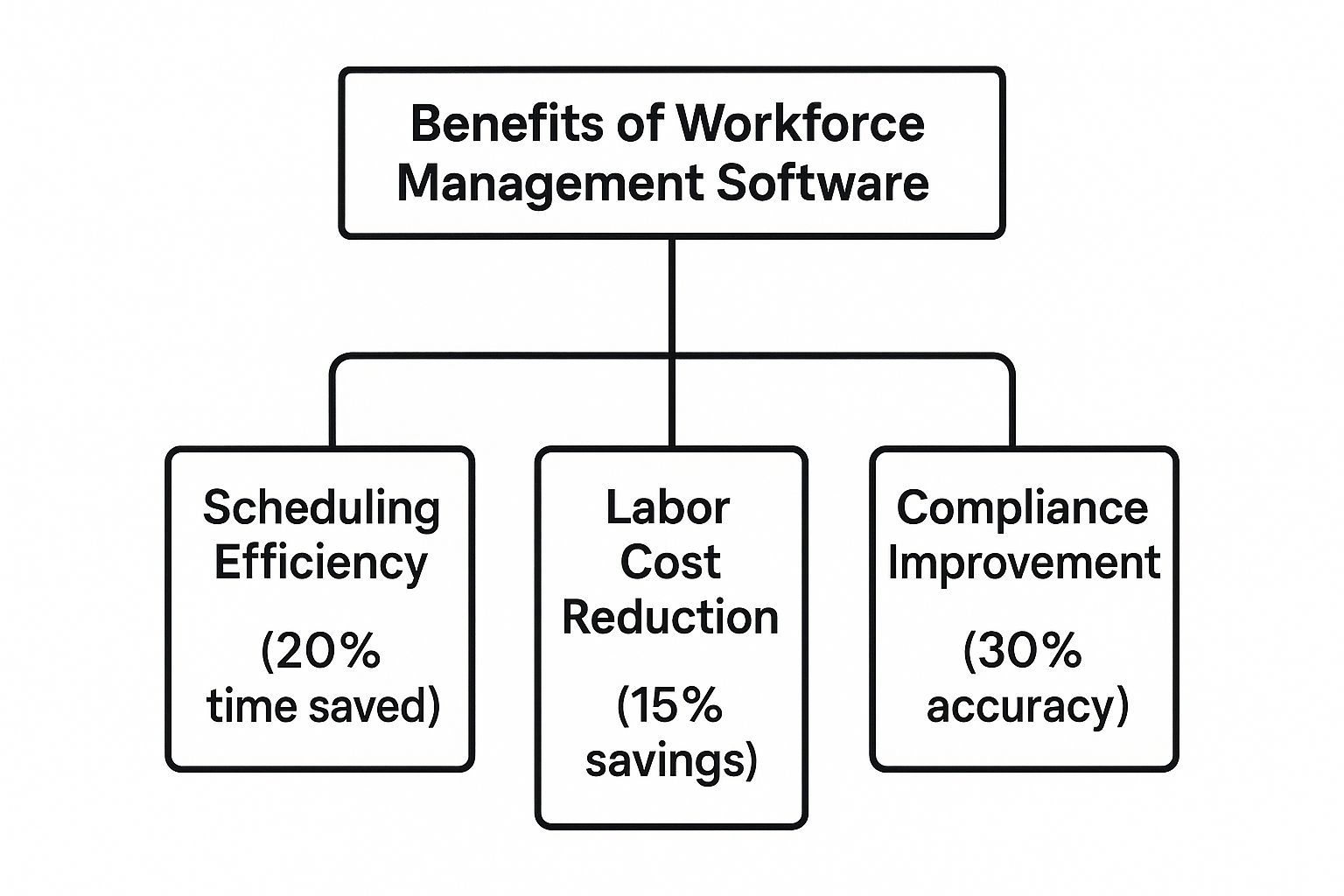
As you can see, it's all about tangible results: smarter scheduling, lower labor costs, and staying on the right side of compliance.
Let’s take a closer look at the core functionalities you should be looking for in any WFM software and the direct business value each one brings.
| Essential Workforce Management Software Features and Benefits | ||
|---|---|---|
| Feature | Primary Function | Key Business Benefit |
| Time & Attendance Tracking | Accurately captures employee work hours, breaks, and overtime automatically. | Eliminates payroll errors, ensures labor law compliance, and builds employee trust. |
| Scheduling & Forecasting | Uses historical data to predict future staffing needs and build optimized schedules. | Prevents understaffing/overstaffing, reduces labor costs, and improves operational efficiency. |
| Absence & Leave Management | Centralizes and automates time-off requests, approvals, and balance tracking. | Simplifies admin work, ensures proper coverage, and provides clear visibility for everyone. |
| Workforce Analytics & Reporting | Converts raw operational data into actionable insights through dashboards and reports. | Enables data-driven decisions, identifies productivity trends, and helps control labor costs. |
These features are the building blocks of a powerful WFM system. They move you from reactive problem-solving to proactive, strategic management of your most valuable asset: your people.
Time and Attendance Tracking
First and foremost, any WFM platform worth its salt has to nail time tracking. And I mean flawlessly. This is so much more than a digital punch clock. We're talking about automated, precise time capture that gets rid of manual entry errors and the endless back-and-forth of chasing down timesheets.
Getting this right ensures every single person is paid correctly for every minute they work. That's a huge part of building trust and keeping morale high.
Plus, accurate tracking is your best defense against compliance headaches. The system should handle meal and break rules, calculate overtime automatically, and keep a clean, auditable log of all hours. This is what protects your business from expensive legal trouble down the road.
Employee Scheduling and Forecasting
This is where WFM software goes from being a simple admin tool to a genuine strategic advantage. Forget building schedules in a spreadsheet and just hoping for the best. Modern platforms use your own historical data—like past sales figures or project workloads—to forecast exactly who you'll need, and when.
This forecasting ability is a total game-changer. For a retail business, it means you're never caught understaffed during a holiday rush. For an agency, it means the right people are assigned to hit deadlines without burning out.
By automatically creating schedules based on demand, employee availability, and skill sets, managers get countless hours back. Suddenly, they can focus on leading their team instead of getting lost in a logistical maze.
Smart scheduling is one of the biggest levers you can pull for efficiency. To see how specialized tools can take this even further, check out our guide to boost productivity with top employee scheduling software.
Absence and Leave Management
Trying to manage time-off requests through email and spreadsheets is a recipe for chaos. A standout feature of the best WFM software is a centralized, self-service portal where employees can handle their own leave.
They can submit requests, check their remaining balances, and see the team calendar, all without having to bug a manager.
This simple change automates the whole workflow. Once a manager clicks "approve," the system instantly updates the schedule, notifies the right people, and adjusts payroll accruals. No more accidental double-bookings or wondering if you have enough coverage for a shift.
Workforce Analytics and Reporting
Data is just noise until you can make sense of it. The most powerful WFM platforms come with a robust analytics engine that turns all that operational data into clear, easy-to-understand reports.
This is what gives you that 30,000-foot view of how your workforce is performing. With good dashboards, you can track key metrics like:
- Labor Costs vs. Budget: See in real-time if you're on track with spending.
- Productivity Trends: Quickly spot who your top performers are and where you can improve.
- Attendance Patterns: Identify issues like chronic lateness before they become a major problem.
This kind of visibility is absolutely critical for companies with remote or hybrid teams. It's no surprise that the North American market for this software is massive, estimated at USD 9.5 billion in 2024 and expected to jump to USD 14.7 billion by 2031. That growth is being driven by the need for tools that deliver real insights in today's flexible work models. You can dig into more details about this market expansion on verifiedmarketresearch.com.
How to Choose the Right WFM Solution
Picking the right workforce management software for your business feels like a huge decision. It is. With a sea of options out there, it's incredibly easy to get distracted by endless feature lists and slick product demos that promise the world.
The trick is to flip the script. Instead of asking what a piece of software can do, start by figuring out what your business needs it to do. This simple shift from an outward-in to an inward-out approach is the key to finding a tool that solves your actual problems, not just one that looks good in a presentation.
Assess Your Unique Business Needs
Before you even glance at a vendor's website, you need to do some internal homework. Every company's DNA is different. A tool that's a game-changer for a 50-person tech startup could be a total disaster for a 500-employee retail chain.
Think of this as creating a practical checklist tailored to your company's reality. Here are the big-picture questions to ask:
- Team Size and Structure: Are you managing a small team in one office or a sprawling, distributed workforce scattered across different time zones? The more complex your setup, the more sophisticated your WFM tool needs to be.
- Industry-Specific Requirements: Every industry has its own quirks. A healthcare provider is juggling complex certifications and demanding shift rotations. A construction firm needs rock-solid mobile access for crews in the field. Your software has to speak your industry's language.
- Compliance and Labor Laws: Are you operating under strict local, state, or federal labor laws for overtime, breaks, or fair scheduling? Your software must be able to automate and enforce these rules without you losing sleep over it.
Nailing this down upfront gives you a scorecard. You can measure every potential solution against it, making your final choice far more objective and strategic.
Core Evaluation Criteria for WFM Software
Once you’ve got a clear map of your needs, you can start looking at specific platforms. It’s tempting to compare feature-for-feature, but you need to look deeper at the three pillars that determine whether a WFM solution will be a long-term asset or a short-term headache.
The right software doesn't just add features; it removes friction. Your goal is to find a system that makes work easier for everyone, from frontline employees to the executive team, creating a more efficient and transparent operation.
Here are the non-negotiables to dig into:
- Scalability: Your business won't stand still, so your software can't be a dead end. Ask vendors how their platform handles growth. What happens when you add more employees, new locations, or more operational complexity? The best systems should support your growth, not get in the way of it.
- Ease of Use: A powerful tool is completely useless if your team finds it clunky and avoids using it. The interface has to be intuitive for managers and employees alike. If it takes a 20-page manual to figure out how to request time off or swap a shift, you've already lost. Prioritize clean, simple systems that people will actually want to use.
- Integration Capabilities: Your WFM software doesn't live on an island. It has to play nicely with your other critical business systems, especially payroll and HR platforms. Solid integration eliminates soul-crushing manual data entry, slashes errors, and creates a single, reliable source of truth for all things employee-related.
Cloud vs On-Premise Solutions
One last crucial fork in the road is deciding between a cloud-based or an on-premise system. Not long ago, this was a real debate. Today, the market has overwhelmingly picked a winner, and for very good reasons.
Cloud-based deployment has become the go-to model, projected to grab 65% of the total workforce management software market share by 2035. This isn't surprising when you look at the broader trend: corporate data stored in the cloud is expected to jump from 25% in 2015 to 50% by 2025.
Cloud software simply offers clear wins: faster setup, lower upfront investment, and the flexibility for your team to manage their work from absolutely anywhere. For a deeper dive into this industry shift, you can check out the full workforce management software market report.
Ensuring a Successful WFM Implementation
Here’s the thing about even the most powerful workforce management software: it’s just a tool. Its real value doesn’t come from a long list of features. It comes from the people who use it every single day. The bridge between buying new tech and actually seeing a return on your investment is a smooth, well-thought-out implementation process.
Success all comes down to effective change management. This means you need to focus just as much on the people part of the transition as you do on the technical setup. When your team understands the "why" behind the change and feels supported through it, they're far more likely to get on board—and fast.
Ignoring this human element is one of the most common ways a rollout fails. A rushed launch with poor communication is a recipe for resistance, confusion, and frustration, which will stop you from ever getting the full benefit of the software.
Building a Clear Implementation Roadmap
A successful rollout is never an accident. It’s the result of a deliberate, step-by-step plan. Think of your implementation roadmap as your guide, breaking down what feels like a massive project into smaller, manageable phases. This ensures nothing important gets missed and everyone knows what’s happening and when.
It's like building a house. You wouldn’t just start nailing boards together without a solid foundation and a detailed blueprint. Your roadmap is that blueprint, providing the structure you need for a stable and successful launch. A good plan must include key milestones, realistic timelines, and clear owners for every task to keep things on track.
Securing Buy-In and Communicating Benefits
Getting your team on board starts with being upfront and honest. It's absolutely critical to frame the new WFM system not as a "Big Brother" monitoring tool, but as a platform designed to make everyone's life easier.
The fastest way to get support is by showing people what’s in it for them. Talk about how the software gives them more flexibility, creates fairer schedules, and offers easy access to their own information, like leave balances and pay stubs.
This simple shift changes the conversation from surveillance to service. Here are a few key benefits to communicate directly to your team:
- More Control Over Their Schedules: Show them how they can easily request time off, see the team calendar, or even swap shifts through a self-service portal.
- Increased Fairness and Transparency: Explain how automated scheduling makes sure work is distributed evenly and overtime is calculated correctly, removing any guesswork or potential bias.
- Faster, More Accurate Payroll: Let them know that accurate time tracking means they will always be paid correctly and on time. No exceptions.
Conducting Comprehensive Employee Training
Finally, proper training is completely non-negotiable. Don't just give your team a quick demo and hope for the best. You need to tailor your training sessions for different groups—a manager will use the software very differently from a frontline employee.
Offer a mix of training materials to suit how different people learn. This could be a mix of live webinars, short video tutorials they can watch on their own time, and a simple quick-reference guide or FAQ document. The goal is to make every person feel confident from day one. When you invest in a well-planned implementation, you're guaranteeing your team will actually use the tool, helping you see a positive return almost immediately.
A Smart WFM Choice for Modern Teams
Knowing the theory behind great workforce management software is one thing, but seeing it in action is what really counts. After breaking down what makes a system top-tier, it’s helpful to look at a real-world example. This is where a solution like DeskCove makes the leap from concept to a real-world application. It’s a perfect case study of how the best WFM software tackles the actual challenges distributed teams face every day.
A well-designed WFM tool is built from the ground up with a focus on simplicity and genuine effectiveness. It zeroes in on the biggest headaches of managing a modern workforce and delivers tangible results by sticking to what matters most: transparency, efficiency, and data-backed insights. It's solid proof that a powerful tool doesn't have to be a complicated one.
Intuitive Tracking Meets Actionable Insights
One of the biggest roadblocks with any new software is getting people to actually use it. A system is worthless if your team ignores it. An effective solution nails this with an incredibly straightforward interface that makes time and activity tracking a breeze for employees. This simplicity is its secret weapon, guaranteeing you get clean, reliable data from day one.
That accurate data feeds directly into powerful, easy-to-read dashboards. Managers are no longer left guessing about who’s working on what or how projects are progressing. Instead, they get a crystal-clear picture of:
- Project Timelines: See precisely how many hours are flowing into specific tasks and projects.
- Workload Distribution: Quickly spot which team members are swamped and who might have the bandwidth to help out.
- Productivity Patterns: Discover when your team hits its stride and identify potential bottlenecks before they derail a project.
This blend of effortless tracking and clear reporting fosters a transparent work environment where performance is measured by results, not by who is sitting in what chair.
The real value of a WFM platform is its ability to transform raw activity data into smarter business decisions. The right tool gives managers the visibility they need to optimize workflows, balance assignments, and offer targeted support—driving performance without ever needing to micromanage.
A Scalable Solution for Growing Businesses
The best workforce management software is designed to grow right alongside your business. It doesn't matter if you're a small agency juggling a few freelancers or a company that's rapidly expanding across the globe—the platform scales to fit your reality. Its flexible project management and reporting tools can handle increasing complexity, so you never lose that clear view of your operations.
This kind of adaptability is a hallmark of the best workforce management software. It gives you a stable foundation to build on, letting you add new people and projects without worrying about outgrowing your tools. The goal is to provide a streamlined solution that boosts your team’s output at every stage of growth. For teams ready to take the next step, learning how to boost team efficiency with this top-rated staff tracker can unlock even more valuable strategies.
Ultimately, a thoughtfully designed WFM platform becomes more than just a tool—it becomes a strategic asset. By delivering operational clarity, smoother project management, and a real lift in team productivity, it empowers businesses to not just manage their workforce, but to truly thrive.
Frequently Asked Questions About WFM Software
Jumping into the world of workforce management software can feel like opening a can of worms. There are a lot of questions that come up as you start comparing options, and it's totally normal to have concerns about cost, the real impact on your team, and what it’s actually like to get one of these systems up and running.
Think of this section as your final sanity check. We'll tackle the most common questions head-on to clear up any lingering doubts you might have.
How Much Does Workforce Management Software Cost?
The price tag on WFM software is all over the map. What you'll end up paying really boils down to a few things: how big your team is, which specific features you can't live without, and whether you go with a cloud-based or on-premise setup.
These days, most solutions are cloud-based and run on a Software-as-a-Service (SaaS) model. This means you're typically looking at a per-user, per-month fee that could be anything from a few dollars to over $20. The upside here is that your initial investment is low, and things like updates and support are usually baked right in. On-premise systems, which are becoming less common, demand a hefty upfront payment for hardware and licenses, though their ongoing fees might be lower.
A word of advice: don't just look at the sticker price. Always consider the Total Cost of Ownership (TCO). This includes any hidden fees for setup, migrating your old data, training your people, and ongoing support. That's how you find a solution that genuinely fits the budget.
Can WFM Software Actually Improve Employee Morale?
You bet it can. It might sound like another top-down management tool, but the best workforce management software is really designed to give employees more control and make their work lives better.
When you roll it out the right way, it creates a sense of fairness and transparency that people truly value. For instance, self-service portals let staff request time off, check their schedules, or even swap shifts without having to chase down a manager. That simple change gives them a huge amount of control over their work-life balance.
On top of that, smart, automated scheduling helps prevent burnout by making sure work is spread out evenly. And maybe the biggest morale booster of all? Accurate time tracking guarantees every single person gets paid correctly and on time. Nothing builds trust faster than that.
Is Workforce Management Software Difficult to Implement?
How tough the implementation is really depends on the software you pick. Most modern, cloud-based platforms are built to be pretty straightforward. Many vendors will walk you through the setup with guided onboarding, detailed help docs, and a dedicated support team to smooth out any bumps.
Honestly, the biggest headaches usually aren't technical. The real challenges often come from moving old data from your previous systems or getting the new software to talk to your other tools, like your payroll or HR platform.
But even these hurdles are manageable with a solid game plan and proper employee training, like we talked about earlier. Doing your homework and choosing a vendor known for great customer support is one of the smartest things you can do to ensure the whole process is as painless as possible.
Ready to see how a smart, intuitive platform can transform your operations? DeskCove provides the powerful time tracking and project management tools you need to boost productivity and manage your team with confidence. Discover DeskCove today.