
Master Project Profitability Analysis for Better Results

Finishing a project on time and under budget feels great, but that's only half the story. The real measure of success—the one that keeps the lights on—is whether the project actually made money. That’s why a solid project profitability analysis is the single most important metric for your business's long-term health. It’s the critical difference between just being busy and being truly profitable.
Why Profitability Is Your Most Important Project Metric

It’s all too easy to get tunnel vision on operational stuff like hitting deadlines and checking off deliverables. While those things matter, they don't guarantee a project is adding to your bottom line. I've seen countless projects that looked successful on the surface quietly leaking cash through hidden costs, poor resource planning, and hours that were never billed.
This is where a change in thinking is required. Stop seeing profitability analysis as a boring accounting task you do after the fact. Instead, think of it as a strategic tool that guides your decisions from the very beginning. This simple shift moves you from constantly putting out fires to making smart, proactive choices that boost your margins.
Moving Beyond Basic Project Management
Relying on old-school project management metrics alone can be seriously misleading. A project can hit every milestone and stay within its expense budget but still be a financial loser. This often happens when the initial bid was too low or when your most expensive people spend way too much time on low-value tasks.
Think about a digital agency that just wrapped up a website redesign. They delivered it on schedule, and the client is over the moon. But when they crunch the numbers, they realize their senior developers sank dozens of unbilled hours into minor revisions, and they completely forgot to factor in a few costly software subscriptions. The "successful" project barely broke even.
This kind of scenario is far more common than you’d think. In fact, research shows that about 10% of every dollar invested in projects is wasted due to poor performance and planning. That’s a huge gap where small inefficiencies are eating away at your profits. If you want to dive deeper into these challenges, PM360 Consulting has some eye-opening findings.
The Strategic Advantage of Financial Clarity
When you make profitability a priority, you get the kind of clarity that leads to smarter business decisions across the board. This insight helps you:
- Create better quotes: Use real data from past projects to build proposals that are both accurate and profitable.
- Optimize your team: Assign the right people to the right tasks based on their cost and the value they deliver.
- Find your best clients: Double down on the types of clients and projects that bring in the highest margins.
- Boost efficiency: Pinpoint and fix the bottlenecks that are draining your time and money.
At the end of the day, the goal is to make sure every single project, big or small, directly contributes to your company's growth and financial stability. Profitability isn't just a number; it's a direct reflection of how healthy your operations are and how well you're planning for the future.
Tools like DeskCove are designed to capture the real-time data you need to make this kind of analysis possible. The dashboard below is a perfect example of how modern platforms can visualize critical productivity and time-tracking data.
This kind of visual data makes it incredibly easy to see exactly where your team's time is going, which is the foundation for any accurate and meaningful profitability analysis.
Getting a Handle on the Numbers That Matter
To really dig into a project's profitability, you have to get comfortable with its core financial pieces. This isn't about becoming a CPA overnight; it's about seeing exactly where the money comes from and where it's going. Think of it as a financial check-up for every single project you take on.
The whole analysis starts with one crucial distinction: direct versus indirect costs. If you get this part wrong, the entire picture of your project's performance will be skewed. It’s absolutely non-negotiable.
Direct vs. Indirect Costs: What's the Difference?
Direct costs are pretty straightforward. These are the expenses you can point to and say, "Yep, that was for Project X." If you’re building a new website for a client, the direct costs are easy to spot.
- Team Labor: This is almost always the biggest expense. It’s the salaries and wages for the developers, designers, and project managers actively working on that website.
- Materials and Software: Think stock photos, premium plugins, or any specific software licenses you had to buy just for this project.
- Third-Party Services: Did you bring in a freelance copywriter or a QA testing service? Their invoices fall squarely into this category.
Then you have the indirect costs, often called overhead. These are the expenses that keep your business running but aren't tied to any single project. They're sneaky because they're easy to overlook, and they can quietly eat away at your profits. This bucket includes things like office rent, utilities, marketing salaries, and general admin expenses. To see a project's true cost, you have to allocate a fair portion of these costs to it.
The Key Metrics That Tell the Real Story
Once you've sorted out your costs, you can start calculating the key performance indicators (KPIs) that reveal your project's financial success. These aren't just abstract numbers on a spreadsheet; they are the vital signs of your project's health.
Understanding these metrics moves you from simply guessing if a project was "good" to knowing precisely how much value it generated. It’s the difference between feeling successful and actually being financially successful.
A well-thought-out budget is the bedrock of project profitability. It’s your roadmap for tracking costs and forecasting where you’ll end up financially. For a deeper dive into mastering project budgeting, including detailed cost breakdowns and financial planning, there's a fantastic guide you can check out.
To really understand your project's performance, you need to look at a few key metrics. This table breaks down the essentials, explaining what each one tells you about your project's financial health.
Key Metrics for Project Profitability Analysis
| Metric | Formula | What It Tells You |
|---|---|---|
| Gross Profit | Total Project Revenue – Direct Costs | This shows your project's profit before factoring in business overhead. It's a great measure of your delivery team's efficiency. |
| Gross Profit Margin | (Gross Profit / Total Revenue) x 100 | This percentage reveals how much profit you make from each dollar of revenue after paying for direct service costs. |
| Net Profit | Gross Profit – Allocated Indirect Costs | This is the true, bottom-line profit of the project after every single expense, both direct and indirect, has been counted. |
| Return on Investment (ROI) | (Net Profit / Total Project Costs) x 100 | ROI measures how efficiently your investment paid off, telling you the return you got for every dollar you put into the project. |
By tracking these KPIs consistently, you're not just closing out one project; you're building an invaluable database of financial performance. This data will inform everything from how you quote your next project to major strategic decisions about the future of your business.
For example, getting your team's labor cost right is fundamental. It isn't just about logging hours; it's about understanding the true cost and value of that time. For anyone looking to nail this down, our guide on how to track billable hours effectively provides practical steps and tools for precision. Honing this one skill can dramatically sharpen the accuracy of your entire project profitability analysis.
A Practical Framework for Analyzing Project Profit
Time to roll up our sleeves and put profitability analysis into practice. Rather than ticking off a rigid checklist, this framework adapts to your unique projects and goals. You’ll see how each phase feeds into the next—from defining targets during scoping to digging into the final profit report.
At its heart, this is a loop of planning, tracking and analysing. Treat profitability not as an afterthought, but as the thread running through every decision you make.
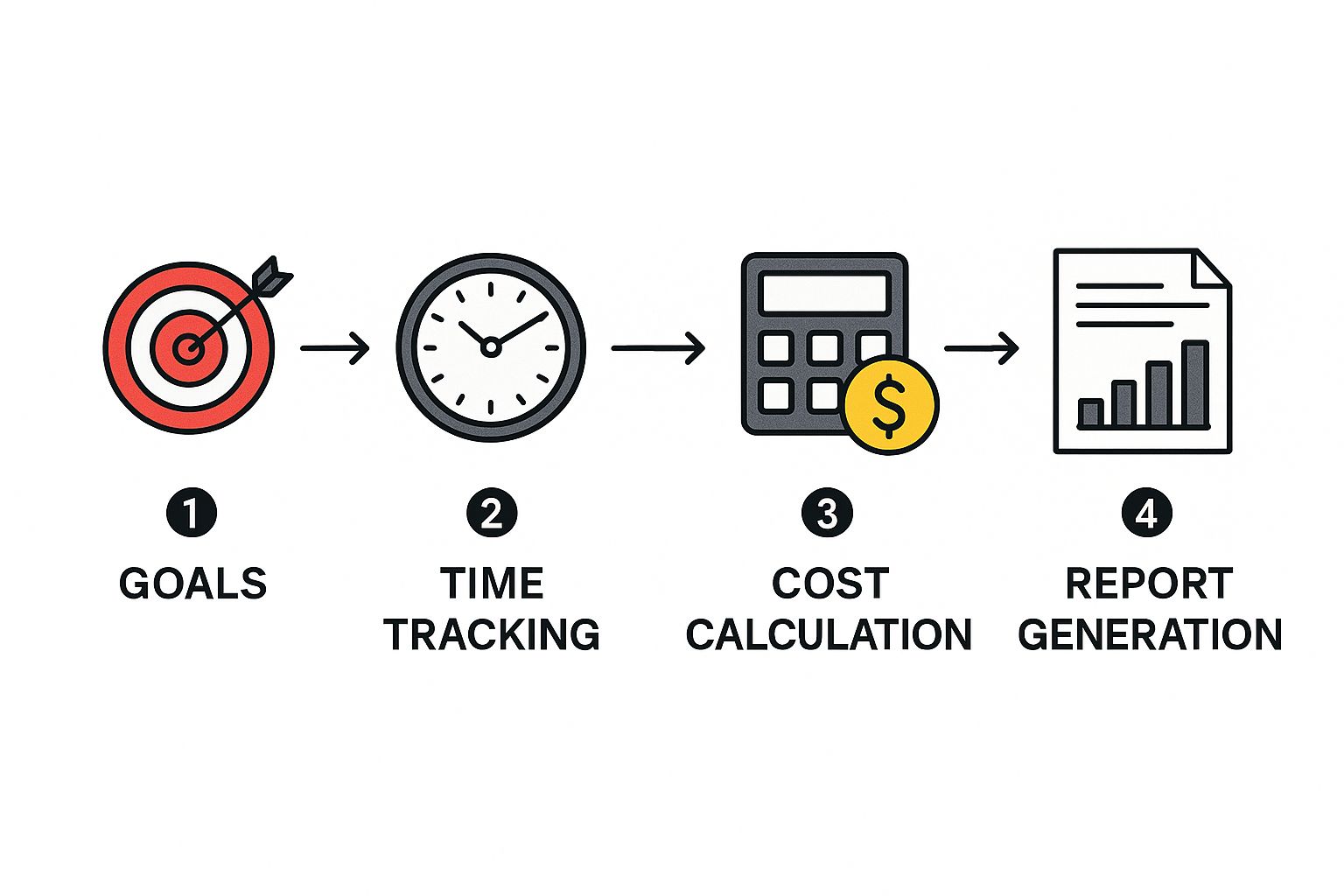
Define Financial Goals During Project Scoping
Before any work kicks off, get crystal clear on what “success” means in dollar terms. During scoping, nail down your profit targets to steer every estimate and decision.
Ask yourself:
- What gross profit margin makes sense for this project’s size and complexity?
- Have all direct costs been accounted for—software licences, specialist contractors, travel expenses?
- How much of our overhead should we allocate to cover shared expenses?
Without sharp targets in scoping, you risk underpricing and eroding margins. To tighten your processes from day one, explore various business process improvement methods that suit your operation.
Set Up Robust Tracking Systems
Once goals are locked in, capture the two most crucial streams of data: time and costs. Ditch error-prone spreadsheets and embrace a dedicated solution.
Time tracking isn’t about micromanagement. When your team sees accurate data powering fair workloads, smarter estimates and healthier margins, everyone benefits.
Consider this: the project management software market is growing rapidly, underscoring just how vital reliable tools have become for financial clarity.
Master the Art of Capturing Labor Costs
Digging into labor costs at task level reveals the real story behind profits. Knowing someone logged 40 hours in a week isn’t enough—you need the breakdown by project, feature or bug fix.
A platform like DeskCove lets you:
- Assign distinct billable rates per team member, project or task
- Automatically link time entries to the right client work
- Track actual versus planned effort in one clean dashboard
This precision stops budget overruns in their tracks and feeds smarter resource decisions. If you want to learn more, check out our guide on how to master resource allocation optimization.
Calculate Revenue And Analyze The Results
With clean cost and time data in hand, it’s time to close out the numbers—and then question them.
- Compare Actuals To Estimates: Where did work run long? Which phases consistently overrun?
- Analyze Team Efficiency: Are senior staff handling tasks that juniors could own?
- Identify Your Most Profitable Work: Which clients and project types deliver the highest margins?
By looping this insight back into your next project, your analysis transforms from a rear-view mirror into a navigation tool for growth.
Using Technology to Gain Deeper Financial Insights
Let's be honest, manual spreadsheets have served their purpose, but they just can't keep up with the fast-paced, dynamic nature of modern projects. To really get a handle on project profitability analysis, you need to graduate from static reports. It's time to embrace technology that acts as a real-time, dynamic command center for your project's financial health.
The true game-changer lies in platforms that bring time tracking, budgeting, and project management together under one digital roof. This consolidation creates a single source of truth, finally putting an end to the data silos and manual entry mistakes that plague spreadsheet-based analysis. Just imagine a world where you're not painstakingly cross-referencing timesheets with expense reports and project timelines.
When these systems talk to each other, the data just flows. It paints a constantly updated picture of your project's financial standing, giving you an instant feedback loop that separates proactive management from reactive damage control.
From Lagging Indicators to Real-Time Alerts
The traditional approach to profitability analysis often feels like driving while looking in the rearview mirror. You only find out you've blown the budget long after the damage is done. Modern tools completely flip that script.
A real-time dashboard can instantly flag when you're straying from the budget or highlight profitability risks the moment they pop up. This lets you course-correct right away, not weeks later when the finance team finally gets around to compiling the monthly reports. For example, if a specific task starts gobbling up more hours than you estimated, the system can send an alert. That's your cue to investigate before the entire project timeline gets thrown off track.
This proactive capability is invaluable. It transforms project management from a guessing game into a precise, data-driven operation where small adjustments along the way ensure a profitable finish.
By the time you notice a budget overrun in a monthly Excel report, you've lost your most valuable asset: the time to fix it. Real-time technology gives you that time back, turning potential crises into manageable course corrections.
The Power of Automated and Predictive Reporting
Beyond just tracking what's happening now, today's project management tech is brilliant at automating the whole reporting process. This saves countless hours and keeps everything consistent. Instead of manually piecing together reports, you can generate detailed profitability statements, resource utilization charts, and budget variance analyses with just a few clicks.
Some of these tools can even give you a glimpse into the future. By analyzing current progress rates and spending patterns, certain platforms offer predictive analytics that forecast potential cost overruns. This means you can see not just where you are, but where you're heading—giving you an even bigger advantage in steering the project toward its financial goals.
This level of insight has a real, measurable impact. Companies that use advanced profitability tools report significantly better visibility into project performance, which is directly tied to a higher probability of projects hitting their financial targets.
Choosing the Right Technology Stack
To get this kind of financial clarity, you need tools that play well together. The goal is to build an ecosystem where data moves freely between all your critical functions.
- Integrated Time Tracking: This is the bedrock of accurate labor cost calculation. A tool that connects directly to your project management system ensures every single hour is automatically logged against the right task and project.
- Centralized Project Management: Think of this as the hub where tasks, timelines, and resources live. This system should be the central point of contact for everything related to the project.
- Automated Costing and Budgeting: This feature is what pulls time tracking data and other expenses together to give you that live view of your budget versus actual spending.
When you're picking your tools, prioritize integration. A standalone time tracker that doesn't talk to your project management software just creates more manual work, defeating the whole purpose. For teams looking to build a robust, integrated system, our ultimate guide to project management time tracking software offers some great insights into selecting platforms that work in harmony. You want technology to be a strategic partner that provides actionable financial insights, not just another utility for tracking tasks.
Common Profitability Pitfalls and How to Avoid Them
Knowing the theory behind project profitability analysis is one thing. Actually pulling it off without a hitch is another story entirely. Even with the best intentions, a few common mistakes can trip you up, leading to fuzzy numbers and bad business decisions. Getting ahead of these pitfalls is the key to making sure your analysis is a reliable tool for growth, not just an exercise in crunching numbers.

One of the biggest culprits I see is inconsistent time tracking. When your team is just guessing their hours at the end of the week or not logging time to specific tasks, your entire labor cost calculation becomes a work of fiction. Since labor is almost always the biggest project expense, this single mistake can make a winning project look like a loser—or worse, hide a project that's quietly draining your bank account.
The fix isn't about micromanaging. It's about making the process painless. When you bring in a simple time-tracking tool with features like automatic reminders and smooth integrations, you remove all the usual excuses. Make it easy, and accuracy will follow.
Overlooking the Hidden Costs
Another classic mistake is getting tunnel vision on direct costs. Sure, it’s easy to track an invoice from a contractor or the price of a software subscription. What's harder to remember is that a slice of your office rent, admin salaries, and utility bills should be baked into every project’s true cost.
Forgetting to allocate this overhead gives you a dangerously rosy picture of profitability. You might pop the champagne for a project you think is a huge success, but in reality, it didn't even cover its fair share of the operational costs that kept the lights on. This leads to underpricing your next gig and slowly chipping away at your company's financial health.
To dodge this, you need a simple way to calculate a fully-loaded cost rate for each team member. This isn't just their salary; it's a rate that includes a proportional share of benefits, taxes, and general company overhead. It’s a much more honest number to use when you're calculating your real labor costs.
Relying on outdated data is like navigating with an old map; you’ll end up in the wrong place. Real-time information isn’t a luxury—it’s a necessity for making smart, timely decisions that protect your profit margins.
This brings me to the danger of stale data. If you’re only looking at project financials once a month, you're driving by looking in the rearview mirror. By the time you spot a budget overrun, it might be weeks too late to do anything meaningful about it. Effective profitability analysis feeds on a steady diet of current, accurate information.
Concrete Strategies for Accurate Analysis
To keep your analysis sharp and genuinely useful, focus on these practical fixes for the most common problems:
- For Inaccurate Time Tracking: Find software with automated tracking and reminders. Position time tracking not as a Big Brother tool, but as a way to improve planning and balance workloads. That's how you get your team on board.
- For Forgotten Indirect Costs: Create a standardized overhead allocation rate. Just don't set it and forget it—review and update it quarterly or annually to make sure it still reflects your actual business expenses.
- For Outdated Data: Use a project management platform that pulls time tracking and budgeting into one place. This gives you a live dashboard where you can check the financial pulse of a project in real-time and jump on issues the moment they pop up.
These aren't complicated solutions, but they do require consistency. When you make them a standard part of how you manage projects, profitability analysis shifts from a flawed historical report into a powerful, forward-looking tool that steers your business toward better, more profitable work.
Common Questions About Project Profitability
Even with a great system in place, some practical questions always come up. Let's tackle some of the most common ones I hear about running a project profitability analysis.
Think of this as your quick-reference guide for those real-world moments when you need a clear answer.
How Often Should I Analyze Project Profitability?
Waiting until a project is completely finished to see if it made money is a classic mistake. It leaves you no room to fix things if they've gone off the rails.
For any project lasting more than a few weeks, you should be checking in on your key profitability numbers weekly or bi-weekly. This gives you enough time to catch issues like scope creep or budget overruns before they do serious damage.
Beyond those regular check-ins, there are two other critical times for a deeper analysis:
- At major project milestones: This is a natural point to pause and confirm everything is still on track.
- After project completion: This final review provides the hard data you'll use to make your next project quotes even sharper.
What Is the Difference Between Project Profitability and ROI?
It's easy to mix these two up, but they tell you very different stories about your project's financial success. Knowing the difference is key.
Project Profitability is simple math: Total Revenue – Total Costs = Profit. It's the bottom-line number that tells you if you made or lost money on that specific job.
Return on Investment (ROI), however, digs a little deeper into how efficiently you made that money. The formula is (Profit / Cost of Investment) x 100. ROI shows you how hard your invested resources worked for you.
A project that brings in a $10,000 profit on a $100,000 investment has a 10% ROI. A smaller project that earns $5,000 on a $20,000 investment has a 25% ROI. Even though the first project made more money, the second one was a much more efficient use of resources.
How Can I Get My Team to Track Their Time Accurately?
Getting your team on board with time tracking is usually the biggest challenge, but it's the foundation of any good profitability analysis. It all comes down to how you frame it.
First things first: make it clear this isn't about micromanagement. The goal is improvement, not surveillance. Show them exactly how their time data helps everyone win.
Explain that with accurate numbers, you can:
- Create fairer quotes and more realistic deadlines for future work.
- Make sure projects are staffed properly so people aren't constantly overloaded.
- Spot the frustrating bottlenecks in your workflow and actually fix them.
And most importantly, make it painless. Using a simple, intuitive tool that fits right into their daily routine is a game-changer. When your team sees that tracking time leads to better-planned projects and less stress, they'll be much more likely to make it a habit.
Ready to stop guessing and start knowing your project numbers? DeskCove gives you the straightforward time tracking and productivity tools you need to master your project profitability analysis. Get real-time clarity, build accurate reports, and make smarter decisions that fuel your growth. Start optimizing your projects with DeskCove today!
