Tackle Distractions at Work for Better Productivity

Workplace distractions are more than just a minor headache; they're a massive roadblock to productivity and even our well-being. Every interruption—whether it's a notification, a colleague stopping by, or just your own wandering mind—chips away at your focus, stretches out project timelines, and can ultimately lead to burnout. It's a constant battle to stay in that deep, meaningful work zone.
Understanding just how much these interruptions cost is the first real step toward taking back control of your attention.
The True Cost of Workplace Distractions
It's easy to brush off a quick Slack message or a short chat with a coworker as no big deal. But those tiny moments pile up, creating a serious drag on performance for both you and the entire company. The real problem isn't the few seconds an interruption takes; it's the long, frustrating climb your brain has to make to get back on track. This "recovery time" is where the real productivity drain happens.
And the scale of this problem is staggering. Workplace distractions are a global issue, costing U.S. businesses an estimated $650 billion a year in lost productivity. In Australia, employees lose around 600 work hours each year to these interruptions. It’s no wonder that 92% of employers see this as a major challenge, with many now turning to software to get a handle on digital noise.
Breaking Down the Types of Distractions
To fight back effectively, you first have to know what you're up against. Distractions usually fall into three main buckets, and each one requires a different strategy. Figuring out which ones hit you the hardest is key.
- Digital Distractions: These are the relentless pings, dings, and pop-ups from emails, messaging apps like Slack, social media, and all those tempting non-work websites. In a modern office, they're often the most persistent and hardest to escape.
- Physical Distractions: This is everything happening in your immediate environment. Think of noisy colleagues, those impromptu "drive-by" meetings at your desk, unnecessary phone calls, or even a cluttered workspace that's silently screaming for your attention.
- Self-Inflicted Distractions: Sometimes, we're our own worst enemy. These are the internal interruptions driven by habit or mindset—like constantly switching between tasks, procrastinating by scrolling through your phone, or just letting your mind drift off.
The real enemy of focus isn't one big event, but the crushing weight of dozens of tiny, seemingly harmless interruptions throughout the day. Each one drains a little bit of your mental energy and kills your momentum.
Once you recognize the financial and mental price of these interruptions, you have a powerful "why" for taking action. Learning how to keep focused at work isn't about forcing yourself into rigid discipline. It's about building a smart, sustainable system to protect your most valuable resource: your attention.
Identify Your Biggest Focus Killers
Before you can tackle distractions at work, you have to know exactly what you're up against. It's easy to just blame a vague "lack of focus," but the real culprits are usually specific, recurring interruptions that have become part of the background noise.
The bottom line is you can't fix what you haven't measured.
To get a clear picture of what's really derailing your day, you need to play detective for a little while. This isn't about guesswork; it's about gathering some simple data on your own work habits. Think of it as a personal "distraction audit." It sounds formal, but it’s a straightforward process that will give you the clarity you need to make real changes.
Start Your Distraction Audit
The goal here is to create a simple log of every single time your focus gets broken over a typical workweek. You can use a notebook, a spreadsheet, whatever works. The only rules are to be consistent and honest with yourself.
For one week, just jot down a note every time you're pulled away from your main task. What was the interruption? How long did it last? What were you trying to get done? It might feel a bit tedious at first, but the patterns that pop up are often eye-opening.
For instance, you might think your inbox is the biggest problem. But after tracking, you could discover that "quick" Slack messages are actually the bigger focus-killer, happening twice as often. Or maybe you'll realize it's not the tech at all—it’s the "got a minute?" drive-by questions from colleagues that truly shatter your concentration.
It's tempting to think each interruption only costs a few minutes. The harsh reality is that it can take over 20 minutes to regain deep focus after being sidetracked. Those "minor" distractions add up to a major time sink.
A simple way to get started is by creating a log to track these interruptions. Here’s a template you can adapt for a spreadsheet or a notebook to see your own patterns emerge.
Your Personal Distraction Audit Template
| Time of Day | Distraction Type (e.g., Email, Colleague, Phone) | Duration (Minutes) | Task Interrupted | Notes/Impact |
|---|---|---|---|---|
| 9:15 AM | Slack notification | 10 | Writing report | Lost my train of thought |
| 10:30 AM | Colleague stopped by desk | 15 | Project planning | Unplanned chat about weekend |
| 11:00 AM | Checked personal phone | 5 | Answering emails | Mindless scrolling |
| 2:45 PM | Unscheduled team meeting request | 20 | Designing graphic | Had to completely switch gears |
Fill this out for a few days, and you'll have a much clearer picture of what's really happening.
Analyze Your Findings for Patterns
After a week, sit down with your log and look for the themes. Ask yourself a few key questions to pinpoint your unique distraction profile:
- What are my top three distractions? Identify the most frequent offenders. Are they digital pings, coworker interruptions, or self-inflicted habits like checking your phone?
- When am I most distracted? Do interruptions spike at certain times? Maybe it's mid-morning when everyone is online, or right after lunch when energy dips.
- Who is involved? Is there a specific person or team that tends to be a frequent source of interruption?
This analysis is your roadmap. Studies show that in a typical 8-hour day, employees only get about 4.9 hours of truly focused work done, with the rest lost to these constant interruptions. That churn doesn't just kill productivity; it adds a ton of stress.
One way to cut down on these interruptions is to boost the efficiency in business communication by eliminating small talk. Once you understand your specific focus killers, you can stop feeling overwhelmed and start taking targeted, effective action.
Engineer Your Digital Workspace for Deep Work
Your digital tools can be your greatest asset for focus or your biggest saboteur. It really just depends on how you set things up. The constant barrage of notifications is one of the most common distractions at work, turning our screens into a minefield for our attention.
The goal isn't to ditch technology altogether. It's about making it work for you, not the other way around. This means shifting from being reactive—where every ping pulls you off task—to being proactive, where you're the one in control. A few small, intentional tweaks can turn a chaotic digital space into a productivity powerhouse. It all starts with notifications.
Taming the Notification Overload
Let's be honest, most apps are designed to grab your attention right now. The first order of business is to flip that dynamic on its head. Instead of letting pings run your day, you need to decide when and how they can reach you.
Think about the endless pings from communication tools. A recent study hit this nail on the head, showing that social media is the top distraction for 27% of employees. Even more telling, 47% of employees said the very platforms meant to help—like Slack, email, and project management apps—actually make them waste time.
Here are a few practical ways to fight back:
- Go Through Your App Settings: Dive into the notification settings on your most-used apps (Slack, Teams, email, you name it). Be ruthless. Turn off everything that isn't a direct mention or an absolute emergency.
- Get Friendly with 'Do Not Disturb': Don't be afraid to use your computer or phone's focus mode. Block out specific chunks of your day where nothing can get through. This is your time.
- Set Up Email Filters and Rules: Create rules in your inbox to automatically sort messages. You can funnel newsletters into a "Read Later" folder and low-priority updates into another, keeping your main inbox clean for what truly matters.
I once worked with a project manager who was completely drowning in notifications. She started by blocking out a two-hour "Focus Time" on her calendar every morning and setting her status to 'do not disturb.' The team quickly learned not to expect an instant reply, and after seeing her productivity shoot up, several others started doing the same.
Creating a Purpose-Driven Digital Setup
Beyond just silencing the noise, how you structure your digital desktop can make a huge difference. A cluttered desktop or a browser with 50 tabs open is basically the digital version of a messy mind.
Treat your digital workspace like you would a physical one. You wouldn't try to tackle a complex report on a desk buried under piles of unrelated junk, right? The same logic applies to your computer screen.
A simple but effective tactic is to use separate tools for separate purposes. For example, have one web browser profile strictly for work—with only the necessary bookmarks and extensions—and another one for personal stuff. This small separation creates a mental barrier that helps keep you from drifting over to social media when you should be working on a presentation.
Taking intentional steps like these helps you build a digital environment that supports deep, focused work instead of sabotaging it. For more ideas on how to boost your output, check out our guide on how to improve productivity at work and skyrocket efficiency.
Design a Physical Environment That Minimizes Interruptions
While digital tools get a lot of blame for our fractured attention, your physical surroundings are a powerful—and often overlooked—source of distractions at work.
Think about it. A noisy open office, a cluttered desk at home, or the constant "drive-by" questions from colleagues can completely derail your focus. The goal is to be intentional about shaping your environment to protect your concentration, creating a personal sanctuary for deep work.
This isn't about building a fortress around your desk. Even small, strategic changes can signal to your brain—and just as importantly, to others—that you’re in a high-focus mode. Your environment is a tool. It can either support your efforts or sabotage them entirely.
Creating Your Focus Zone
Whether you're in a buzzing office or a busy home, the first step is to set up some clear physical boundaries. For a lot of people, sound is the number one offender. A good pair of noise-canceling headphones is one of the best investments you can make for your productivity. They're an instant "do not disturb" sign and a fantastic way to block out distracting chatter.
Another surprisingly effective tactic is simply clearing your desk. A messy workspace is a battle for your attention. Every out-of-place item is a tiny visual distraction, and they add up, draining your mental energy throughout the day. A clean, organized desk sends a clear message to your brain: it’s time to focus.
An environment designed for focus isn’t about isolation; it's about control. It’s about creating a space where you get to decide what gets your attention and when, rather than letting your surroundings dictate your workflow.
If you’re in an open office, visual cues are your best friend for managing interruptions. Try using a small sign on your desk or monitor to signal when you're in a deep work session. It's a simple, non-confrontational way to let colleagues know you're unavailable without having to say a word.
Setting Boundaries at Home and the Office
For remote workers, the line between work and home life gets blurry fast, leading to a constant stream of interruptions from family or roommates.
Tips for a Distraction-Free Home Office:
- Designate a specific workspace. Even if it’s just the corner of a room, having a dedicated spot helps create that crucial mental separation between "work" and "home."
- Communicate your schedule. Let the people you live with know your core working hours and, more importantly, when you absolutely cannot be disturbed.
- Use the door. A closed door is the universal symbol for "I'm busy." If you have one, use it to create a real physical barrier against interruptions.
In a traditional office, those "drive-by" questions require a bit more finesse. Instead of letting them break your flow, learn to politely redirect them. You could say something like, "That's a great question. Can I swing by your desk in 30 minutes once I finish this?"
This approach respects your colleague's needs while protecting your own focus block. By taking control of your physical space, you build a powerful defense against some of the most common—and frustrating—workplace interruptions.
Master The Mental Habits Of Unbreakable Focus
Even if you've decluttered your desk and silenced your notifications, the biggest battle against distractions at work often happens inside your own head. At the end of the day, focus is a skill. It’s a muscle you can build. This means shifting your mindset from just reacting to every ping and interruption to proactively managing your own attention.
It all starts by treating your time and mental energy like the finite resources they are. Instead of letting the day pull you in a dozen different directions, you can take the reins by giving your attention a clear structure. This is where a few proven techniques can make a world of difference, helping you build the internal discipline needed for deep, meaningful work.
Build Your Focus Muscle With Proven Techniques
When it comes to structuring your focus, a few methods stand out. Time blocking and the Pomodoro Technique are two of the most effective, and they come at the problem from slightly different angles. Both, however, share the same goal: to carve out dedicated, interruption-free windows for your most important tasks.
- Time Blocking: Think of this as creating a detailed budget for your time. You look at your to-do list and assign specific blocks on your calendar for each item. A designer might block off 9 AM to 11 AM for "Deep Work on Project X" and 3 PM to 3:30 PM for "Client Emails." This simple act prevents the mental whiplash of constantly switching between tasks.
- The Pomodoro Technique: This method uses a timer to break down work into intense, focused bursts. You work for 25 minutes on a single task, take a quick 5-minute break, and repeat. After four of these cycles, or "pomodoros," you take a longer break. It's a fantastic way to overcome procrastination because it makes even the most daunting tasks feel manageable.
The image below really drives home just how damaging daily interruptions can be, showing a clear link between the number of distractions and the hit our productivity takes.
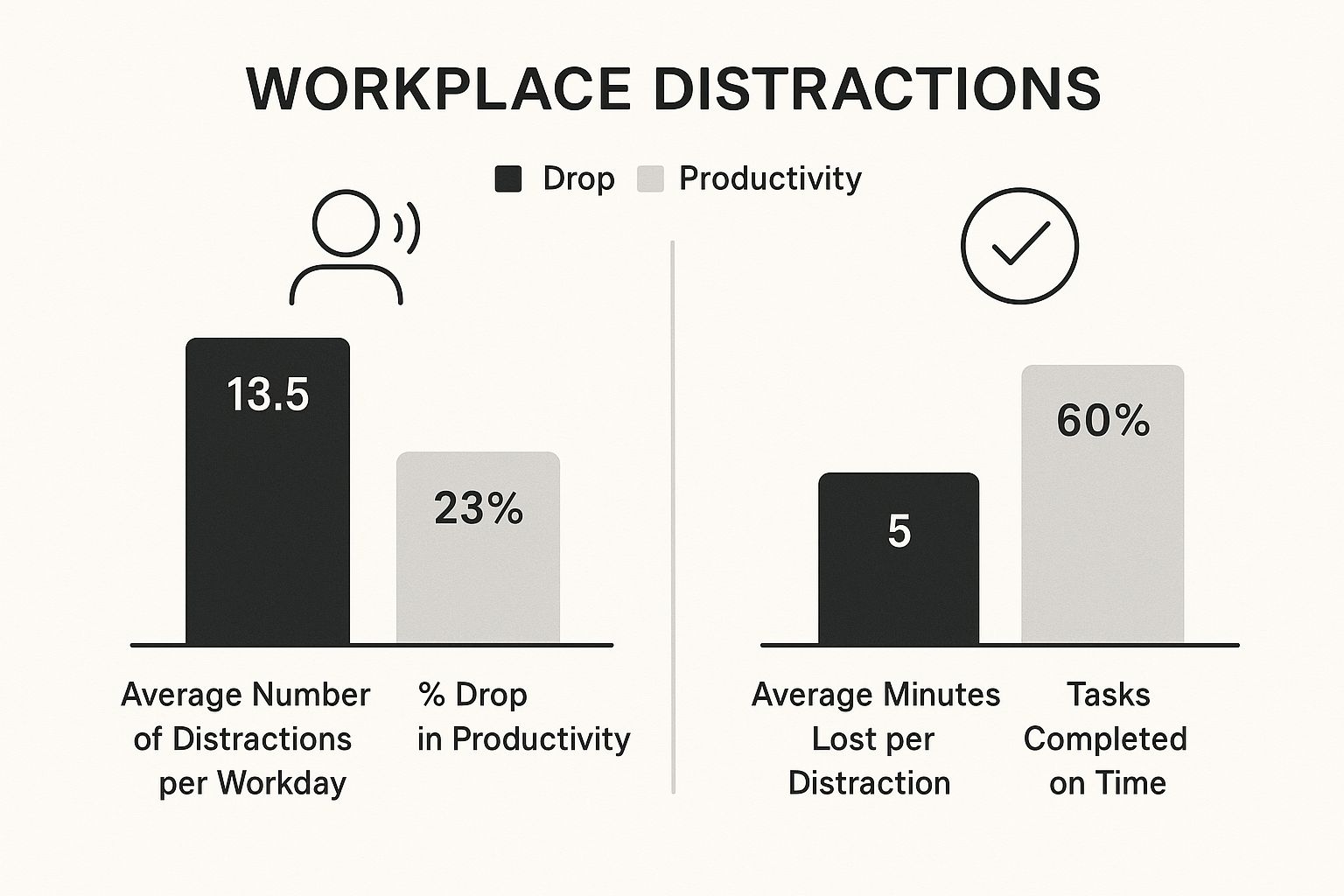
As you can see, even tiny interruptions add up, creating a massive drag on our ability to get things done well and on time.
To help you decide which technique might be the best fit for you, here’s a quick comparison of a few popular focus methods.
Comparing Popular Focus Techniques
| Technique | Best For | Core Principle | Potential Drawback |
|---|---|---|---|
| Time Blocking | People who thrive on structure and have predictable daily tasks. | Proactively scheduling every part of your day to prevent decision fatigue. | Can feel too rigid; unexpected tasks can throw the whole schedule off. |
| The Pomodoro Technique | Those who get overwhelmed by large projects or struggle with procrastination. | Working in short, timed sprints with built-in breaks to maintain high energy. | The constant stopping and starting can break the flow for creative or deep thinking tasks. |
| Eat the Frog | Individuals who tend to put off their most important or difficult tasks. | Tackling your biggest, most challenging task first thing in the morning. | Can be demotivating if the "frog" is too large to finish early in the day. |
Ultimately, the best technique is the one you can stick with consistently. Don't be afraid to experiment with each of these to see what clicks with your personal workflow and the demands of your job.
Address The Mental Side Of Distraction
Building focus isn't just about managing your calendar; it's also about managing your internal state. To truly cultivate that unbreakable focus, you have to address the psychological triggers that pull you off task, like stress and anxiety. If you want to dive deeper, you can explore some great strategies for reducing workplace stress that build mental resilience.
Your mind will wander. The key isn't to prevent it from ever happening, but to get better and faster at gently bringing it back to the task at hand. This act of "returning to focus" is the repetition that strengthens your attention muscle.
Learning to manage these internal urges is a critical skill. When you combine structured work techniques with mindful self-regulation, you create a powerful defense against distraction. For companies wanting to support their teams, learning how to boost productivity with the best computer monitoring software can offer insights into work patterns and highlight where people might need more support.
By practicing these mental habits consistently, you'll slowly but surely transform your ability to concentrate.
Answering Your Questions About Workplace Distractions

Putting new strategies into practice is where the rubber meets the road. As you start trying to reclaim your focus from the constant barrage of distractions at work, you're bound to run into a few tricky, real-world situations.
Think of this section as a quick troubleshooting guide. I've gathered some of the most common questions and challenges people face to help you navigate the gray areas with a bit more confidence.
How Do I Handle a Chatty Boss Who Is My Biggest Distraction?
This is a delicate one, isn't it? It's a surprisingly common problem. You can’t exactly ignore your manager or put up a "do not disturb" sign when they walk over. The key here is to be respectful while gently redirecting the conversation back to the priorities they set.
When your boss stops by to chat while you're deep in a task, try leading with something positive, then pivot. For example: "I’d love to catch up on that. Right now, I'm trying to finish the Q3 report by that EOD deadline you set. Can I swing by your office this afternoon once it's sent?"
This approach does a few things perfectly: it acknowledges their authority, shows you're focused on their priorities, and still sets a clear, respectful boundary.
Navigating interruptions from superiors isn't about avoidance; it's about alignment. Frame your need for focus in the context of completing the high-value work they assigned to you.
Are Focus-Enhancing Apps Actually Effective?
Focus apps can be a fantastic tool, but they aren't a magic bullet. I've seen them work wonders for some and do nothing for others. Ultimately, their effectiveness comes down to how you use them.
Apps that block distracting websites or use timers, like those based on the Pomodoro Technique, provide the structure some of us need to build better habits. They work best when you combine them with the other strategies we’ve talked about, like consciously designing your physical and digital spaces.
Think of them as training wheels for your attention span—they help you build the "focus muscle" but won't do the workout for you. My advice? Start simple. Try a free website blocker or a Pomodoro timer and see how it fits into your workflow before you go all-in on a complex, paid tool.
What Is the Single Most Important Step I Can Take Today?
If you're going to do just one thing after reading this, make it this: conduct a personal distraction audit.
You can't fight an enemy you can't see. Taking a single workday to honestly log every single interruption—every notification, every shoulder tap, every time you open a social media tab—will give you the most valuable data you can possibly get.
This one simple act moves you from guessing what your problems are to knowing exactly what they are. It’s the foundational step that makes every other strategy ten times more effective because you'll be targeting your true focus-killers instead of just spinning your wheels.
Take control of your team's focus and productivity with DeskCove. By providing clear insights into work patterns and digital habits, our tool helps you identify and reduce workplace distractions, empowering your team to achieve deep work and drive better results. Learn more about how you can improve efficiency.