Remote Employee Time Tracking That Actually Works

Remote employee time tracking is simply using software to log the hours your distributed team spends on their work. But it’s so much more than a digital punch clock. It’s about moving past guesswork and getting real clarity on how time is actually spent across different projects and tasks. With that kind of objective data, managers can finally ensure workloads are fair and productivity stays on track, no matter where everyone is.
Why Managing Remote Teams Feels Different
Let’s be honest: the old management playbook got thrown out the window when teams went remote. The methods we used to rely on—like walking the floor, quick desk-side chats, and just generally seeing people work—are gone.
Suddenly, managers are dealing with a huge loss of visibility. It's tough to know who’s swamped and who’s got bandwidth. It’s hard to track project progress without constantly asking for updates. This vacuum is often filled with assumptions, where you’re just hoping everyone is productive instead of actually knowing.
This creates the core challenge for any remote leader: how do you build trust and maintain fairness when you can't physically see your team? This is where time tracking becomes a game-changer. It’s not about surveillance; it’s about creating a single source of truth that benefits everyone. For managers, it provides the hard data needed to spread work equitably and give support exactly where it's needed.
This infographic really puts into perspective both the rapid adoption of these tools and the impressive productivity gains companies are seeing after they make the switch.
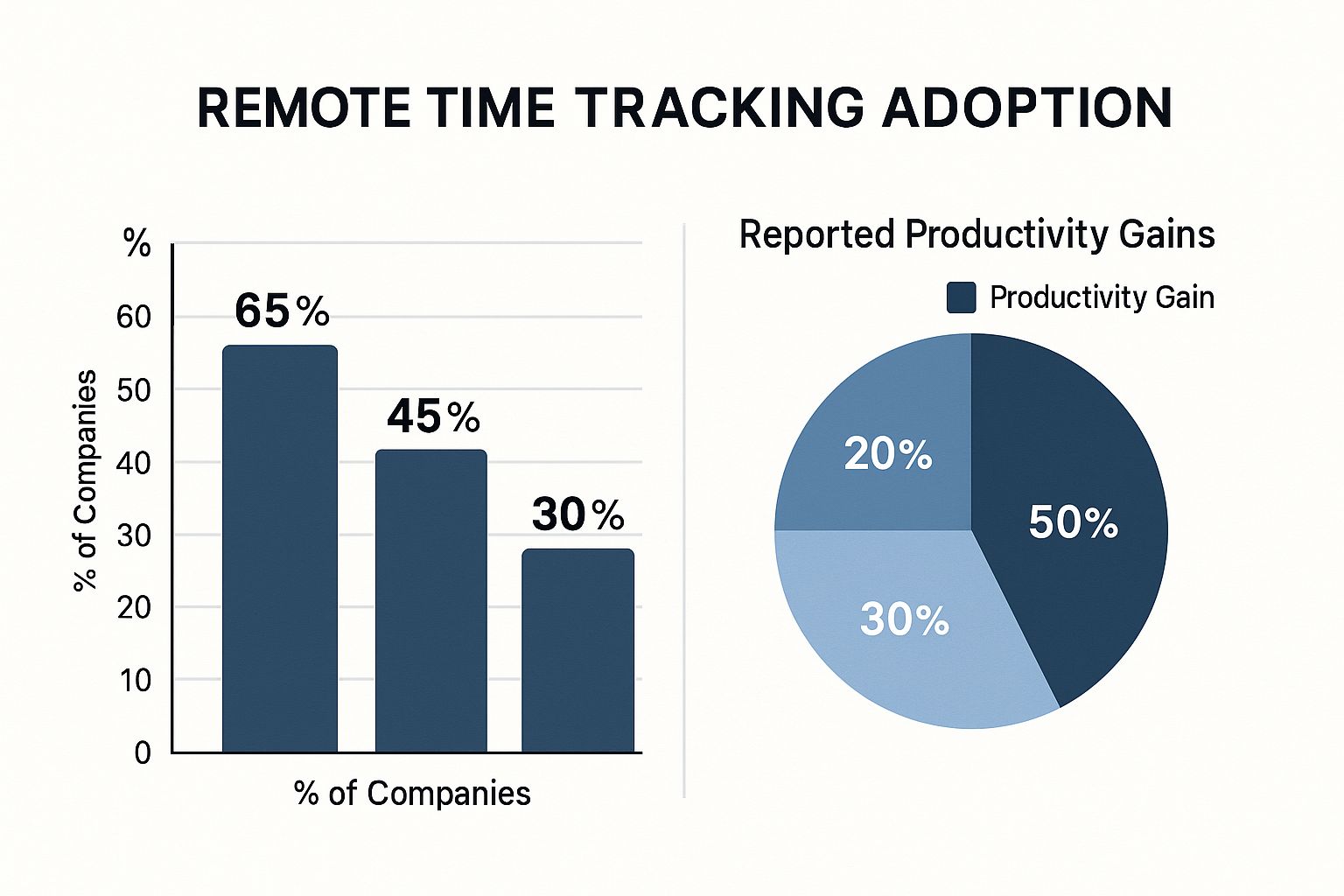
As you can see, there’s a clear line connecting the use of time tracking tools and real, measurable boosts in team efficiency.
The goal is to transform management from a practice of oversight into a practice of insight. By providing clear, objective data, you empower both managers and employees to work together in a transparent and high-trust culture.
The scale of this shift isn’t small. By 2025, the number of fully remote jobs in the U.S. has tripled since 2020, now accounting for over 15% of the workforce. And on a global scale, almost 48% of professionals are working remotely in some capacity. This has pushed 96% of companies to bring time tracking tools into their core management strategy.
Old Management Habits vs. New Remote Realities
When you can't rely on old habits, you need new tools. Many of the frustrations remote managers face come from trying to apply in-office logic to a distributed world. Here’s a quick breakdown of those challenges and how a modern approach to time tracking provides a clear solution.
| Remote Management Challenge | How Time Tracking Provides a Solution |
|---|---|
| Lack of Visibility: Guessing who's busy and who's not. | Data-Driven Insights: Provides a clear view of workloads, showing exactly how time is allocated across tasks and projects. |
| Uneven Workloads: Risk of burning out top performers while others are underutilized. | Fair Distribution: Helps managers balance assignments based on actual capacity, preventing burnout and improving team morale. |
| Trust Issues: Managers worry if work is getting done; employees feel micromanaged. | Objective Accountability: Creates a transparent record of work, building trust and replacing "are you working?" with "how can I help?" |
| Inaccurate Project Estimates: Projects consistently go over budget or past deadlines. | Better Forecasting: Delivers historical data on how long tasks really take, leading to more accurate quotes and realistic timelines. |
| Proof of Work: Difficulty justifying billing and showing clients where their money is going. | Transparent Invoicing: Generates detailed timesheets and reports that serve as concrete proof of work for clients and stakeholders. |
Ultimately, time tracking isn't about controlling your team—it's about equipping them with the clarity they need to succeed.
Of course, managing a remote team effectively goes beyond just tracking hours. It also means building a secure foundation. As you get your processes in order, taking the time to explore essential remote work security best practices is a critical next step for any leader building a resilient distributed team.
Beyond the Punch Clock: What Time Tracking Really Is
Let's be honest, the phrase "remote employee time tracking" can sound a bit like a digital punch clock. And while logging hours is part of the picture, that's just scratching the surface. True, modern time tracking isn't about watching the clock; it's about understanding the work.
Think of it like a fitness tracker for your team’s projects. A simple pedometer tells you how many steps you took. That’s okay, but a smart fitness tracker shows you your sleep patterns, heart rate zones, and which exercises are actually moving the needle on your goals. It reveals the whole story.

Time tracking software does the same for your team’s effort. It pulls you out of the world of guesswork and into a space of clear, objective insight.
Uncovering How Work Actually Happens
Without solid data, how do you really know where the time goes? Time tracking tools give managers and their teams the power to answer critical questions that used to be a complete shot in the dark.
- Finding the Productivity Sweet Spots: You can finally see if your team crushes it on Tuesday mornings or hits a slump on Friday afternoons. This lets you schedule deep-work sessions and crucial meetings when people are naturally at their best.
- Spotting the Hidden Roadblocks: The data might show that a specific task, like report generation, consistently takes twice as long as anyone thought. This isn't a "gotcha" moment; it's a signal that the team might need a better process, more training, or a new tool.
- Checking Your Strategic Compass: Are most of your team's hours flowing into top-priority projects? Or is "busy work" and administrative overhead quietly hijacking everyone's focus? The data tells the tale.
It's all about making decisions based on reality, not just gut feelings. You can finally stop saying, "I feel like we spend too much time in meetings," and start saying, "The data shows we spent 25% of our project hours in meetings last month. Let's see how we can make them more efficient."
At its core, time tracking is about reframing our relationship with work. It's a tool for clarity—the kind of clarity you need to lead smarter, support your team more effectively, and make sure everyone is pulling in the same direction.
From Monitoring to Empowering
When you roll this out the right way, the whole dynamic shifts. It stops feeling like big brother and starts feeling like a genuine tool for empowerment.
For employees, it's a way to take control of their own day. They get a clear record of their incredible contributions and can see exactly where their time is going, helping them protect their focus and find a better workflow.
For managers, the data becomes an amazing coaching tool. The conversation changes completely. Instead of a skeptical, "What did you get done today?" it becomes a supportive, "I noticed this task took a bit longer than we planned—did you run into any roadblocks I can help clear?" It turns scrutiny into support and builds the kind of trust and transparency every great remote team is built on.
Essential Features of Modern Time Tracking Tools
Not all time tracking tools are created equal. A basic timer might tell you someone logged hours, but a truly effective platform becomes a powerful asset for managing your team. Knowing what to look for is the first step in telling the difference between a simple app and a system that actually drives productivity and gives you real clarity.
Think of it this way: a basic tool is like a car's odometer—it only tells you how far you've gone. A modern tool is the entire dashboard, showing your speed, fuel efficiency, and engine health. It gives you the complete picture to make smarter decisions on the road.
Automated and Accurate Time Capture
The bedrock of any great time tracking system is its ability to capture time accurately without creating more work for your team. Manual timesheets are notoriously unreliable. They’re filled with guesswork and honest mistakes, which completely defeats the purpose of tracking in the first place.
Modern tools fix this problem with automated time capture. They run quietly in the background, logging activity as it happens. This means your team can stay focused on their work instead of constantly starting and stopping a timer, which leads to far more precise and trustworthy data for everyone.
The best systems get rid of the administrative headache of time entry. They make tracking a seamless, almost invisible part of the workday, ensuring the data you collect is a true reflection of effort, not just a good guess.
This screenshot shows how a modern dashboard can present time tracking data clearly and visually, making it easy to understand what’s happening at a glance.
Breaking down hours by project or task like this allows managers to see exactly where the team’s resources are going in seconds.
Project Tracking and Seamless Integrations
Beyond just knowing when people work, it's critical to know what they're working on. The best platforms let you assign time directly to specific projects, individual tasks, or clients. This gives you granular insight into things like project profitability and helps you figure out if you have the right people on the right tasks.
Even better, the top tools don’t work in a vacuum. Integrations are a make-or-break feature, allowing your time tracker to connect with the other software your team relies on, like Asana, Trello, or Jira. You can learn more about how to master time tracking tools with integration to really get your workflows humming. This connectivity stops you from having to enter the same data in multiple places and ensures information flows smoothly across your entire toolkit.
Advanced Analytics and Reporting
Raw data is just a pile of numbers; it’s the insights that actually help you improve. A top-tier tool will offer robust analytics and reporting features. These dashboards go way beyond a simple timesheet to show you productivity patterns, help you spot bottlenecks before they become major problems, and highlight opportunities to make your processes better.
Leading tools are now using AI to automatically log hours and categorize tasks, which drastically cuts down on manual errors. Some even have features like biometric authentication to make sure the right person is clocking in, adding an extra layer of security. When all this time data syncs up with your project management systems and gets analyzed in real-time, you get an immediate, clear view of team performance. This helps you make faster, more informed decisions every single day.
How Time Tracking Boosts Productivity and Profit
Let's be honest, implementing remote employee time tracking isn't just about clocking in and out. It’s about connecting the dots between your team's daily efforts and your company's bottom line. When you get it right, time tracking becomes less of a chore and more of a superpower, giving you a clear roadmap to boost efficiency and drive real financial growth.
Think of it as a diagnostic tool for your entire operation. By seeing exactly where every hour goes, you can finally pinpoint which activities are actually making you money and which are just draining resources. That kind of clarity is the first step toward smarter workflows and a much better return on your team's time.
Driving Project Profitability
Guesswork is the arch-nemesis of a profitable project. Without hard data on time, quoting new work is like throwing a dart in the dark—you often end up with underestimated timelines and razor-thin margins. Time tracking changes the game by giving you a historical blueprint of what similar projects actually cost in terms of hours.
This insight helps you build quotes and deadlines that are grounded in reality. For instance, if you discover a specific design phase consistently takes 20% longer than you thought, you can adjust future proposals to protect your profits. It also makes invoicing a breeze, especially with clients. You can hand them detailed reports that justify every billable hour, which not only builds trust but ensures you get paid fairly for all the hard work your team puts in.
Enhancing Team Productivity and Accountability
Data-driven insights are a manager's best friend. Instead of guessing who’s swamped and who has room for more, you can see the workload distribution in black and white. This makes it easy to reassign tasks, prevent burnout before it happens, and keep projects humming along smoothly. For leaders, adopting solid time management strategies for business owners is the key to leading by example.
This level of transparency also cultivates a natural sense of accountability. When team members can see how their time directly contributes to the bigger picture, they feel more connected and motivated to perform.
Time tracking shifts the entire team's focus from just "looking busy" to being genuinely productive. It creates an environment where everyone understands their impact and is empowered to own their time, which is a win for both the individual and the company.
Once you have a handle on these patterns, you can dig even deeper and learn how to measure productivity metrics to optimize business outcomes.
Ensuring Fair and Accurate Payroll
For remote teams—especially those with hourly or non-exempt employees—getting payroll right isn't just good practice; it's a legal and ethical must. Time tracking automates this entire headache, wiping out manual errors and guaranteeing every employee is paid accurately for every minute worked, including overtime.
It creates a system that’s fair for everyone:
- Employees can trust they’re being compensated correctly.
- Managers get back hours previously lost to administrative payroll tasks.
- The company stays compliant and avoids messy wage-and-hour disputes.
At the end of the day, this simple function builds a foundation of trust that is absolutely critical for keeping morale high in any distributed team.
Implementing Time Tracking Without Creating Mistrust
Introducing remote employee time tracking can feel like walking a tightrope. On one side, you have the clear business need for data and clarity. On the other, you have your team's very real concern about feeling watched or micromanaged.
The secret to a successful rollout isn't about the software you pick—it's about the communication and transparency you wrap around it. The single biggest mistake managers make is a surprise launch. Dropping a new tracking system on your team without context is a recipe for instant resentment.
This needs to be a conversation, not a command.
Frame the Conversation Around Fairness and Clarity
Start by explaining the "why" behind the decision, but focus on the benefits for the team, not just the C-suite. Frame it as a tool for ensuring workloads are balanced, protecting everyone’s work-life boundaries by spotting burnout risks, and billing clients more accurately so the team's hard work is properly valued.
Stay away from language centered on surveillance or monitoring. You want to present this as a system for understanding workflows and improving processes together. When employees see the tool as a way to get objective proof of their contributions and guarantee fairness, they are far more likely to get on board.
The most successful rollouts are positioned as a team improvement initiative, not a management oversight tool. It’s about replacing assumptions with objective data that helps everyone work smarter.
To really build buy-in, involve your team in the selection process. Let them demo a few different tools and give their honest feedback. When people have a voice in choosing the system they'll be using every day, they gain a sense of ownership from the very beginning.
Establish Clear Policies from Day One
Once you've picked a tool, the next critical step is to establish and communicate a crystal-clear usage policy. This document should be straightforward, answering the tough questions before they’re even asked. Being proactive here is essential for building long-term trust.
To help you get started, we've put together a simple checklist of "dos and don'ts" to guide your implementation. Think of it as a roadmap to keeping things transparent and ethical.
Ethical Implementation Checklist
| Action (Do) | Mistake to Avoid (Don't) |
|---|---|
| Be transparent about the "why." Explain how data helps balance workloads and ensure fair pay. | Spring it on the team. A surprise rollout immediately creates suspicion and kills trust. |
| Involve the team in the tool selection process. Let them give feedback and have a say. | Use surveillance-focused language. Avoid words like "monitoring" or "watching." |
| Define exactly what is tracked and who sees the data. Put it in writing. | Leave policies vague. Ambiguity leads to anxiety and assumptions. |
| Focus on outcomes and productivity, not just hours. Use data to improve processes. | Use data punitively. Never punish someone for taking a legitimate break. |
| Get written consent and provide a clear policy. Ensure everyone understands and agrees. | Track during off-hours or break times. Respect personal boundaries. |
A well-defined policy acts as a constitution for your time tracking efforts. It creates a foundation of trust and mutual respect that prevents future misunderstandings.
Your policy should explicitly state:
- What is being tracked: Clearly outline if it's just project time, app usage, or other metrics.
- Who can see the data: Define access levels so employees know exactly who views their information.
- How the data will be used: Commit in writing that data is for improving workflows, balancing workloads, and accurate payroll—not for punishing employees for taking breaks.
This is also a great time to get a deeper understanding of how to ethically monitor remote worker activity to make sure your policies align with best practices. When the rules are clear and the focus is on positive outcomes, everyone can get back to doing great work.
Common Pitfalls and How to Avoid Them
Even with the best intentions, rolling out remote employee time tracking can hit some serious snags. A common trap is misusing the data you collect, which can quickly turn a tool meant for clarity into a source of stress and mistrust. Knowing what these pitfalls look like is the first step to building a remote culture that’s healthy and productive.
One of the biggest mistakes managers make is sliding into digital micromanagement. This is what happens when you get bogged down in activity metrics—like keystrokes or mouse movements—instead of focusing on what’s actually getting done. The point isn’t to watch people work; it's to understand workflows and get rid of roadblocks.

Another classic error is rewarding "hours logged" over real output. This sends the message that being present is more important than being productive, a surefire recipe for burnout as people feel pressured to stay online. In fact, one study found that when employees worked an average of 2 extra hours a day, their productivity actually dropped by 8% to 19% thanks to more meetings and communication overhead. You can dig into the findings about employee monitoring and productivity trends to see this dynamic in action.
Keeping Your Strategy Healthy and Productive
To steer clear of these traps, you have to fundamentally shift your mindset from supervision to support. Use the data to open up helpful conversations, not to put every minute of the day under a microscope.
Here’s how to keep your approach on the right track:
- Focus on Outcomes, Not Activity: The real question isn't, "Was everyone busy for eight hours?" It's, "Did we hit our goals efficiently?" Always tie time data back to project milestones and concrete objectives.
- Use Data for Coaching: If you see a task is taking way longer than planned, get curious. Instead of jumping to conclusions, ask your employee, "Hey, I saw this took a bit more time. Are there any bottlenecks I can help clear out for you?"
- Promote Autonomy: Trust your team to manage their own time. The data is there to give you a high-level view and make sure workloads are balanced—not to dictate how someone structures their day.
By treating time tracking data as a tool for collective improvement rather than individual scrutiny, you build a foundation of trust. This approach ensures your strategy supports a culture of autonomy and high performance.
A Few Common Questions About Remote Time Tracking
Even with the best game plan, it's completely normal to have some questions about remote employee time tracking. Tackling these concerns head-on is the best way to build confidence and get everyone on the same page, from the C-suite to your newest hire. Here are some straightforward answers to the questions we hear most often.
Is It Actually Legal to Track My Team's Time and Activity?
Yes, in most places, it's perfectly legal for an employer to track work activity on company-owned devices. The key thing to remember, though, is that the specific laws can change quite a bit depending on where your employees live. For instance, the EU’s GDPR requires you to get clear consent from your employees and be totally upfront about what data you’re collecting and why.
Some U.S. states have their own rules, too. The single most important takeaway is transparency. You absolutely need a clear, written policy that every employee reviews and signs off on. It’s also a smart move to chat with a legal expert to make sure you're squared away with all local and national laws.
How Do I Handle Time Tracking for Employees in Different Time Zones?
This used to be a headache, but modern time tracking software is built for global teams. The best tools automatically figure out and adjust to each person's local time zone, which is a must-have feature for any distributed team. This makes sure that all the timestamps—from when someone clocks in to their activity logs—are accurate for everyone.
This feature makes payroll a breeze and gives managers a realistic picture of when their team is available and how work flows across the globe. When you're setting up your system, just double-check that each employee’s profile is set to their correct local time zone.
A good time tracking system should make geography irrelevant. It’s all about creating a single, clear view of your team's effort, no matter where in the world that effort is happening.
What's the Difference Between Tracking "Activity" and Measuring "Productivity"?
This is a really important distinction. Tracking activity is about measuring the inputs—things like keystrokes, mouse movements, or which apps are open. It tells you if someone looks busy.
Measuring productivity, on the other hand, is all about the outputs. It focuses on what actually got done: tasks completed, goals hit, and the real value delivered. Great managers use time tracking data to connect the hours spent with tangible results, not just to watch a live feed of clicks. The data should answer the question, "How long did it take us to achieve this outcome?" not "Was someone moving their mouse all day?"
How Can I Use This Data Without Being a Micromanager?
The secret is to frame the data as a tool for support, not for surveillance. Be completely open about what you're tracking and why you're tracking it. Instead of using it to call someone out for taking a short break, use it to start helpful conversations.
For example, you might say, "I noticed our project data shows we're spending 30% of our time in meetings. Any ideas on how we could make them more efficient for everyone?"
Use the data to:
- Celebrate wins and give a shout-out for efficiency.
- Spot bottlenecks that are slowing the whole team down.
- Balance workloads to keep people from burning out.
- Justify requests for more help or better tools.
When your team sees the data being used to make their work lives better and more productive, they’ll naturally start to see it as a positive tool.
Ready to get the clarity your remote team needs to do their best work? DeskCove offers powerful, yet simple, time tracking and productivity insights that build trust and drive real results. Start making data-driven decisions that empower your team and grow your business. Explore how DeskCove can transform your remote management strategy today.