Best Remote Work Monitoring Software for Teams

Let’s be honest, the term “remote work monitoring software” can sound a bit… Big Brother. But what are we really talking about here? It’s a category of tools built to give managers visibility into how their teams work when they’re not all under one roof. The goal is to understand how work hours are being spent, keep projects moving forward, and make sure everyone is using company resources the right way.
What Is Remote Work Monitoring Software Anyway?
Let’s cut through the corporate-speak for a minute. Imagine trying to fly a plane without an instrument panel. You wouldn’t have a clue about your altitude, speed, or fuel levels. That’s what managing a remote team without the right data feels like.
Remote work monitoring software is that instrument panel. It provides a clear, data-driven view of team activity and project progress without needing constant “just checking in” messages or virtual shoulder-tapping. It’s not about spying; it’s about understanding. The whole point is to find insights that help you lead and support your team better.
Of course, these tools don’t exist in a vacuum. They’re just one piece of the puzzle. To really get it, you have to look at the bigger picture of strategies for managing remote teams effectively. This kind of software provides the raw data needed to make those strategies work.
A Platform for Strategic Insight
At its core, this software is all about collecting and presenting data on how work actually gets done. By tracking things like which apps are being used, how much time is spent on specific tasks, or general activity levels, managers can start to see the full story. You can spot bottlenecks, find opportunities for coaching, and make sure workloads are balanced fairly across the team.
This move toward data-driven leadership isn’t just a niche trend; it’s a massive shift. The global market for these systems was valued at around USD 3.55 billion in 2024. And it’s not slowing down—projections show it could climb to nearly USD 7.69 billion by 2034. That explosive growth tells you everything you need to know about how modern companies are choosing to operate.
Think of it this way: remote work monitoring software translates daily activity into actionable intelligence. It replaces guesswork with real data, letting managers lead with clarity instead of assumptions.
This allows leaders to manage based on outcomes, not just actions. Instead of asking “Are you working?” the data helps you answer far more important questions, like:
- Are we dedicating enough time and resources to our most critical projects?
- Does the team have the tools they need to stay focused, or are they getting bogged down by distractions?
- Where are the hidden roadblocks in our workflows that are slowing everyone down?
Beyond Productivity and Security
Sure, boosting output and keeping company data secure are big wins. But the real value here is in building a more connected and efficient remote work environment. The data provides a transparent, objective foundation for performance reviews, project planning, and resource allocation.
When you truly understand your team’s work patterns, you can build smarter processes, offer support exactly where it’s needed, and create a remote setup that’s built to last. It’s an essential part of the toolkit for any business serious about making their distributed workforce a long-term success.
Decoding the Must-Have Software Features
Trying to choose the right remote work monitoring software can feel like navigating a maze of features. Every platform out there promises to skyrocket productivity, but let’s be honest—not all features deliver real value. The key is to understand the core capabilities so you can pick a tool that actually solves problems instead of just creating more data noise.
At its core, this software is all about building a transparent and fair way to measure work. It helps everyone move past assumptions and gut feelings, providing solid data that both managers and employees can use to get better.
So, let’s break down the essential features that truly make a difference.
Time and Activity Tracking
The most basic, non-negotiable feature is time and activity tracking. Think of it as a digital timesheet, but way smarter and more accurate. Instead of relying on employees to remember and log their hours, the software automatically tracks work time from the moment they clock in to the moment they sign off.
But this isn’t just about making sure people are at their desks. It gives you a crystal-clear record of billable hours for client projects, which is critical for accurate invoicing and protecting your profit margins. This is often paired with activity tracking, which measures keyboard and mouse usage to give a general sense of engagement during work hours.
This image breaks down how the core features work together.
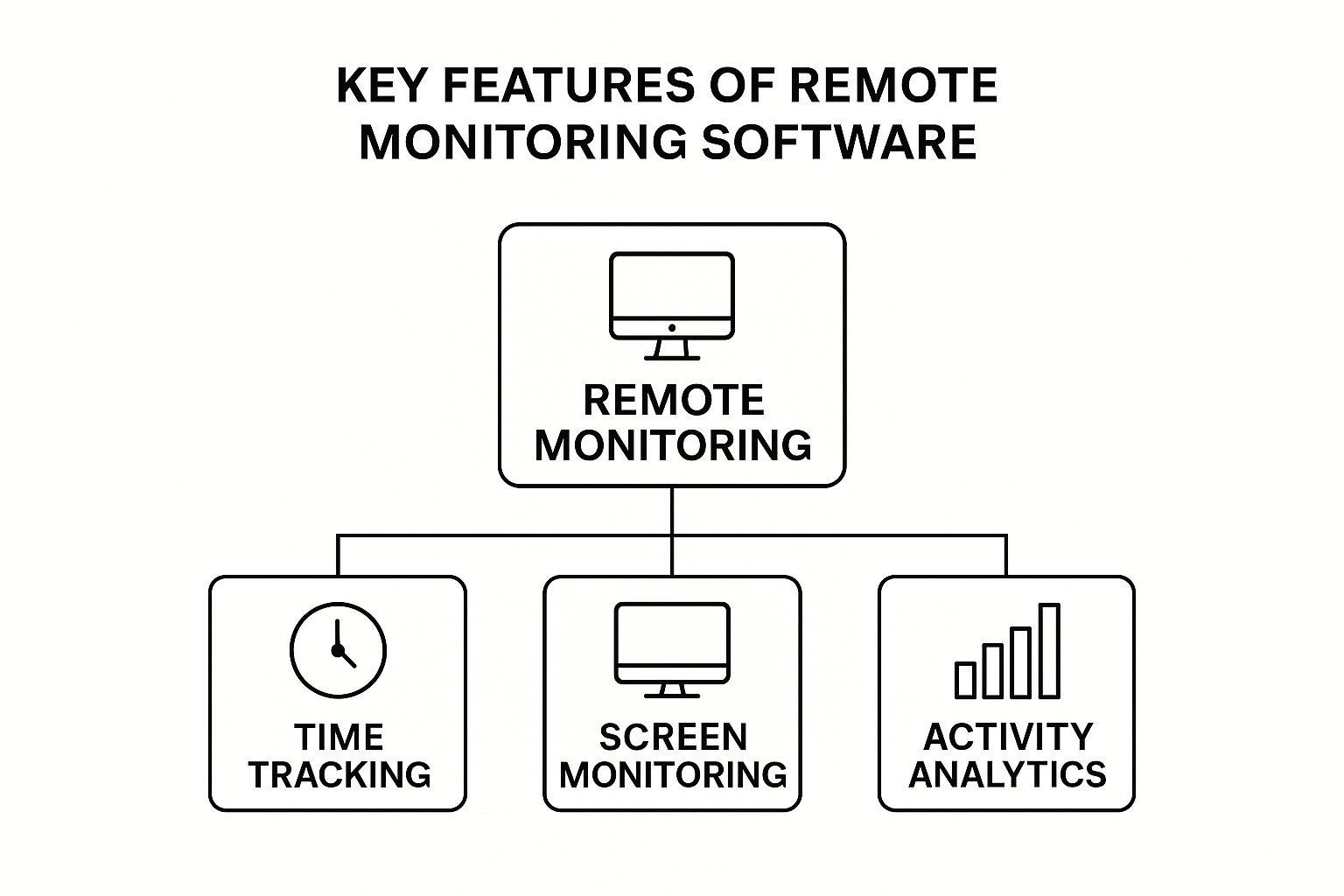
As you can see, these different functions—tracking time, monitoring screens, and analyzing activity—don’t operate in a vacuum. They combine to create a complete, understandable picture of how your remote team operates.
Application and Website Usage Analysis
Knowing how long someone worked is one thing. Knowing what they worked on is where the real power lies. This is where application and website usage analysis comes into play. The software logs the time spent on specific apps and websites, letting managers classify them as productive, unproductive, or neutral depending on the person’s role.
For instance, a graphic designer spending hours in Adobe Photoshop is a great sign of productivity. But if a customer service rep is spending that same amount of time in Photoshop, it might point to a distraction or a workflow problem. This data isn’t about micromanagement; it’s about spotting patterns. You can see which tools your team relies on, identify common distractions, and get a clear view of where time is being invested. The insights here can even inform a broader founder’s guide to task automation by pinpointing repetitive tasks that are eating up valuable time.
This feature turns abstract hours into a clear story of the daily workflow. It helps answer the most important question: “Are we spending our time on the right things?”
Screenshot Functionality
Screenshots are easily the most misunderstood feature of monitoring software. When they’re used ethically and with full transparency, they provide incredibly valuable context and accountability. This is especially true for teams that handle sensitive information or work on highly visual projects.
Good platforms let you customize this feature, allowing you to set the frequency of screen captures or even turn it off completely for certain roles. The main goal is to offer a snapshot of work-in-progress, validate activity on a specific task, or provide an audit trail for compliance. It’s a tool for verification, not for hovering over someone’s shoulder. To see how these features fit into a bigger picture, you can learn more about how automated time tracking is a game-changer for remote teams.
Integrated Productivity Analytics
The final piece of the puzzle is integrated productivity analytics. This is what pulls all the other data points together and turns them into a story you can actually understand. Raw data on its own is just noise, but a well-designed analytics dashboard visualizes trends and serves up insights you can act on.
These dashboards can quickly show you:
- Peak Productivity Hours: Pinpoint when your team is most focused and doing their best work.
- Project Time Allocation: See exactly how many hours are going into specific projects or clients.
- Workflow Inefficiencies: Spot patterns where team members might be getting stuck or sidetracked.
- Burnout Risks: Notice when people are consistently working long hours, so you can step in before they burn out.
To wrap it up, here’s a quick summary of how these essential features translate into direct benefits for managers.
Essential Features of Remote Monitoring Software and Their Benefits
| Feature | Primary Function | Key Benefit for Managers |
|---|---|---|
| Time & Activity Tracking | Logs work hours and measures user activity levels. | Validates billable hours and ensures fair workload distribution. |
| App & URL Usage Analysis | Records time spent on different applications/sites. | Identifies process inefficiencies and highlights coaching opportunities. |
| Screenshot Functionality | Captures screen images at set intervals. | Provides work verification and supports compliance/security audits. |
| Productivity Analytics | Aggregates and visualizes all collected data. | Offers strategic insights for resource allocation and process improvement. |
Ultimately, the best remote monitoring software doesn’t just watch; it informs. By focusing on these core features, you can find a platform that empowers your team with clarity, supports smart, data-driven decisions, and truly helps your remote operations thrive.
The Real Benefits of Managing with Data

Moving beyond a simple list of features, the real magic of remote work monitoring software happens when you start using the data it generates. These tools do more than just track activity; they unlock tangible benefits in productivity, security, and overall management, turning guesswork into a solid business strategy. It’s all about using hard numbers to build a smarter, more efficient remote workplace.
This isn’t just some niche trend, either. The global market for Employee Monitoring Solutions was valued at a hefty USD 1.39 billion in 2025. The U.S. market alone hit USD 406.51 million and is still climbing, which tells you that businesses are seeing a real return on their investment. You can dig into these numbers in the full research on employee monitoring solutions.
At its core, this data-driven approach shifts the conversation from “Are people busy?” to “Are we focused on the right things?” It gives leaders the clarity to manage outcomes, not just clock-watching.
Sharpening Productivity and Performance
One of the first things you’ll notice is how quickly you can spot and fix hidden problems. When you look at aggregated workflow data, you can see bottlenecks that are slowing everyone down. For instance, if the numbers show your marketing team is constantly bouncing between their project management tool and their chat app, that’s a red flag. It might mean you need better software integration or a simpler process.
This kind of insight lets you take targeted action. Instead of vague advice, managers can offer specific training or find a new tool that solves the actual problem. This doesn’t just improve the team’s output; it cuts down on employee frustration by getting rid of those daily annoyances.
Data from monitoring software acts like an MRI for your company’s workflows. It lets you see beneath the surface to diagnose issues you would otherwise never know existed, leading to healthier, more effective operational processes.
It’s also empowering for employees. When people can see for themselves where their time goes, they get better at managing their own day. They can prioritize high-value tasks and tune out distractions, which is a major way to boost productivity with the best computer monitoring software.
Fortifying Security and Compliance
When your team is spread out, security is a huge deal. Remote work monitoring software works like an early-warning system for potential threats. It learns what “normal” user behavior looks like, so it can immediately flag anything out of the ordinary that might signal a security risk.
Think about these common security headaches that monitoring data helps prevent:
- Unusual Data Access: An alert pops up when someone’s account starts accessing sensitive files late at night or outside their usual job scope. This could mean a compromised account.
- Unauthorized Software: The system flags when an unapproved app is installed on a company device, stopping potential malware before it gets on the network.
- Compliance Audits: Time-stamped logs and screenshots create a clear, verifiable audit trail. This makes it easy to prove you’re following specific regulatory protocols.
By automating this kind of oversight, you’re adding a powerful layer of defense that protects company assets and client data without getting in your team’s way.
Empowering Smarter Management Decisions
Ultimately, the biggest win is giving leaders the tools to make smarter strategic decisions. Gut feelings and office chatter are replaced by objective, aggregated data. This directly improves several key areas of management.
For example, a project manager can look at time allocation data from past projects to create much more accurate timelines and budgets for future work. If a certain type of project consistently takes 20% longer than planned, that data gives them a clear reason to adjust quotes and set better client expectations.
Team leads can also use workload analytics to make sure tasks are distributed fairly and prevent burnout. By seeing who’s constantly swamped and who has some breathing room, managers can reassign work effectively. This creates a more balanced and sustainable work environment for everyone. This shift—from putting out fires to proactively leading with data—is what separates a good remote operation from a great one.
How to Choose the Right Monitoring Tool
Trying to find the right remote monitoring software can feel like navigating a maze. The market is packed with options, and every single one claims to be the perfect fit. It’s easy to get overwhelmed. The trick is to step back and create a simple, practical framework that puts your company’s actual needs first.
Think of it like hiring a new person for your team. You wouldn’t just look at their resume; you’d want to know if they fit your company culture and can work well with your existing crew. Let’s walk through the essential criteria to help you find a platform that actually supports your team instead of causing headaches.
Define Your Core Requirements First
Before you even glance at a product page or sign up for a demo, you need to know what problem you’re trying to solve. What’s the real goal here? Are you trying to dial in project profitability, lock down security compliance, or just get a clearer picture of who’s overworked and who has capacity?
Your answers to these questions become your personal scorecard for judging any tool you look at. If you skip this step, you’ll get distracted by shiny features you’ll never actually use. A small creative agency that lives and dies by billable hours has completely different needs from a massive corporation worried about data leaks.
For example, a startup might just need a simple, affordable tool with great time tracking. A larger company, on the other hand, will be looking for ironclad security protocols and deep-dive analytics.
Evaluate Scalability and Integration Capabilities
The best software grows with you. A tool that’s perfect for a team of 10 can quickly become a clumsy bottleneck when you scale to 50 or 100. You need to look for a platform with flexible pricing that can handle more users without slowing down to a crawl.
Just as important is how well the new software plays with your current tools. A monitoring platform should make your life easier, not add another layer of complexity. Always check for direct integrations with the software your team already uses every day, such as:
- Project Management Software: Syncing with tools like Jira, Asana, or Trello automates time tracking against specific tasks.
- Communication Tools: When it connects with Slack or Microsoft Teams, you can get important notifications and reports without switching apps.
- Accounting and Payroll Systems: Linking to platforms like QuickBooks or Xero turns tracked hours into invoices or payroll runs with just a few clicks.
A tool that can’t integrate properly creates isolated pools of data and forces your team into mind-numbing manual entry. That completely defeats the purpose of trying to be more efficient.
The right monitoring platform should feel like a natural extension of your existing workflow, not a clunky add-on. Its ability to integrate smoothly is a direct measure of its long-term value.
Prioritize Security and Compliance
When your team is distributed, security isn’t just a feature—it’s everything. You have to put any potential software under a microscope. Look for essentials like end-to-end data encryption, secure cloud hosting, and granular access controls so only the right managers see sensitive employee data.
Compliance is the other side of that coin, especially if you work in a regulated industry like healthcare or finance, or have team members across the globe. Make sure the software follows major privacy laws like GDPR (General Data Protection Regulation) or HIPAA (Health Insurance Portability and Accountability Act) if they apply to you. A vendor that takes compliance seriously is one that takes your data protection seriously.
Assess the User Experience for Everyone
A tool is useless if your team won’t use it properly. A confusing or clunky interface is a one-way ticket to frustration for both managers and employees. Always ask for a demo or a free trial, and when you get it, pay close attention to the experience from both sides of the screen.
For managers, the dashboard needs to be clean and insightful. The best platforms don’t just dump raw data on you; they offer actionable insights. Look for customizable reports and visual charts that help you spot trends at a glance.
For employees, the software needs to be simple and almost invisible. Clocking in, assigning time to a task, and checking their own stats should be effortless. A clean design fosters trust and makes people much more likely to adopt the tool without a fight.
Here’s a quick breakdown to help you focus on what matters for your business size.
Software Selection Criteria for Different Business Needs
Choosing the right software isn’t one-size-fits-all. A small, agile team has very different priorities than a large, complex enterprise. This table breaks down what to look for based on your company’s scale.
| Selection Criterion | Why It Matters for a Small Business | Why It Matters for a Large Enterprise |
|---|---|---|
| Price & Scalability | Needs affordable, flexible plans that can grow with the team without a huge initial investment. | Requires enterprise-grade plans that support hundreds of users and offer volume discounts. |
| Integration | Focuses on key integrations with core tools like project management and accounting software. | Demands extensive API access and integrations with a complex ecosystem of internal systems. |
| Security & Compliance | Requires foundational security features like data encryption and adherence to basic privacy laws. | Needs advanced security protocols, role-based access, and certifications for GDPR, HIPAA, or SOC 2. |
| User Experience | A simple, intuitive interface is crucial for quick adoption by a small, agile team. | Must be easy to deploy and manage at scale, with comprehensive training and support resources. |
By thinking through these distinct needs, you can more effectively evaluate which tool truly fits your operational reality.
Ultimately, by using this structured approach, you can tune out the marketing noise. You’ll be able to confidently choose a remote work monitoring software that genuinely aligns with your business goals, team culture, and daily operations.
Rolling Out Monitoring Software the Right Way
How you introduce remote work monitoring software is just as important as which tool you pick. A rushed or secretive rollout can shatter trust overnight, creating a culture of anxiety and suspicion. The real key to getting this right is to treat it less like a tech upgrade and more like a crucial conversation about transparency, fairness, and what you’re trying to achieve together.
The entire process has to be built on a foundation of open communication. People are much more likely to get on board when they understand the “why” behind it all. It’s best to frame the conversation around the benefits that help everyone—things like making sure workloads are balanced, spotting process roadblocks before they become major issues, and protecting billable hours.
This approach shifts the software’s perception from a “big brother” surveillance tool to a helpful instrument designed for the team’s success. It’s about building a system that helps people do their best work, wherever they happen to be.
Crafting a Clear and Fair Monitoring Policy
Before anyone installs a single piece of software, you need a formal, written monitoring policy. Think of this document as your cornerstone for building trust and staying on the right side of the law. It needs to be easy to understand, thorough, and leave zero room for interpretation.
Your policy must spell out exactly what is being monitored, when monitoring happens, and how that data will be used. This isn’t the time for vague corporate speak. Be direct and crystal clear to head off any misunderstandings down the road.
Make sure your policy covers these key areas:
- Scope of Monitoring: Clearly define what’s being tracked—like application usage, websites visited, and general activity levels. Critically, specify that monitoring only occurs during paid work hours.
- Data Usage: Explain that the data is for spotting high-level productivity trends, handling project costing, and fine-tuning workflows—not for micromanaging individuals.
- Data Security: Detail who can access the data and what security measures are in place to keep everyone’s information safe and private.
- Employee Rights: Acknowledge your team’s right to privacy outside of work hours and state plainly that no personal data will ever be tracked or stored.
A well-crafted monitoring policy is basically a social contract between the company and its team. It sets clear expectations and shows a real commitment to ethical oversight, which is absolutely fundamental for a healthy remote work culture.
Communicating the Rollout Transparently
With your policy finalized, the next move is to communicate it before you do anything else. Just dropping a surprise “install this now” email is a guaranteed recipe for disaster. Instead, schedule a team meeting specifically to walk everyone through the change.
In that meeting, present both the software and the policy. Lay out the business reasons for making this move, always emphasizing how the data will help the company and, just as importantly, support the team. This is your chance to tackle concerns head-on and answer questions in an open forum. When bringing in new systems, you have to be thoughtful; explore strategies to improve team productivity without alienating employees.
The goal here is to build understanding and get buy-in before the launch. This kind of open dialogue shows that the company values its people and sees this tool as a positive step forward for everyone.
Focusing on Legal and Ethical Considerations
Navigating the legal side of employee monitoring is non-negotiable. Laws can vary dramatically from one state or country to another, so sitting down with a legal expert to review your policy is a must-do step. This ensures you’re fully compliant with all the relevant privacy regulations.
Ethically, the focus should always be on team-wide trends and insights, not on individual scrutiny. Use the aggregated data to spot patterns, make processes better, and guide smart decisions. When you keep your eye on the big picture, you can find the right employee activity monitoring tools for remote work that genuinely support your team without chipping away at trust.
A thoughtful, transparent, and legally sound rollout is what sets the stage for a more productive and collaborative remote work environment.
Success Stories From The Real World
Theory is one thing, but seeing how remote work monitoring software performs in the wild is what really matters. When you see how other companies solve real-world problems with these tools, their value becomes crystal clear. These anonymized stories show exactly how data-driven insights can fuel tangible business growth.
Each of these examples digs into a common challenge remote teams run into. More importantly, they show how monitoring tools offered a straightforward, effective fix—moving beyond abstract ideas to show concrete, positive results.
Boosting Profitability At a Creative Agency
A growing creative agency was dealing with a classic headache: their project quotes were way off. They kept underestimating the hours needed for complex design work, which was eating into their profit margins and burning out their designers. The root of the problem was a simple lack of data on how long tasks actually took.
By putting time-tracking software in place, they started logging every minute spent on client projects automatically. After just a few months, they had a goldmine of data. The big surprise? They found that certain “quick” revision requests were actually taking up 30% more time than they were billing for.
Armed with this hard data, the agency completely rebuilt its quoting process. Their new proposals were based on reality, not guesswork. This single change led to a 15% jump in overall project profitability in just six months, and designers reported feeling much less stressed by unrealistic deadlines.
Identifying Training Gaps In a Support Team
After a customer support team went fully remote, managers noticed that key performance metrics were starting to dip. First-contact resolution rates were down, and ticket times were slowly climbing. They had a hunch it was a knowledge gap, but they had no way of knowing exactly where the team was getting stuck.
The team lead turned to application usage reports to get a better look. The data quickly revealed a pattern: several agents were constantly toggling between the CRM and the internal knowledge base during calls. It was a dead giveaway that they were struggling to find information on the fly.
This data provided the “why” behind the slumping metrics. It wasn’t about a lack of effort; it was a clear signal that the team needed better access to information and more targeted training.
Using these insights, the company rolled out a new training module focused on using advanced search features in the knowledge base. They also created quick-reference guides for the most common issues. Within a single quarter, first-contact resolution rates shot up by 20%, and the whole team felt more confident in their roles.
Strengthening Security For an IT Department
An IT department was tasked with managing a distributed workforce, and many employees handled sensitive client data on their laptops. Their biggest worry was stopping unauthorized access and staying compliant with data protection laws. Trying to audit every device manually was simply out of the question.
They deployed monitoring software that focused heavily on security features. The platform was set up to automatically flag suspicious activity, like someone trying to access a restricted server or install unapproved software. One afternoon, the system fired off an alert: an employee’s device was trying to copy a massive amount of data to an external drive at a weird time.
The IT team was able to remotely lock the device in seconds, stopping a potential data breach before it could happen. This one incident proved the software’s worth, turning it from a simple monitoring tool into an indispensable layer of their cybersecurity defense.
Common Questions About Monitoring Software
Even with a clear grasp of the benefits, it’s natural to have a few questions before diving into the world of remote work monitoring software. Let’s tackle some of the most common ones managers and teams bring up. Addressing these concerns head-on is the best way to move forward with confidence.
Is It Legal To Monitor Remote Employees?
This is usually the first question on everyone’s mind, and the answer almost always comes down to two things: transparency and location. In most places, it’s perfectly legal to monitor activity on company-owned devices during work hours. The absolute non-negotiable, however, is having a clear, written policy.
This policy needs to spell out exactly what you’re monitoring and why you’re doing it. Every single employee should read and acknowledge it. Since laws can vary quite a bit from state to state and country to country, it’s always smart to have legal counsel review your policy to make sure you’re fully compliant. That simple step protects both the company and your team.
Will This Software Destroy Team Morale?
The impact on morale really depends on how you roll it out. If the software is introduced like a digital watchdog for micromanagement, it will absolutely crush trust. But if you frame it as a tool for fairness, support, and process improvement, it can actually have the opposite effect.
The key is to focus on team-wide trends over individual scrutiny. Use the data to identify collective roadblocks, balance workloads, and offer targeted support—not to catch people making mistakes.
When your team sees the software as a way to ensure workloads are fair and prevent burnout, it stops being a source of anxiety. Instead, it becomes a positive part of the workflow. The goal should always be to use data to help, not to punish.
How Does The Software Actually Measure Productivity?
Productivity isn’t a one-size-fits-all metric, and good monitoring software gets that. The software itself doesn’t decide what’s “productive”—you do. Administrators configure the system by classifying different apps and websites based on specific job roles.
For example, spending time on social media might be classified as ‘unproductive’ for a software developer but ‘productive’ for a social media manager. This customization is what makes the tool so powerful. It generates nuanced reports that show how time is actually being spent, giving you a realistic and fair picture of productivity that’s tailored to each person’s role.
Ready to manage your remote team with clarity and confidence? DeskCove provides the powerful, user-friendly tools you need to boost productivity and foster a transparent work environment. See how our remote time tracking and monitoring software can make a difference for your team.
Learn more and get started at https://deskcove.com