Best Remote Team Management Software for Productivity

Remote team management software is essentially the digital headquarters for your scattered team. Think of it as the central hub where all the communication, project tracking, and performance check-ins happen. It’s what replaces the traditional office with a virtual workspace, making sure everyone stays in sync and on track, no matter where they’re logging in from. With flexible work becoming the new standard, these tools are no longer a nice-to-have; they're a core part of how modern businesses run.
Why Remote Team Management Software Is Now Essential
The big shift away from a central office has completely changed the game. Old-school management styles that relied on face-to-face meetings and just being physically present don't work anymore. It’s impossible when your team is spread across different cities, countries, and time zones.
This distance can create some serious headaches. Communication gets messy, it's tough to see who's doing what, and building a strong company culture feels almost impossible. Without the right digital tools in place, productivity can easily slip, and team members can start to feel isolated and disconnected.
That's where remote team management software steps in. It acts as the connective tissue for a distributed team, bridging the physical gap by creating one unified digital space where all the work happens.
The Digital Blueprint for a Virtual Office
Imagine you’re building a virtual office from the ground up. This software is your architect's blueprint. It provides the fundamental structure that allows your team to work together smoothly and gives managers the oversight they need without having to constantly look over everyone's shoulder.
This digital framework is built on a few key pillars:
- Centralized Communication: It pulls everything from real-time chat and video calls to asynchronous updates into one place. This stops information from getting trapped in silos and keeps everyone in the loop.
- Transparent Collaboration: Shared project boards and task lists give everyone a clear view of who is working on what and when it's due. No more guessing games.
- Consistent Productivity: It helps managers keep an eye on progress, track time spent on tasks, and make sure projects stay on schedule.
- Accessible Knowledge: It becomes the go-to spot for important documents and company info, making resources available to everyone, anytime they need them.
The real goal of remote management software is to take the best parts of being in an office—the collaboration, the visibility, the connection—and bring them online, without the hassle of a physical location. It’s all about building a resilient, efficient, and engaged team that’s ready for the future of work.
As businesses keep evolving, understanding essential digital transformation strategies is more important than ever, and it really drives home why having dedicated management software is non-negotiable. These platforms are far more than just a quick fix; they're a fundamental piece of a modern, successful business. By getting on board with these tools, companies are laying a solid foundation for success in a world where work is becoming more flexible and global every day. To get a better handle on this big shift, check out our guide on embracing the future of flexible employment.
Breaking Down the Core Features of Management Platforms
To really get a handle on what makes a remote team click, we need to look under the hood of the software that powers them. Effective remote team management software isn’t just one tool; it's more like a digital headquarters built from several key pieces that all work together. Think of it as a craftsman's workshop—each tool has a distinct job, but they all contribute to the finished product.
These platforms are built to bring the best parts of an office—easy collaboration, clear visibility on projects, and instant access to information—into the digital world, minus the friction of physical distance. The whole point is to create a central hub where work just flows, and everyone feels connected to the company's mission.
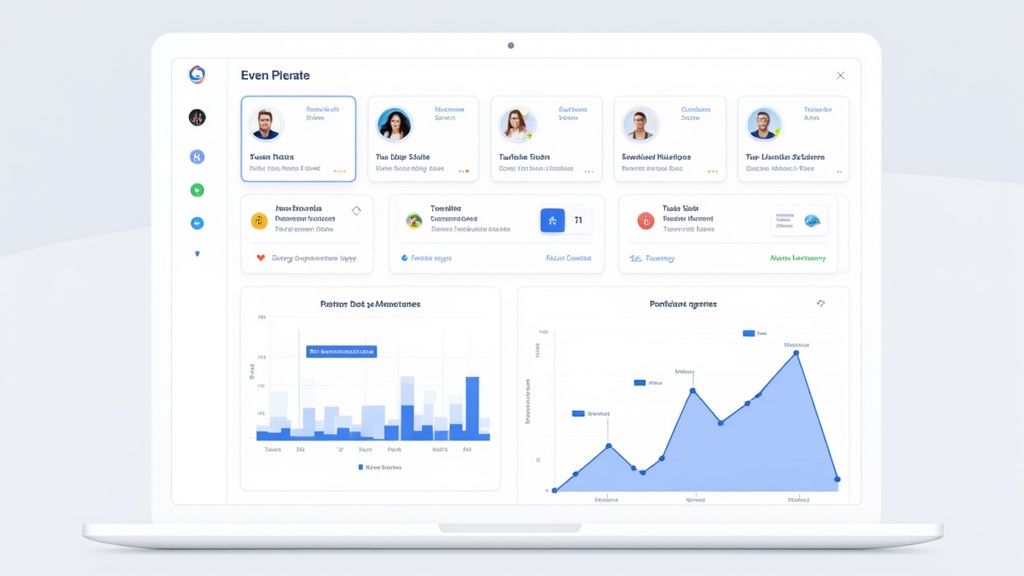
So, what are these essential features? Let’s take a look at the core components that you absolutely need.
Essential Features in Remote Team Management Software
Every solid platform is built on a foundation of a few critical feature categories. These aren't just nice-to-haves; they are the gears that make the whole machine run. Understanding what they are and why they matter is the first step in picking the right tool for your team.
| Feature Category | Key Functionalities | Primary Benefit for Remote Teams |
|---|---|---|
| Communication & Collaboration | Real-time chat, video conferencing, file sharing, announcements | Creates a connected culture by replacing in-office chatter and meetings, ensuring everyone stays in the loop regardless of their time zone. |
| Project & Task Management | Task assignments, project timelines (Gantt charts), Kanban boards, progress tracking | Provides a single source of truth for all work, making it clear who is doing what and by when, which eliminates confusion and boosts accountability. |
| Performance & Productivity | Goal setting (OKRs), time tracking, activity monitoring, analytics dashboards | Offers objective insights into how work gets done, helping managers support their team and measure output without micromanaging. |
| Centralized Knowledge Base | Document storage, internal wiki, process guides, onboarding materials | Acts as the team's shared brain, giving everyone instant access to the information they need to do their job, reducing repeat questions. |
These features combine to create a cohesive digital workspace where communication fuels action and progress is visible to all. Let's dig a bit deeper into each one.
Communication and Collaboration Hubs
The absolute bedrock of any remote setup is a strong communication system. This is way more than just a simple chat app. It blends different types of interaction to support various work styles and prevent critical information from getting trapped in silos.
- Real-Time Messaging: For those quick questions and casual check-ins, instant messaging channels are the digital equivalent of tapping a colleague on the shoulder.
- Video Conferencing: Built-in video calls are non-negotiable for team meetings, one-on-ones, and brainstorming sessions where seeing faces and reading body language makes all the difference.
- Asynchronous Updates: Features like threaded conversations and shared announcements are perfect for teams spread across time zones, letting everyone catch up on their own schedule without being online at the same time.
This layered approach keeps communication fluid and makes sure context isn't lost, which is vital for keeping a distributed team on the same page.
Project and Task Management Systems
Next up is the engine of productivity: project and task management. These features create the transparency needed to track progress and hold people accountable without ever needing to micromanage. They turn big, abstract goals into clear, actionable steps.
Think of a project like a massive jigsaw puzzle. Task management tools give everyone the box cover—the final picture—while also handing each person their specific pieces to work on. Managers get a bird's-eye view of the entire board, while team members can zero in on their assigned tasks, deadlines, and what depends on their work. If you want to go deeper, check out our ultimate guide to project management time tracking software.
This level of visibility is crucial for balancing workloads, spotting roadblocks before they become disasters, and keeping everything on schedule.
A powerful platform integrates these core features into a cohesive whole. It’s not just a collection of separate tools but a truly unified digital workspace where communication fuels action and progress is visible to everyone.
Performance and Productivity Tracking
To make sure everyone's efforts are pulling in the same direction, performance tracking features are a must. These tools help measure productivity in a fair, objective way by focusing on results, not just hours logged. This is a game-changer for remote teams where managers can't physically see who is "at their desk."
Key functionalities usually include:
- Goal Setting: Connecting individual tasks to team objectives and company-wide goals.
- Time Tracking: Showing exactly how time is being spent across different projects.
- Productivity Analytics: Offering insights into work patterns to help identify wins and areas for improvement.
The explosion in remote work has fueled massive growth here. The global team collaboration software market was valued at around USD 36.1 billion in 2024 and is expected to hit USD 57.4 billion by 2030, all thanks to the demand for these integrated digital workspaces. You can see more on these trends in the full team collaboration software market analysis.
Centralized Knowledge Hubs
Finally, a centralized knowledge base acts as the team’s collective memory. This is the single, go-to place for all important documents, process guides, training materials, and company policies.
Instead of vital info being lost in a sea of emails and scattered across personal hard drives, a knowledge hub guarantees everyone has access to the same, up-to-date information. It drastically cuts down on time wasted hunting for files and empowers people to find answers on their own.
Unlocking the Benefits of the Right Software
Choosing the right remote team management software isn't just an operational tweak; it’s a strategic move that pays off in big ways. Sure, the most obvious plus is that it lets your team work from anywhere. But the real magic happens deeper, changing how your team collaborates, connects, and gets things done. Think of these platforms as the central hub for a distributed team, creating a sense of unity and efficiency that’s nearly impossible to achieve otherwise.

When you get the implementation right, this software is a direct shot of adrenaline for your team's productivity. By automating all the tedious admin work and keeping project info in one place, it frees up your people to focus on what really matters. No more digging through endless email chains for the latest file or chasing down status updates. Everyone has a single source of truth, which means projects get finished faster and with fewer headaches.
Boosting Productivity and Engagement
A huge win here is the clarity these tools bring to the table. Everyone can see project progress, who’s responsible for what, and what deadlines are coming up. This transparency builds a natural sense of accountability.
But it’s not just about efficiency. This clarity is a massive morale booster. When people see exactly how their individual tasks fit into the bigger picture, their work suddenly feels more meaningful. In a remote setup where it’s easy to feel isolated, that connection to the company’s mission is everything.
A well-chosen platform strengthens company culture across any distance by creating a transparent, connected, and supportive digital workspace. It proves that physical proximity isn't a requirement for a cohesive and high-performing team.
These systems also give managers objective insights into performance. Instead of relying on gut feelings, you can use real data to see who’s excelling, spot signs of burnout before they become a problem, and offer help where it’s needed most. This data-driven approach keeps evaluations fair and helps build a culture where everyone is always improving.
Realizing Tangible Business Gains
Beyond making daily workflows smoother, the financial and strategic upsides are substantial. One of the most immediate benefits is cost savings. By embracing a fully remote or hybrid model, companies can slash or even eliminate huge expenses like office rent, utilities, and maintenance.
This shift is fueling some serious market growth. The remote working software market hit a value of USD 23.2 billion in 2023 and is on track to more than double to USD 53.2 billion by 2027.
But perhaps the biggest strategic win is the freedom to hire talent from anywhere in the world. You’re no longer limited to who lives within a commuting radius. You can hire the absolute best person for the job, period. This opens up a world of expertise, boosts diversity, and gives you a major competitive advantage. To get the most out of your software stack, it's also worth exploring the key Learning Management System benefits, as ongoing training is vital for a thriving distributed team.
How to Choose the Right Platform for Your Team
With what feels like a million options on the market, picking the right remote team management software can be a real headache. But here’s the secret: the goal isn't to find the platform with the most bells and whistles. It’s about finding the one that clicks with how your team actually gets things done.
Think of it less like a software demo and more like an honest look in the mirror. Before you even glance at a pricing page, you need to do a little internal audit. Pull your team leaders into a room (or a Zoom call) and ask the tough questions. Where do conversations fall through the cracks? What mind-numbing admin tasks are stealing everyone's time? Getting a crystal-clear picture of your unique pain points is your true north—it’ll guide you to a tool that solves real problems, not just another monthly subscription.
This quick decision tree can help you start mapping out the path forward based on what your team looks like and what it truly needs.
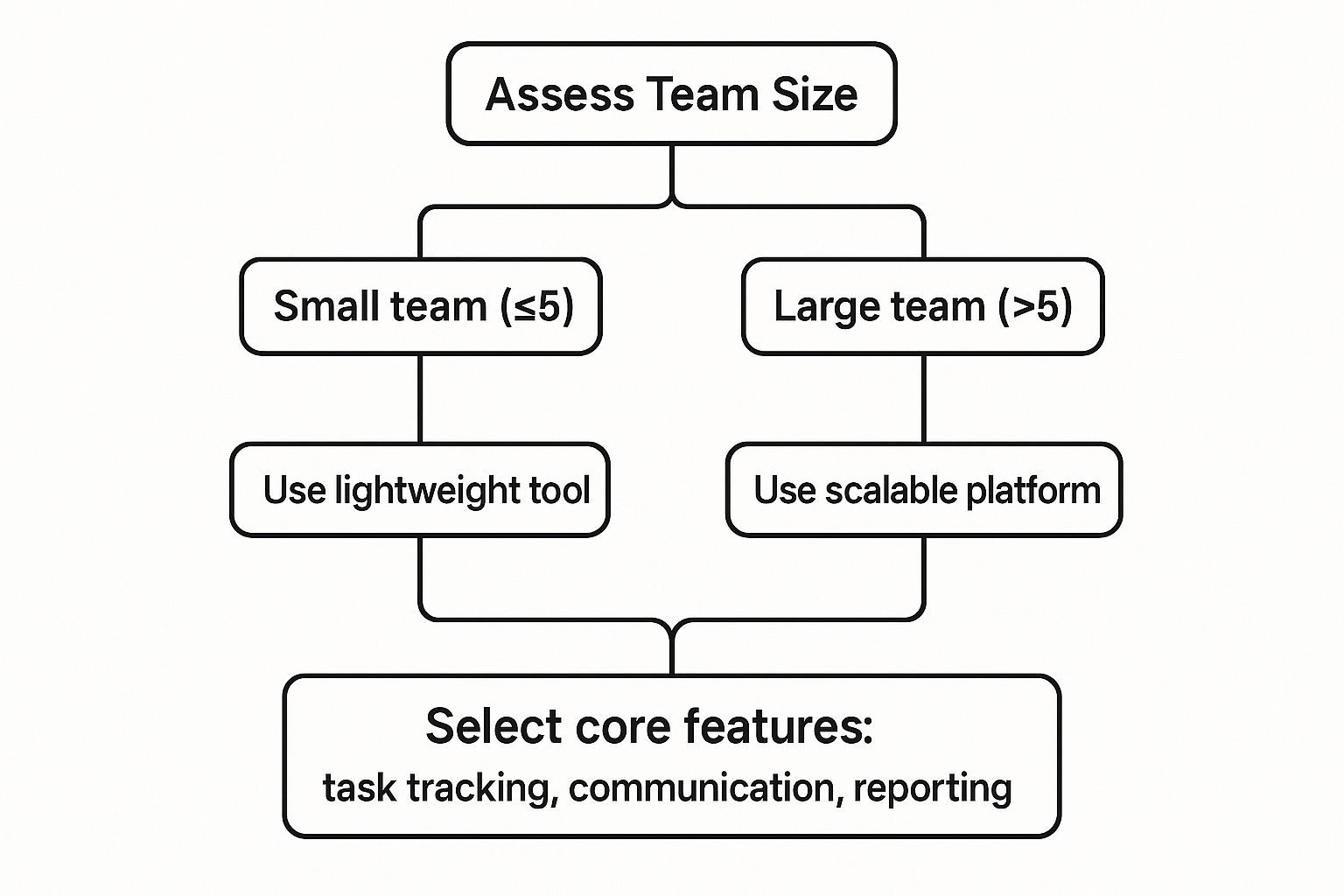
As you can see, the process kicks off with the basics, like team size. That one factor alone helps you immediately start sorting lightweight tools from the more heavy-duty, scalable platforms.
Evaluate Scalability for Future Growth
One of the biggest traps I see leaders fall into is choosing software that fits their team right now. But what about next year? Or in five years? You have to think ahead. Will this platform grow alongside you, or will it become a digital straitjacket, forcing a painful migration down the road?
Look for flexible pricing tiers and the ability to add new users or features without a fuss. A truly scalable solution means that as your team grows from five people to fifty, your digital HQ can expand right along with it. It should support your growth, not get in the way of it.
Choosing a platform is a long-term investment in your team's operational backbone. Prioritize solutions that are built for growth, ensuring the software you select today will still be a powerful asset for your team tomorrow.
Prioritize Seamless Integrations
Your new software won't operate on an island. It absolutely has to play nice with the other tools your team already lives in every single day. A platform that can't connect to your existing tech stack creates more headaches than it solves, forcing your team into clunky workarounds and soul-crushing manual data entry.
Before you commit, make a simple checklist of your non-negotiables. For instance:
- Communication Apps: Does it link up with Slack, Microsoft Teams, or your email client?
- File Storage: Can it sync effortlessly with Google Drive, Dropbox, or OneDrive?
- Calendars: Does it offer a solid two-way sync with Google Calendar or Outlook?
Strong integrations are what turn a standalone tool into a genuine command center, creating a smooth, uninterrupted workflow. This interconnectedness is everything for keeping a remote team in sync and productive.
Scrutinize Security and Compliance
When your team is spread out across different locations, protecting sensitive company and client data is non-negotiable. Don't just take a vendor's word for it on their security page. You have to dig a little deeper into their protocols and certifications. A data breach can be absolutely catastrophic, so this is one area where being overly cautious pays off.
Ask them direct questions. What are their data encryption standards, both for data in transit and at rest? Do they comply with regulations relevant to your industry, like GDPR or HIPAA? Make sure robust features like two-factor authentication and granular user permissions aren't just afterthoughts—they should be core to the platform.
Key Software Selection Criteria at a Glance
To simplify this process, I’ve put together a quick-reference table. Use it as a checklist to systematically compare your top contenders and make sure you're covering all your bases.
| Evaluation Criterion | Why It Matters | Key Question to Ask Vendors |
|---|---|---|
| User Experience (UX) | If the tool is clunky or confusing, your team won't use it. Period. | Can you walk me through the typical daily workflow for a user on my team? |
| Scalability | You need a platform that grows with you, not one you'll outgrow in a year. | What do your pricing tiers look like as we add more users and features? |
| Integrations | The software must connect with your existing tools to avoid creating data silos. | Do you have native integrations with [Tool X] and [Tool Y], or do we need a third-party connector? |
| Security & Compliance | Protecting company and client data is paramount in a remote environment. | What specific security certifications (e.g., SOC 2, ISO 27001) do you hold? |
| Customer Support | When something goes wrong, you need fast, reliable help. | What are your support channels and guaranteed response times for a customer of our size? |
| Total Cost of Ownership | The subscription price is just the beginning. Consider implementation and training costs. | Are there any one-time setup fees, training costs, or hidden charges I should know about? |
By taking a structured approach to assessing your needs and vetting potential platforms against these core criteria, you can cut through the marketing fluff. This lets you choose a tool that doesn't just look good in a demo but becomes a true, indispensable asset for your team's success.
Best Practices for a Smooth Software Rollout
Choosing the perfect remote team management software is a huge win, but it's only half the battle. The real victory is a successful rollout—one that gets everyone on board and makes the switch feel like a natural step up, not another top-down mandate. Without a smart strategy, even the best platform can end up collecting digital dust.
The trick is to think of the rollout as a change management project, not just an IT task. This means you have to focus on the people involved. Communicate clearly, provide great training, and build excitement from day one. A messy launch can create frustration and resistance, sinking the very benefits you were hoping for.
Design a Phased Rollout Plan
Instead of flipping a switch and moving the whole company at once, try a phased approach. This method keeps disruption to a minimum and lets you gather priceless feedback in a controlled setting. Think of it as a soft launch for an internal tool.
Start with a small, tech-friendly pilot group or a single department. This gives you a chance to spot any issues, polish your training materials, and create a core group of internal champions who can later help their colleagues get up to speed. It’s a sandbox where you can work out all the kinks before going company-wide.
A structured plan could look something like this:
- Select a Pilot Team: Pick a group that’s open to new things and has a pretty typical workflow.
- Gather Initial Feedback: Actively ask them what's working and what's not.
- Refine and Adjust: Use their input to tweak settings, update guides, and prep for the next stage.
- Expand Incrementally: Roll the software out to other teams one by one.
Establish Clear Usage Guidelines from Day One
Confusion is the enemy of adoption. Right from the start, your team needs to know how and why they should be using the new remote team management software. Don't leave it up to them to figure it out.
Create a simple, easy-to-read guide outlining the "rules of the road." This should make it crystal clear which tool is for what. For example, you might decide all project updates must happen in the new platform, but urgent questions can still be handled over instant messenger. This clarity prevents tool fatigue and makes sure everyone uses the software the right way. Creating solid guidelines is also a key component of a successful employee onboarding process; you can learn more from our guide on onboarding checklists that transform new hires into top performers.
The goal is not to micromanage but to provide a clear framework that reduces confusion and helps new habits stick. When everyone understands the expectations, the platform becomes a source of clarity, not chaos.
Deliver Effective and Role-Specific Training
One-size-fits-all training just doesn't cut it. A project manager uses software in a completely different way than a graphic designer or a writer. Tailoring your training sessions to specific roles makes the information far more relevant and keeps people engaged.
Zero in on the features each person will use every day. For managers, that might mean focusing on dashboards and team workload reports. For individual team members, the training could center on managing their tasks and collaborating with others. Hands-on, practical examples will always beat a boring tour of every single feature.
Ultimately, a smooth rollout comes down to proactive communication and real support. By getting buy-in from key leaders, explaining the benefits clearly, and actually listening to your team's concerns, you can build the positive momentum needed to make your new software an indispensable part of how you work.
Weaving in Specialized Tools for Stronger Remote Operations
While a great all-in-one remote team management software acts as your digital HQ, let's be realistic—no single platform is a silver bullet. The sharpest remote teams I've seen build out an ecosystem of specialized tools that plug right into their main hub. The trick is to add real power without drowning everyone in a sea of apps.
Think of your core platform as the foundation and frame of a house. It’s absolutely essential, but you still need specialized systems like plumbing and electrical to make it a livable home. That's what integrating complementary software does for your digital workspace; each tool solves a specific problem with surgical precision.
This strategy lets you build a powerful, customized tech stack that supports every part of remote work, from those messy creative brainstorms to mission-critical IT support. The endgame is a smooth, cohesive system where information flows effortlessly between your tools.
Bolstering Your Operations with Niche Applications
Some remote work challenges just demand more than a general-purpose feature can offer. This is where niche tools step in to fill the gaps that a bigger platform might only skim the surface of.
For instance, a few high-impact additions can make a world of difference:
- Digital Whiteboards: Trying to replicate that spontaneous, visual energy of an in-office brainstorm is tough. Tools like Miro or Mural are game-changers here. They offer an infinite canvas for teams to map ideas, hash out flowcharts, and get creative together in real-time.
- Dedicated Time-Tracking Tools: If your team needs deep insights for project billing or productivity analysis, a specialized time tracker like DeskCove goes way beyond the basics. These tools usually pack in much more robust features, like detailed reporting and activity monitoring.
- Asynchronous Video Messengers: To cut down on endless text chains and "just checking in" meetings, apps like Loom are brilliant. Team members can record quick video updates, walk-throughs, or feedback, which is a lifesaver for teams spread across different time zones.
The Critical Role of Remote Desktop Software
Of all the specialized tools, one of the most vital for any distributed company is remote desktop software. It’s the magic that lets authorized users—usually your IT support team—securely access and control an office computer from anywhere on the planet. It’s the digital equivalent of an IT tech walking over to an employee’s desk to fix a problem.
By providing a secure gateway to essential office systems, remote desktop software ensures business continuity, strengthens security, and empowers IT teams to provide immediate support to any employee, anywhere in the world.
This is absolutely essential for troubleshooting tech glitches, installing software, or accessing files stuck on an on-premise network. Its importance is exploding, too. The remote desktop software market was valued at USD 3.33 billion in 2024 and is on track to hit nearly USD 12 billion by 2032. As you can see from recent remote desktop software market insights, this growth is fired up by the nonstop demand for secure, real-time access.
By thoughtfully weaving these specialized tools into your setup, you build a digital ecosystem that’s more powerful, flexible, and resilient—one that can truly handle the dynamic needs of a modern remote team.
Common Questions About Remote Management Software
Whenever you're thinking about bringing a new digital tool into your workspace, questions are going to pop up. It's only natural. To make a smart decision, you need clear, straightforward answers about what to expect when you pick and use remote team management software. Let's tackle some of the most common ones.
How Do You Measure the ROI of This Software?
Figuring out the return on investment (ROI) for these platforms isn’t just about the subscription fee. It’s a mix of hard numbers and those softer—but equally important—improvements to your company culture.
To get the full picture, you need to track both quantitative and qualitative metrics:
- Quantitative Metrics: Look for tangible changes. Are projects getting done faster? Is less time being spent on administrative busywork? Are you seeing direct savings from reduced office overhead?
- Qualitative Metrics: Keep an eye on the human element. Are employee satisfaction surveys showing happier people? Are you seeing lower staff turnover? Is the onboarding process for new hires getting smoother and faster?
Here’s the key: establish clear baseline metrics before you roll out the software. This is the only way to get a true "before and after" snapshot of its impact on your team's performance and morale.
What Is the Biggest Mistake Companies Make When Adopting These Tools?
The single biggest fumble we see is treating the software like a magic wand—a simple plug-and-play fix—without changing the company's culture and daily habits along with it. Just taking your old, office-based routines and trying to do them online is a recipe for frustration and low adoption.
Real success comes from a genuine shift to a remote-first mindset. That means creating new communication ground rules, setting clear expectations for asynchronous work, and rethinking workflows from scratch. The tool is there to support new, better ways of working, not just to be a digital copy of your old office. A platform is only as good as the processes you build around it.
Can Small Businesses Benefit from This Type of Software?
Absolutely. In fact, remote management software can be a massive equalizer. It gives small businesses the power to operate with the efficiency and reach of companies many times their size. By opening up access to a global talent pool, it levels the playing field in a big way.
Many of these platforms are built to grow with you, offering flexible pricing plans and even powerful free versions. This puts top-tier management and collaboration tools within reach for teams of any size. For a small business looking to scale, this kind of software is often the key to growing effectively without the crippling overhead of physical expansion.
Ready to boost your team's productivity and streamline your remote operations? DeskCove offers powerful, intuitive tools for time tracking and performance monitoring, giving you the clarity you need to succeed. Discover how DeskCove can transform your remote team management by visiting https://deskcove.com today.