Top Business Process Automation Examples for 2025

Business Process Automation (BPA) isn't just a futuristic concept; it's the engine driving efficiency and growth for leading companies today. But what does it actually look like in practice? Moving beyond theory, this article dives into 10 tangible business process automation examples across various departments, from finance to HR to marketing. We'll break down the specific challenges each process faced, the automation strategies implemented, and the measurable results achieved.
This isn't just a list of ideas. It's a strategic teardown of how real companies identified repetitive tasks and replaced them with streamlined, automated systems. We will explore the specific software used, the workflows designed, and the before-and-after impact on productivity, cost, and accuracy. By understanding these real-world applications, you'll gain a clear roadmap for identifying and implementing similar opportunities within your own organization.
Prepare to see exactly how you can replicate these successes. You'll learn how to eliminate bottlenecks and free up your team for the strategic work that truly matters, transforming your operational efficiency in 2025 and beyond. As businesses increasingly leverage advanced technologies, understanding these foundational concepts is crucial. For a broader perspective on how this integrates with next-generation tools, you can also delve into AI workflow automation for your business to see the bigger picture.
Our focus here is on practical, replicable strategies that deliver concrete value. Each example will provide actionable takeaways you can apply to your own processes, whether you’re a project manager, team owner, or freelancer aiming to scale your operations.
1. Invoice Processing Automation
Manual invoice processing is a notorious bottleneck for finance departments, often plagued by tedious data entry, human error, and lengthy approval cycles. This process is a prime candidate for automation, making it one of the most impactful business process automation examples for companies aiming to boost efficiency and financial control.
Invoice processing automation leverages technologies like Optical Character Recognition (OCR) and machine learning to digitize and interpret invoice data. The system automatically extracts key information, validates it against purchase orders and receipts in a "three-way match," routes it through a predefined digital workflow for approval, and schedules the payment in the accounting system. This eliminates manual touchpoints, significantly speeding up the entire accounts payable (AP) cycle.
Strategic Breakdown and Analysis
Global giants have demonstrated the immense value of AP automation. Siemens, for instance, achieved a remarkable 73% reduction in invoice processing costs by implementing an automated system. Similarly, Ford Motor Company processes over one million invoices annually with its automated solution, while Coca-Cola European Partners successfully automated 80% of its invoice processing, freeing up its finance team for more strategic tasks.
Key Strategic Insight: The core value of invoice automation isn't just speed; it's about transforming the AP function from a cost center into a strategic asset. By eliminating manual tasks, teams can focus on cash flow optimization, vendor relationship management, and early payment discount capture.
Visualizing the Automated Workflow
The following infographic illustrates the streamlined, three-step journey of an invoice through an automated system.
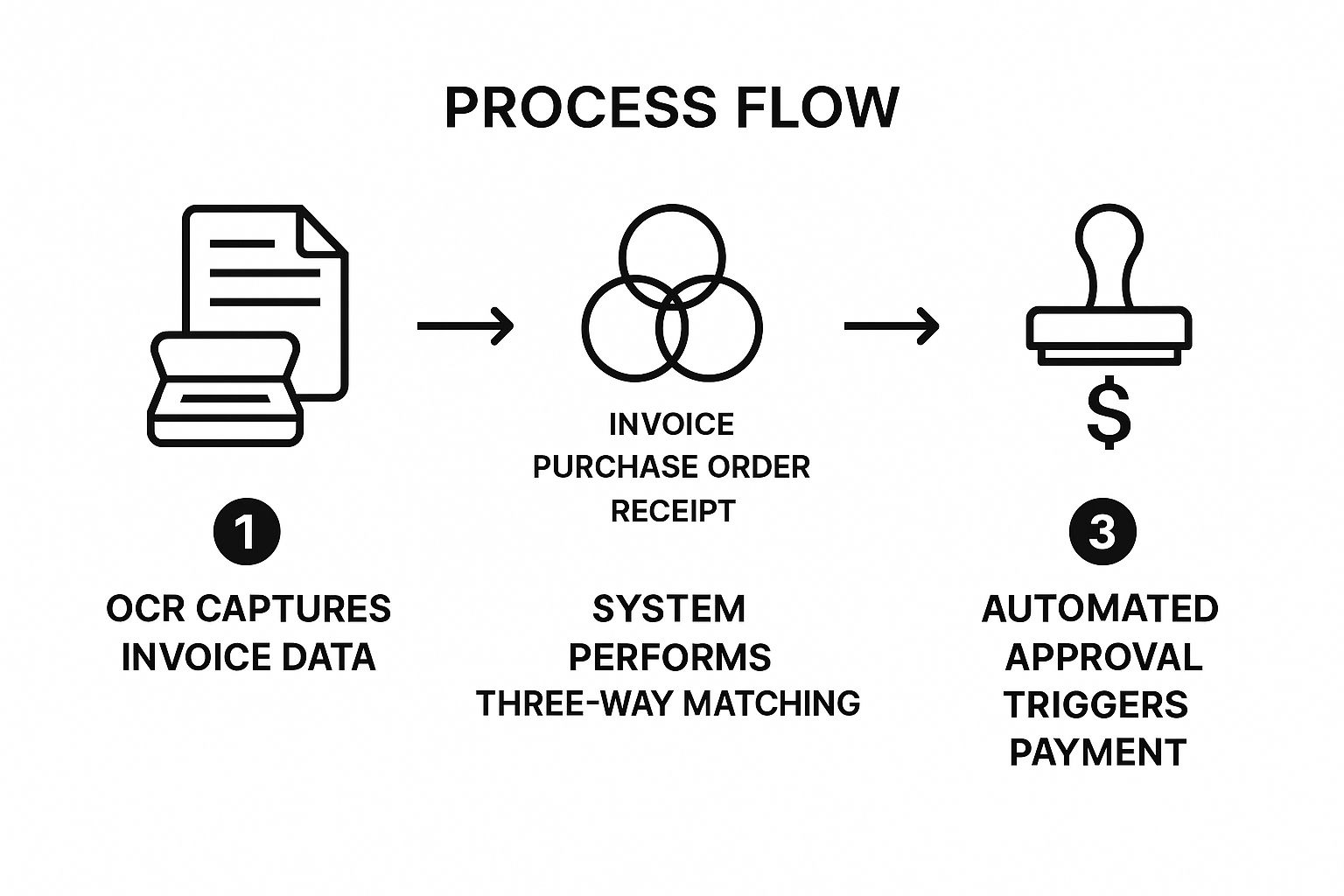
This visual process flow highlights how technology replaces manual intervention at critical validation and approval stages, ensuring both speed and accuracy.
Actionable Takeaways for Implementation
To replicate this success, consider these steps:
- Start Small: Begin with a pilot program for a single department or a specific group of high-volume vendors to prove the concept and refine the process.
- Standardize Inputs: Work with key suppliers to standardize invoice formats where possible, which improves OCR accuracy and reduces exceptions.
- Define Workflows: Establish clear, digital approval hierarchies and spending limits within the automation software to prevent delays.
- Choose Integrated Tools: Select a platform that integrates seamlessly with your existing ERP or accounting software.
2. Customer Onboarding Automation
A positive first impression is critical for long-term customer retention, yet manual onboarding processes are often inconsistent, slow, and resource-intensive. Automating this crucial stage ensures every new client receives a prompt, personalized, and thorough welcome. This makes customer onboarding one of the most valuable business process automation examples for companies focused on reducing churn and maximizing lifetime value.
Customer onboarding automation uses triggers and timed sequences to guide new users. The system can instantly send welcome emails, collect necessary documentation, create user accounts, and deliver educational content or in-app tutorials. By automating these initial steps, businesses create a seamless and scalable process that helps customers achieve their first "win" with the product faster.

Strategic Breakdown and Analysis
Tech leaders have perfected this automation to drive product adoption. Slack, for instance, uses automated in-app messages and email sequences to guide new users through setting up channels and inviting team members, contributing to a 30% increase in activation rates. Similarly, HubSpot automates its entire customer journey with personalized email drips and in-app guidance, while Zendesk successfully reduced its onboarding time from weeks to just a few days by implementing a robust automation strategy.
Key Strategic Insight: Effective onboarding automation is not about removing human interaction; it's about scaling it. By automating repetitive tasks, teams can intervene at high-impact moments, such as strategic check-ins or complex support queries, to provide a superior customer experience.
Visualizing the Automated Workflow
The diagram above illustrates the typical journey of a new customer through an automated onboarding system. It shows how automated touchpoints-like welcome emails, setup guides, and follow-up sequences-are triggered based on user actions or a predefined timeline. This visual flow demonstrates how automation creates a consistent and supportive experience without requiring constant manual effort, a concept that can be applied to internal processes as well. For further reading, you can explore onboarding checklists on deskcove.com that highlight similar structured approaches.
This structured process ensures that customers are consistently nurtured from signup to activation, significantly improving their likelihood of success.
Actionable Takeaways for Implementation
To implement successful onboarding automation, follow these steps:
- Map the Journey: Before automating, create a detailed map of the ideal customer onboarding journey, identifying key milestones and potential friction points.
- Segment Your Audience: Customize automated workflows based on customer segments, such as user role, company size, or subscription plan, to deliver a more relevant experience.
- Incorporate Human Checkpoints: Schedule automated alerts for your customer success team to engage with clients at critical moments, like after they complete a key setup step.
- Choose Integrated Tools: Select a platform that integrates with your CRM to create a unified view of the customer and trigger personalized communication.
3. Employee Payroll Automation
Manual payroll management is a high-stakes, repetitive task fraught with risk, from calculation errors to compliance failures. It demands significant administrative effort and can lead to costly penalties and employee dissatisfaction. Employee payroll automation is one of the most fundamental business process automation examples, transforming this complex function into a streamlined, accurate, and reliable operation.
This automation uses integrated software to manage the entire payroll lifecycle. The system automatically calculates gross wages from time-tracking data, deducts taxes and benefits, processes direct deposits or check printing, and generates detailed pay stubs. It syncs with HR and accounting systems, ensuring data consistency and maintaining compliance with constantly changing labor laws and tax regulations.
Strategic Breakdown and Analysis
The widespread adoption of payroll automation by companies of all sizes underscores its strategic value. ADP, for instance, provides automated payroll for over one million businesses globally, while Paychex serves more than 670,000 companies. Fast-food giant McDonald's relies on automated systems to manage payroll across thousands of franchise locations, handling complex variables like shift differentials and local wage laws with precision.
Key Strategic Insight: Automating payroll transcends simple time-saving. It mitigates significant compliance risk, enhances data security, and improves employee trust by ensuring consistent, accurate, and on-time payments. This allows HR and finance teams to shift their focus from transactional processing to strategic workforce planning and financial analysis.
Actionable Takeaways for Implementation
To successfully implement payroll automation, follow these critical steps:
- Integrate Time Tracking: Before implementation, ensure your time-tracking systems are accurate and can seamlessly integrate with the payroll software to eliminate manual data entry.
- Run Parallel Systems: For the first one or two pay cycles, run your old manual system alongside the new automated one. This "parallel processing" allows you to verify accuracy and catch any discrepancies before fully cutting over.
- Establish Clear Cutoffs: Communicate and enforce firm deadlines for submitting timesheets and any payroll changes (e.g., new hires, terminations, raises) to ensure smooth, on-time processing.
- Choose Scalable Platforms: Select a trusted provider that can grow with your business. For insights into how robust platforms like Paychex simplify HR and payroll for businesses of all sizes, explore their solutions here.
4. Email Marketing Automation
Sending the right message to the right person at the right time is the core challenge of modern marketing. Manual email campaigns often fail to scale, leading to generic messaging and missed opportunities. Email marketing automation is a powerful solution, making it one of the most transformative business process automation examples for companies focused on nurturing leads and driving customer loyalty.
This type of automation uses software to send targeted, personalized email campaigns based on user behaviors, triggers, or schedules. The system segments audiences, personalizes content, schedules delivery, tracks engagement, and can automatically adjust campaigns based on recipient actions like opens, clicks, or purchases. This ensures timely, relevant communication that feels personal, even when sent to thousands.
Strategic Breakdown and Analysis
The strategic impact of email automation is evident across leading e-commerce and digital service brands. Amazon, for example, generates a significant portion of its revenue through automated product recommendation emails based on browsing and purchase history. Similarly, Netflix's "What to Watch Next" automated emails keep subscribers engaged, reducing churn, while Sephora successfully recovers an estimated 15% of lost sales by using automated abandoned cart email sequences.
Key Strategic Insight: Effective email automation shifts the marketing focus from broad "batch and blast" campaigns to building individual customer journeys. The goal is not just to send emails, but to create a responsive, automated dialogue that guides a user from initial interest to conversion and long-term advocacy.
Visualizing the Automated Workflow
The following diagram illustrates a common automated email workflow, such as an abandoned cart sequence, where user actions trigger specific, timed marketing responses.
This visual flow demonstrates how automation creates a personalized path for each user, delivering relevant content based on their direct engagement signals.
Actionable Takeaways for Implementation
To implement this successfully, follow these strategic steps:
- Start with Simple Workflows: Begin with high-impact, easy-to-implement automations like a welcome series for new subscribers or an abandoned cart sequence.
- Clean Your Email List: Regularly remove inactive subscribers and validate email addresses to maintain high deliverability rates and protect your sender reputation.
- Use Clear Triggers: Define specific, logical triggers (e.g., "user added item to cart but did not purchase in 2 hours") to initiate your workflows.
- Choose Scalable Tools: Select a platform that can grow with your needs and integrates with your other marketing and sales software.
5. Help Desk Ticket Management Automation
Manual help desk management quickly becomes chaotic as businesses scale, leading to slow response times, inconsistent service, and frustrated customers. Support teams often struggle with routing tickets, prioritizing urgent requests, and answering repetitive questions. Automating this process is one of the most effective business process automation examples for enhancing customer satisfaction and operational efficiency.
Help desk automation uses rule-based workflows and AI to intelligently manage the entire ticket lifecycle. The system can automatically categorize incoming requests, assign them to the right agent based on skill or workload, and send instant acknowledgments to customers. It can also deflect common queries by suggesting relevant knowledge base articles or using chatbots, ensuring human agents focus on complex, high-value issues.
Strategic Breakdown and Analysis
Leading companies showcase the transformative power of support automation. Shopify effectively handles millions of merchant inquiries by automating its ticketing system, ensuring timely and consistent support. Similarly, Spotify successfully reduced its support ticket volume by 25% by implementing a robust self-service and automation strategy. Platforms like Atlassian’s Jira Service Management and Zendesk have enabled thousands of businesses to streamline their IT and customer support, with Zendesk users reporting an average of 36% faster ticket resolution times thanks to automation features.
Key Strategic Insight: The goal of help desk automation is not to replace human agents but to augment their capabilities. By handling the high-volume, low-complexity tasks, automation frees up support professionals to provide empathetic, in-depth assistance for issues that truly require a human touch.
Visualizing the Automated Workflow
The journey of a support ticket through an automated system is far more efficient than a manual one. From initial receipt to final resolution, intelligent routing and automated responses minimize delays and ensure the request is handled by the most qualified person without manual triage. This streamlined flow guarantees faster, more accurate resolutions.
Actionable Takeaways for Implementation
To successfully automate your help desk, follow these steps:
- Automate the Obvious: Start by identifying and automating responses to the most common and repetitive inquiries. This provides immediate relief to your support team.
- Build a Knowledge Base: Before full implementation, create a comprehensive and easily searchable knowledge base. This is the foundation for effective self-service and ticket deflection.
- Define Escalation Paths: Establish clear, automated rules for escalating complex or high-priority issues to senior staff or other departments to prevent bottlenecks.
- Choose the Right Tools: Select a dedicated help desk platform that offers robust automation rules, integrations, and analytics to monitor performance.
6. Inventory Management Automation
Managing inventory manually is a complex, error-prone task that can lead to stockouts, overstocking, and significant capital being tied up in unsold goods. It's a critical operational area ripe for optimization, making inventory management automation one of the most transformative business process automation examples for retail, manufacturing, and logistics companies. This approach ensures product availability while minimizing carrying costs.
Inventory management automation leverages technologies like RFID, barcode scanning, and integrated software to track stock levels in real time. The system automatically updates inventory counts as sales occur, triggers purchase orders when stock hits predefined reorder points, and provides data for demand forecasting. This creates a cohesive, self-regulating system that maintains optimal inventory levels across all sales channels and locations.

Strategic Breakdown and Analysis
Retail and e-commerce giants have perfected this process out of necessity. Amazon's fulfillment centers use a combination of robotics and AI to manage millions of items, directing robots to retrieve products for shipping. Similarly, Zara’s fast-fashion model relies heavily on automated inventory systems to restock popular items in stores within days, while Target reportedly reduced out-of-stock incidents by 30% after implementing RFID technology.
Key Strategic Insight: The true power of inventory automation lies in its ability to turn inventory from a liability into a dynamic asset. By achieving real-time visibility and predictive accuracy, businesses can improve cash flow, enhance customer satisfaction by preventing stockouts, and make data-driven decisions about product lifecycle management.
Actionable Takeaways for Implementation
To implement a successful inventory automation strategy, follow these steps:
- Audit First: Conduct a complete physical inventory count before going live to ensure your starting data is 100% accurate.
- Prioritize SKUs: Start your automation efforts by focusing on high-value or fast-moving items (ABC analysis) to maximize initial impact.
- Set Smart Triggers: Define dynamic reorder points within your system that account for supplier lead times and sales velocity to prevent stockouts.
- Integrate Systems: Choose a platform that integrates seamlessly with your point-of-sale (POS) and e-commerce platforms to maintain a single source of truth for inventory data.
7. Social Media Management Automation
Manually managing multiple social media accounts is a major time drain for marketing teams, filled with repetitive scheduling, cross-posting, and performance tracking. This highly manual process is an ideal candidate for automation. Social media management is one of the most accessible business process automation examples for businesses looking to enhance their digital presence and marketing ROI.
Automation in this area uses specialized platforms to schedule posts across various channels like LinkedIn, X (formerly Twitter), and Instagram from a single dashboard. These systems can automatically publish content at optimal engagement times, monitor brand mentions and keywords, route customer inquiries, and compile performance analytics. This frees marketers from tedious administrative work, allowing them to focus on strategy and creative content.
Strategic Breakdown and Analysis
The success of social media automation is widespread. Buffer, a popular tool, has helped businesses increase their social media engagement by over 50% through optimized scheduling. Global brands like Nike leverage automation to consistently manage hundreds of distinct brand and athlete accounts worldwide. Even Wendy's, known for its witty, real-time engagement, combines automation for scheduled content with a dedicated team for the spontaneous interactions that drive its viral success.
Key Strategic Insight: Effective social media automation is not about "setting it and forgetting it." It's about creating operational efficiency to enable higher-quality, strategic human interaction. By automating the mundane, teams can dedicate more resources to authentic engagement, community building, and creative campaigns that cannot be automated.
Visualizing the Automated Workflow
The following diagram illustrates how automation transforms a scattered, manual social media process into a centralized, efficient cycle of planning, execution, and analysis.
This workflow shows how a central platform automates publishing and data collection, feeding insights back into the content strategy loop for continuous improvement.
Actionable Takeaways for Implementation
To implement social media automation effectively, follow these best practices:
- Balance Your Content Mix: Aim for a 70/30 or 80/20 split between scheduled, automated posts and spontaneous, real-time engagement to maintain an authentic voice.
- Batch Your Content Creation: Create and schedule a week's or a month's worth of content in one sitting to maximize efficiency and ensure a consistent posting cadence.
- Use Automation for Listening: Set up automated alerts for brand mentions, keywords, and competitor activity. This allows you to engage personally and strategically in relevant conversations.
- Choose the Right Tools: Select a platform that aligns with your team's needs, budget, and integrates with other marketing tools you use.
8. Lead Scoring and Qualification Automation
Manually sifting through leads to identify high-potential prospects is a time-consuming task for sales and marketing teams, often leading to missed opportunities and wasted effort. Automating this process ensures that sales reps focus their attention on the most promising leads. This makes lead scoring and qualification one of the most valuable business process automation examples for companies focused on accelerating their sales pipeline and improving conversion rates.
Lead scoring automation uses predefined rules and machine learning to evaluate and rank leads based on their likelihood to convert. The system assigns point values to demographic data and behavioral triggers like website visits, content downloads, and email engagement. High-scoring leads are automatically routed to the sales team for immediate follow-up, while lower-scoring leads are placed into automated nurturing campaigns until they show greater interest.
Strategic Breakdown and Analysis
Leading marketing and sales platforms have proven the power of this automation. HubSpot’s predictive lead scoring, for example, has helped its customers increase conversion rates by as much as 15%. Similarly, Salesforce Einstein leverages AI to score leads, boosting sales productivity by prioritizing the most valuable prospects. Marketo, another key player, has helped its users reduce their sales cycle length by an average of 20% through efficient lead qualification.
Key Strategic Insight: The true advantage of automated lead scoring is aligning sales and marketing efforts. It creates a data-driven, objective definition of a "qualified lead," eliminating friction and ensuring that marketing delivers high-quality prospects that sales is ready to engage.
Actionable Takeaways for Implementation
To implement this strategy successfully, follow these key steps:
- Define a Qualified Lead: Collaborate closely with the sales team to establish clear criteria for what constitutes a sales-qualified lead (SQL) versus a marketing-qualified lead (MQL).
- Start with Simple Rules: Begin with a basic scoring model based on key firmographic data (company size, industry) and critical actions (demo request). You can add complexity over time.
- Assign Negative Scores: Implement negative scoring for disqualifying actions, such as unsubscribing from emails or visiting the careers page, to filter out poor-fit leads.
- Review and Refine: Schedule quarterly reviews to analyze the performance of your scoring model against actual conversion data and adjust thresholds and rules as needed.
9. Document Workflow and Approval Automation
Manual document handling is a significant drain on productivity, creating bottlenecks for everything from contract signatures to procurement requests. This process is an ideal candidate for improvement, making document workflow and approval one of the most fundamental business process automation examples for organizations seeking to accelerate decision-making and ensure compliance.
This type of automation digitizes the entire lifecycle of a document. It leverages software to automatically route files to the correct stakeholders based on predefined rules, track versions, send reminders for pending approvals, and securely store the final versions. This system creates a transparent, auditable trail for every document, eliminating the risks of lost paperwork and missed deadlines.
Strategic Breakdown and Analysis
The impact of this automation is evident across major industries. DocuSign, for instance, processes over a billion documents annually with its automated workflows, showcasing immense scalability. Similarly, General Electric dramatically reduced its contract cycle time from weeks to mere days, while Siemens successfully automated 90% of its procurement document approvals. Even government agencies rely on these workflows to streamline permit and license processing.
Key Strategic Insight: Automating document approvals is less about going paperless and more about creating a single source of truth. It instills process integrity, provides clear visibility into operational bottlenecks, and builds a robust, compliant foundation for scalable growth.
Visualizing the Automated Workflow
The journey of a document through an automated workflow is a clear, multi-stage process that minimizes human error and delay.
This visual flow demonstrates how automation systematically manages routing, review, and archival stages, transforming a chaotic manual process into an efficient and transparent operation.
Actionable Takeaways for Implementation
To implement this automation effectively, focus on these core steps:
- Map Existing Processes: Before automating, thoroughly chart your current approval workflows to identify bottlenecks and key decision-makers.
- Start with High-Volume Documents: Begin your automation journey with standardized, high-volume documents like purchase orders or marketing collateral to achieve quick wins. To learn more, you can read about how to streamline workflow approvals in marketing campaigns.
- Build in Escalation Paths: Configure the system to automatically escalate requests to a secondary approver if the primary one is unresponsive, preventing delays.
- Prioritize Integration and Security: Choose a platform that integrates with your existing systems and provides role-based access controls to maintain security.
10. HR Recruitment and Applicant Tracking Automation
The recruitment process is often a high-volume, resource-intensive function, bogged down by repetitive administrative tasks from posting jobs to screening countless resumes. This area is an ideal candidate for automation, making it one of the most transformative business process automation examples for companies looking to hire top talent faster and more efficiently.
Recruitment automation uses technology like Artificial Intelligence (AI) and Applicant Tracking Systems (ATS) to streamline the entire hiring pipeline. The system can automatically post job openings across multiple boards, screen resumes for keywords and qualifications, schedule interviews with qualified candidates, and send automated yet personalized communications. This frees up HR professionals from manual work, allowing them to focus on high-value interactions and strategic hiring decisions.
Strategic Breakdown and Analysis
Leading global companies have embraced this automation to gain a competitive edge in talent acquisition. Unilever leverages an AI-powered system to screen over 250,000 applicants annually, drastically reducing manual review time. Similarly, Hilton automated its recruiting processes to achieve a 20% increase in hiring efficiency, while IBM’s Watson Recruitment famously helped reduce its time-to-hire by 75%.
Key Strategic Insight: The true power of recruitment automation lies in creating a scalable and consistent candidate experience. By automating administrative touchpoints, companies can ensure no applicant falls through the cracks, improve their employer brand, and focus human effort on building relationships with the most promising candidates.
Visualizing the Automated Workflow
The following infographic outlines the key stages of an automated recruitment funnel, from initial application to final offer.
This visual demonstrates how automation handles the high-volume, low-touch stages, allowing HR teams to dedicate their time to more personalized, high-touch interactions later in the process.
Actionable Takeaways for Implementation
To implement this automation effectively, consider these steps:
- Define Screening Criteria: Clearly differentiate between "must-have" and "nice-to-have" qualifications to configure your screening algorithms accurately.
- Personalize Communications: Use tokens for candidate names and job titles in your automated emails to maintain a personal touch and keep applicants engaged.
- Maintain Human Oversight: Reserve final candidate selection and relationship-building activities for human recruiters to ensure quality of hire and cultural fit.
- Choose the Right Tools: Select an ATS that integrates with your existing HR systems and aligns with your hiring goals. Implementing these tools is central to many strategies to reduce recruitment cost per hire.
Top 10 Business Process Automation Examples Comparison
| Automation Type | Implementation Complexity 🔄 | Resource Requirements ⚡ | Expected Outcomes 📊 | Ideal Use Cases 💡 | Key Advantages ⭐ |
|---|---|---|---|---|---|
| Invoice Processing Automation | Medium to high: 2-6 months setup, integration challenges | Moderate to high: OCR tools, workflow software, ERP integration | High ROI (300-400%), reduces errors by 80-90%, faster payments | Businesses with high invoice volume, accounting teams | Significant cost/time savings, error reduction, audit trails |
| Customer Onboarding Automation | Medium: Setup of workflows and content creation | Moderate: CRM integration, form/document collection tools | Reduces onboarding time by 50-70%, improves satisfaction | SaaS, financial services, B2B companies | Consistent personalized onboarding, scalable processes |
| Employee Payroll Automation | Medium to high: complex setup for pay structures | Moderate: payroll software, HR/time tracking integration | 80% faster payroll processing, compliance ensured | Businesses with varied payroll needs | Accurate calculations, tax compliance, real-time cost visibility |
| Email Marketing Automation | Medium: Setup of workflows and content creation | Low to moderate: marketing platforms, CRM integration | ROI increase (~320%), higher engagement, lead nurturing | Marketing teams needing personalized campaigns | Scalable personalization, automated lead nurturing |
| Help Desk Ticket Management Automation | Medium to high: complex rule configuration, knowledge base setup | Moderate: AI integration, multi-channel support tools | 40% faster ticket resolution, 30-40% cost reduction | Organizations with 100+ support tickets daily | Faster response, even workload distribution, analytics |
| Inventory Management Automation | High: hardware/software investment, integration complexity | High: RFID/IoT sensors, software licenses, physical audits | Reduces stockouts 50-80%, 95%+ accuracy, cost savings | Retailers, warehouses with multi-location inventory | Real-time tracking, demand forecasting, reduced errors |
| Social Media Management Automation | Low to medium: scheduling and analytics setup | Low: social tools subscription | Saves 6+ hours/week, consistent posting, improved engagement | Marketing teams managing multiple social platforms | Time savings, unified analytics, optimal timing |
| Lead Scoring and Qualification Automation | Medium: data modeling, AI tuning required | Moderate: CRM and ML platform integration | 30-40% conversion increase, 50% sales efficiency improvement | Sales and marketing alignment, lead prioritization | Data-driven prioritization, improved conversion rates |
| Document Workflow and Approval Automation | Medium to high: workflow mapping and multi-system integration | Moderate: electronic signature, compliance tools | 50-60% cost reduction, 70-80% faster approvals | Regulated industries, legal, finance, procurement | Compliance support, audit trails, reduced cycle time |
| HR Recruitment and Applicant Tracking Automation | Medium to high: AI screening configuration, integrations | Moderate: ATS software, AI tools | 40-50% faster hires, unbiased screening, improved candidate experience | High-volume recruitment, diverse hiring pipelines | Faster hiring, bias reduction, data insights |
From Examples to Action: Your Next Steps in Automation
The diverse collection of business process automation examples we've explored, from invoice processing and customer onboarding to inventory management and HR recruitment, reveals a powerful, unifying theme. Automation is not about replacing human ingenuity; it's about liberating it. The most successful implementations are not grand, all-encompassing overhauls but targeted, strategic interventions that eliminate the repetitive, error-prone tasks that stifle creativity and slow down progress.
Across all ten examples, a clear pattern emerges. The "before" state was consistently characterized by manual data entry, fragmented communication, and significant time sinks. The "after" state, powered by automation, showcases streamlined workflows, centralized data, and empowered teams who can dedicate their cognitive energy to high-value strategic work, such as building customer relationships, innovating on products, or analyzing market trends.
The Strategic Blueprint for Automation Success
Reflecting on the detailed breakdowns, the core lesson is that successful automation hinges on a clear, replicable strategy rather than just the technology itself. Think of it as a blueprint you can adapt to any process within your organization.
- Identify the Bottleneck: The first and most critical step is pinpointing the right process to automate. Don't chase shiny objects. Instead, look for the biggest sources of friction, delay, and manual effort in your daily operations. Where are mistakes most common? What tasks do your team members universally dread?
- Map the Existing Workflow: Before you can improve a process, you must understand it intimately. Document every single step, every decision point, and every person involved. This mapping exercise often reveals hidden inefficiencies and redundancies that are ripe for automation.
- Define Success Metrics: How will you know if your automation is successful? Establish clear, measurable Key Performance Indicators (KPIs) upfront. This could be reducing invoice processing time by 50%, increasing lead qualification rates by 20%, or cutting down employee onboarding time from one week to one day.
- Start Small and Iterate: The most effective approach is to begin with a single, high-impact process. Choose a workflow that is relatively self-contained and has a clear potential for a quick win. This builds momentum, demonstrates value, and provides crucial learnings you can apply to more complex automation projects later.
Turning Insights into Actionable Momentum
The journey into business process automation doesn't require a massive budget or a dedicated IT department from day one. It starts with a mindset shift-viewing manual, repetitive tasks not as a cost of doing business, but as an opportunity for strategic improvement. The business process automation examples in this article serve as your guide, proving that companies of all sizes can achieve remarkable efficiency gains.
Key Takeaway: The goal is not just to do tasks faster, but to fundamentally redesign how work gets done. By automating the predictable, you create space for your team to excel at the unpredictable, driving innovation and sustainable growth.
Your next step is to move from passive learning to active implementation. Take one process from this list that resonates with your team's challenges. Whether it's streamlining help desk tickets to improve customer satisfaction or automating social media scheduling to build a stronger brand presence, the principles remain the same. Begin the process of mapping, defining metrics, and exploring the right tools to bring your vision to life. The cumulative effect of these small, targeted automations will transform your organization, one efficient process at a time.
Ready to take the first step in your automation journey? Many of the processes we discussed, like payroll and project management, rely on accurate time and activity data. DeskCove provides the foundational layer for this by automating employee time tracking and productivity monitoring, giving you the clean, reliable data needed to streamline workflows and make smarter decisions. See how DeskCove can help you build a more efficient and data-driven organization today.