Remote teams: increasing employee productivity strategies

If you want to boost your team's productivity, you need to think beyond just tracking hours. It's about a complete culture shift—moving away from old-school metrics and building an environment founded on clear goals, real engagement, and the right tech. The goal isn't just to monitor activity; it's to empower your team to do their best work.
The New Rules of Remote Productivity
In a remote world, the gap between hours logged and actual results can be huge. The old way of measuring productivity—basically, who's online the longest—just doesn't work anymore. For remote teams to truly succeed, you need a smarter framework that puts outcomes first. This means creating a space where performance is driven by purpose and clarity, not by a feeling of being watched.
This really boils down to three key things:
- Define Clear Goals: Everyone on the team needs to know exactly what success looks like for their role and how their work ties into the bigger company objectives.
- Foster Genuine Engagement: An engaged employee is a productive one. It's that simple. When people feel connected to their work and valued, their performance naturally goes up.
- Use the Right Technology: Your tools should make work easier and provide useful insights, not create friction or make people feel like they're under a microscope.
The Real Cost of Disengagement
One of the biggest killers of productivity is disengagement. When your team members feel disconnected, motivation drops, and so does their output. And this isn't just a feeling—it has a massive financial impact.
A recent Gallup report on the global workplace found that only 21% of workers feel engaged at work. This shockingly low number is directly linked to an estimated $438 billion in lost productivity every single year.
That number should be a wake-up call. You can't fix a productivity problem if you ignore the engagement crisis that's often driving it.
The infographic below breaks down how these pieces fit together to boost remote productivity.
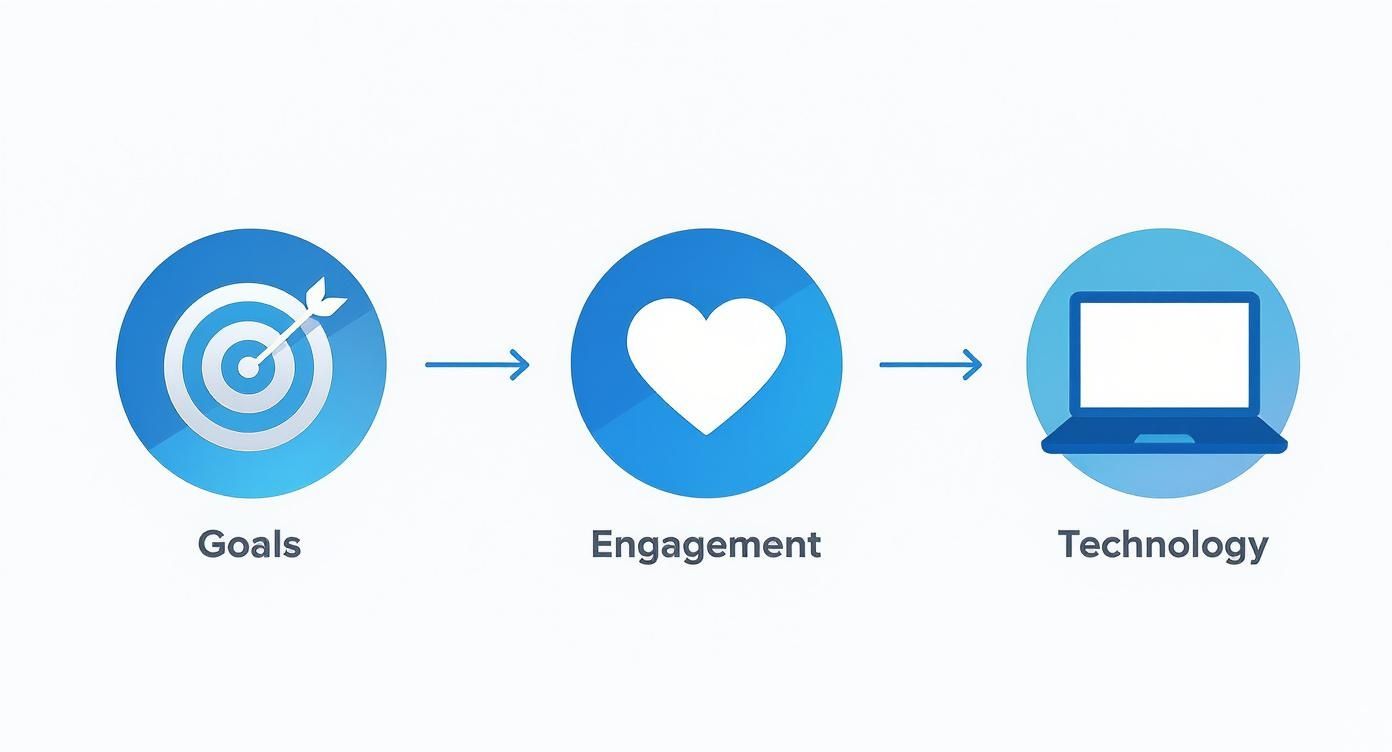
As you can see, it all starts with clear goals. That foundation leads to better engagement, which is then supercharged by using the right technology to support your team.
The table below summarizes this shift in thinking, moving from outdated methods to a more effective, modern approach.
Key Pillars of Modern Employee Productivity
| Pillar | Traditional Approach | Modern Strategy |
|---|---|---|
| Goals | Vague, top-down objectives | Clear, transparent, and collaborative goal-setting (OKRs) |
| Engagement | Annual surveys and pizza parties | Continuous feedback, recognition, and fostering a sense of purpose |
| Technology | Surveillance and micromanagement tools | Supportive platforms that provide insights and improve workflows |
This modern framework isn't just a trend; it's a fundamental change in how we manage and lead teams in a remote-first world.
A Modern Framework for Success
To really get this right, leaders have to let go of the old ways and embrace strategies that actually work for today's teams. This means building trust, giving people autonomy, and using data to support them, not to micromanage them.
For some practical ideas on where to start, check out these essential remote work productivity tips. This guide will walk you through the concrete steps you can take to build a high-trust, high-output team where everyone can truly thrive.
Building a Foundation of Trust and Transparency

Before you even think about introducing time-tracking or productivity tools, you have to address the elephant in the room: trust. For many employees, "productivity monitoring" is just a corporate-speak for "micromanagement."
If you just roll out new software without laying the right groundwork, you’re practically guaranteeing a drop in morale. You risk creating a culture of surveillance, which is a surefire way to kill the very productivity you’re trying to boost.
The whole game is about framing. These tools shouldn't be seen as a way to watch over shoulders, but as a resource for creating fairness, managing workloads better, and helping everyone grow professionally. This all starts with open, honest communication—long before anyone clicks "install."
Frame the Conversation Correctly
Your team needs to get the "why" behind this change. Don't lead with the tracking features; instead, highlight the benefits that directly affect them. Position the software as a tool to make sure workloads are distributed fairly and to spot where someone might need more support or resources.
For instance, you could start a conversation like this: "We're looking for a way to get a clearer picture of our project timelines. The goal is to protect everyone's work-life balance and make sure no one is heading for burnout." This simple shift in language moves the focus from oversight to support. Suddenly, it feels less like a mandate and more like a collaborative effort in increasing employee productivity.
Involve Your Team in the Process
One of the best ways I’ve seen to get genuine buy-in is to give your team a voice in the decision. Don't just pick a tool and force it on them. It rarely ends well.
Instead, shortlist two or three solid options and invite a small group of team members to run a pilot program. Let them kick the tires.
This approach pays off in a few ways:
- Empowerment: It sends a clear message that you value their opinion and trust their judgment.
- Feedback: You get real-world, on-the-ground insights into which tool actually fits your team’s workflow, not just what looks good on a features list.
- Adoption: The folks who help choose the tool often become its biggest champions when it’s time for a company-wide rollout.
Involving people in the decisions that directly affect their daily work is a massive motivator. When your team feels like they have a stake in the outcome, they're far more likely to embrace the change and help make it a success.
Establish Crystal-Clear Usage Policies
Transparency here is completely non-negotiable. Your team has every right to know exactly what data is being collected, who can see it, and how it will be used. A formal, easy-to-understand policy document is your best friend for building and maintaining trust.
This document needs to spell everything out in plain language:
- What is tracked: Be specific. Does it include app usage, time spent on certain projects, or screenshots?
- What is not tracked: Reassure your team that personal data and non-work activities are off-limits and private.
- How the data is used: Explain that the goal is to analyze project efficiency and workloads, not to punish individuals for taking a break.
- Who sees the data: Clearly define access levels for managers, HR, and individual employees (who should always be able to see their own data).
Documenting these points prevents misunderstandings and demonstrates respect for your team's privacy. If you need a hand getting started, a good remote work policy template can provide a solid foundation. By being upfront and collaborative from the start, you can turn a potentially tricky topic into a shared goal of working smarter, not harder.
How to Choose the Right Productivity Tools

The market is flooded with software all promising to skyrocket performance, but let’s be real: the best tool is the one your team actually uses. Picking the right platform isn't about chasing the longest feature list. It's about finding something that slots right into your team’s existing workflow without causing a headache.
A clunky, over-engineered tool creates more friction than it solves, torpedoing the very productivity you’re trying to build. You’re looking for tech that supports your people, not something that adds another layer of complexity to their day. To get a feel for what's out there, you can browse lists of the top remote work apps for productivity, which give a good overview.
Ultimately, this means looking past the flashy marketing and zeroing in on a few key factors that will determine whether a tool becomes an asset or just expensive shelfware.
Prioritize Usability and Seamless Integration
Your new productivity tool can't live on an island. It has to play nice with the applications your team already depends on every single day, whether that’s a project management hub like Asana or a communication platform like Slack. Without smooth integration, you’re just creating more work as people are forced to jump between disconnected systems.
Think of it this way: a tool that demands constant manual data entry or forces employees to switch tabs every five minutes is a productivity bottleneck, not a solution. The best systems are the ones that run quietly in the background, gathering what you need without breaking anyone's focus.
The real test for any new software is its adoption rate. If a tool isn't intuitive and dead simple to use from day one, your team will find workarounds or just ignore it. That makes your entire investment worthless.
Compare Tool Categories for the Right Fit
Not all productivity tools are built the same. They serve different needs and fit different company cultures, so understanding the main categories is your first step toward making a smart choice for increasing employee productivity.
Some platforms are lightweight time trackers, perfect for freelancers or agencies that need to bill by the hour. Others are powerful analytics platforms offering deep dives into workflow patterns and app usage, which are better suited for larger organizations trying to optimize complex processes.
To make sense of it all, it helps to break down the common types of tools you’ll encounter.
Comparing Productivity Tool Categories
The table below breaks down the different productivity tools available to help you pinpoint the best fit for your team's specific needs and your company culture.
| Tool Category | Primary Function | Best For | Potential Pitfall |
|---|---|---|---|
| Simple Time Trackers | Manual or automatic tracking of hours worked on specific tasks. | Freelancers, consultants, and teams needing accurate client billing. | Lacks deeper insights into workflow efficiency or application usage. |
| Project Management Tools | Organizing tasks, deadlines, and team collaboration within projects. | Teams managing multi-step projects with many moving parts. | Can become cluttered and overwhelming if not managed properly. |
| Productivity Analytics | Analyzing application usage, website visits, and work patterns. | Managers seeking to identify bottlenecks and improve team-wide efficiency. | Can feel intrusive if not implemented with transparency and trust. |
| All-in-One Platforms | Combining time tracking, project management, and analytics features. | Businesses wanting a single source of truth for all productivity data. | May have more features than a small team actually needs. |
Each category serves a unique purpose. The key is to match the tool’s core function with the problem you're actually trying to solve, rather than getting distracted by bells and whistles you’ll never use.
Run a Pilot Program Before Committing
The absolute best way to know if a tool will work is to test it in the wild. Instead of forcing a top-down, company-wide rollout, pick a small, representative group of employees for a pilot program.
This approach gives you a massive advantage for a few reasons:
- You get authentic feedback. You’ll learn exactly what works and what doesn’t straight from the people who will be in the software all day.
- You can spot roadblocks early. This is your chance to troubleshoot integration issues or identify training gaps on a small scale, before they become company-wide problems.
- You create internal champions. When pilot users have a great experience, they become your best advocates, helping drive enthusiasm and adoption when you're ready for the full rollout.
By taking a measured, user-first approach, you’ll end up with a tool that doesn't just deliver valuable data but genuinely empowers your team to do their best work.
Turning Productivity Data into Actionable Insights
Collecting data with productivity tools? That's the easy part. The real magic happens when you turn those raw numbers into a clear story about how your team actually works. This isn't about scrutinizing every minute of the day. It's about spotting the patterns that reveal opportunities to make work better for everyone.
Think of the data as a high-powered diagnostic tool. If you only glance at surface-level metrics like total hours worked, you're missing the whole picture. The goal is to move beyond simple time logs and start asking smarter questions about workflow, workload balance, and project efficiency.
Identify and Address Hidden Bottlenecks
One of the best uses for productivity data is uncovering those silent workflow killers. You might discover that a specific task consistently takes twice as long as everyone thought. It's often not about the employee, but about a clunky process or a tool that’s fighting them every step of the way.
For instance, a marketing team's data might show that designers are burning an excessive amount of time just searching for assets in a messy, disorganized cloud drive. That single insight lets you take direct action—maybe by implementing a proper digital asset management system—that gives the entire team an immediate efficiency boost. This is a perfect example of using data for increasing employee productivity without ever pointing a finger.
Another classic scenario? Uncovering a lopsided workload. You might notice one person is consistently online late to hit deadlines while another has significant downtime. This data gives you the objective evidence you need to start a conversation about reallocating tasks for a more sustainable and fair workflow.
Use Data for Supportive Conversations
Productivity insights can completely change the dynamic of your one-on-one meetings. When you approach these conversations with objective data in hand, you shift the focus from subjective feelings to collaborative problem-solving.
Instead of saying, "I feel like you're falling behind," you can open with, "The data shows Project X is taking more time than we planned. What roadblocks are you running into, and how can I help clear them?"
This data-driven approach fosters a supportive environment where employees feel understood, not judged. It opens the door for an honest discussion about what’s really going on. For a deeper dive into these kinds of conversations, our guide on how to track remote employee productivity has more great strategies.
Spot Early Signs of Burnout
Burnout is a massive threat to any team's long-term success, and your data can act as an early warning system. Consistent patterns of long hours, working late into the night, or skipping breaks are all red flags that someone is getting overwhelmed. In fact, nearly one-fifth of employees who experience health issues at work say it's due to burnout.
Here are a few specific trends to watch for in your productivity data:
- A sudden spike in hours worked: Especially if it isn't tied to a specific, short-term project deadline.
- Erratic work patterns: Frequent switching between tasks without completing anything can signal that stress is wrecking their focus.
- A drop in "productive" time: If an employee is online for ten hours but their active work time keeps falling, they might be struggling with focus and motivation.
By proactively identifying these trends, you can step in with support before an employee hits a wall. This could mean adjusting their workload, strongly encouraging them to take time off, or finding them additional resources. At the end of the day, turning data into action is about creating a more efficient, balanced, and sustainable work environment for your whole team.
Creating a Culture of Continuous Improvement

Boosting employee productivity isn't a one-and-done project you can just check off a list. It's a fundamental shift in your company's culture. Think of it as an ongoing commitment to finding smarter, better, and more efficient ways to get work done. The data you gather is the fuel, but the real engine driving long-term success is a culture of continuous improvement.
This means getting out of a reactive, problem-solving mindset and building a proactive environment from the ground up. In this kind of culture, everyone feels empowered to tweak processes, share their ideas, and contribute to the team's collective growth. It's about building momentum that lasts long after the initial push for productivity fades.
Refine Workflows with Data-Driven Insights
Your productivity data is an absolute goldmine for refining your processes. It helps you move from vague feelings like, "I think this is slow," to a concrete, data-backed conclusion: "I know this specific process creates a bottleneck."
Make it a habit to regularly review team-wide data. You're looking for recurring patterns—those sneaky spots where time gets lost or tasks consistently get stuck. For instance, you might notice that the review cycle for a certain type of project consistently tacks 2-3 extra days onto the timeline. That single insight lets you redesign the approval process, maybe by cutting down the number of stakeholders or simply setting clearer review criteria from the start.
These small, data-informed tweaks might seem minor on their own, but they add up to massive gains in efficiency over time.
Foster Psychological Safety for Open Feedback
A culture of improvement can only really take off if people feel safe enough to speak their minds. Your employees are on the front lines, and they often know exactly what's broken. But they won't share those invaluable insights if they're worried about being criticized or dismissed.
It's vital to create regular, structured feedback loops where talking about challenges isn't just accepted—it's actively encouraged. This could look like a few different things in practice:
- Weekly "Process Pitches": Carve out dedicated time in team meetings for anyone to suggest a workflow improvement, no matter how small.
- Anonymous Suggestion Boxes: A simple digital form or channel where team members can submit ideas without any fear of judgment.
- "What Went Wrong" Post-Mortems: After a project wraps, focus the conversation on the process, not the people, to figure out what can be done better next time.
A huge part of increasing employee productivity is creating a space where failure is treated as a learning opportunity. When your team sees that their feedback actually leads to real change, they become much more invested in finding and flagging inefficiencies themselves.
Build Recognition Around Efficiency and Collaboration
To keep a high-performance mindset going, you have to recognize and reward the behaviors you want to see more of. Celebrating a finished project is great, but don't forget to celebrate the process improvements that made it possible.
Publicly acknowledge employees who figure out a more efficient way to work or who collaborate effectively to smash a roadblock. You could even create a "Process Hero" award each month for the person whose suggestion saved the team the most time.
This does more than just make one employee feel valued. It sends a powerful message to everyone that smart work—not just hard work—is what truly matters. This kind of recognition shifts the entire team's focus from merely being busy to being genuinely productive and collaborative.
Got Questions? We’ve Got Answers.
When you start talking about tracking productivity for a remote team, questions and concerns are bound to pop up. That’s a good thing. It means people are engaged. Tackling these head-on is the only way to build a system that’s transparent, fair, and actually works.
Let’s get into some of the most common questions we hear from managers and employees alike.
How Can We Ensure Fairness When Measuring Productivity?
This is the big one. Fairness isn't about comparing who logs the most hours—that’s a recipe for burnout and resentment. True fairness comes from focusing on outcomes, not just activity.
Instead of getting bogged down in hours, measure performance against clear, pre-defined goals for each role. A software developer’s productive day looks completely different from a sales rep's, and your metrics should reflect that. This approach acknowledges that different tasks demand different kinds of effort and time.
Think of productivity data as a tool for checking your own assumptions. Are workloads genuinely balanced? Are the goals you've set actually realistic? The point isn’t to pit people against each other, but to make sure everyone has what they need to succeed without being overloaded.
Is Productivity Monitoring an Invasion of Privacy?
A totally valid concern, and one that should be taken seriously. Let’s be clear: ethical productivity monitoring is about understanding work patterns, not snooping on personal lives.
The goal is to get a bird's-eye view of workflow efficiency. We're looking for things like team-wide bottlenecks, software that’s slowing everyone down, or processes that need a rethink. It’s absolutely not about spying on individuals.
Any company doing this right must be crystal clear about what’s being tracked and, just as importantly, what is never tracked (like personal browsing, keystrokes, or screen captures). This data should be used to support the team, not micromanage them.
What’s the Real Purpose of These Tools?
At the end of the day, it's about helping everyone work smarter, not longer. These tools cut through the guesswork and provide objective data that helps teams spot and fix what’s holding them back. For a manager, that might mean getting a clearer picture of project timelines or seeing who has the bandwidth to take on a new task.
For employees, it’s just as valuable. It can be the hard data that validates their efforts, protects their work-life balance by flagging an unsustainable workload, and provides a solid foundation for more productive one-on-one meetings about their career path and needs. Used the right way, it’s a tool for improvement, not an instrument for oversight.
Ready to turn data into a powerful asset for increasing employee productivity? DeskCove provides the insights you need to build a more efficient, transparent, and supportive remote work environment. Start your free trial today and see the difference it makes.