Best Time Tracking for Small Business

For a small business, the best time tracking solution isn't just about punching a clock. It’s about finding a tool that gives you a clear, honest look at project profitability and where your team's energy is going. The right software automates the tedious parts and fits right into your existing workflow, turning lost hours into a genuine strategic advantage.
Why Time Tracking Is a Game Changer for Small Businesses

Let's be real—for a small business, time isn't just money. It's your most precious, non-renewable asset. Every untracked hour is like a slow leak in your boat, silently draining your profits while you're busy rowing.
Smart time tracking isn’t about micromanaging your team. It's about giving your business a fighting chance. Modern tools take those raw hours and turn them into a roadmap, showing you exactly where your team’s focus is. That insight is the first step toward building a smarter, more resilient operation.
From Chore to Strategic Instrument
Seeing time tracking as just another daily chore is a massive missed opportunity. Think of it more like a diagnostic tool for your business's health. It helps you answer the big questions that really determine whether you sink or swim.
Without that data, you're flying blind. You might feel busy, but are you busy with the right things? That's the million-dollar question that proper tracking helps you answer. You can learn more about how to https://deskcove.com/why-you-should-integrate-time-tracking-into-your-workflow-now/ and start seeing the results almost immediately.
Here’s how it completely reframes your operations:
- Pinpoint Profitability: Finally see which projects and clients are your cash cows and which ones are just draining the life out of your business.
- Quote with Confidence: Stop guessing on new projects. Use real historical data to build accurate quotes that protect your margins every time.
- Empower Your Team: Give your people the information they need to manage their own time effectively. It’s about working smarter, not just harder.
Time tracking provides the objective data needed to move from guesswork to informed decision-making. It’s the foundation for building a more efficient, predictable, and profitable business model.
Overcoming Outdated Methods
It's surprising how many businesses are still stuck in the past. Manual methods aren't just slow; they're a direct hit to your productivity and accuracy. In the United States, about 38% of companies still rely on paper timesheets and punch cards. In Canada, that number jumps to a staggering 58%. These outdated systems are time-sinks and riddled with errors.
Beyond just tracking time, exploring other modern solutions can open up new possibilities. For instance, there are many ways the Power Platform can boost productivity for small businesses. Ultimately, adopting modern tools isn't just about efficiency—it's about staying competitive.
The Must-Have Features in Time Tracking Software

Choosing the right software can feel like navigating a maze. But at its core, the goal is simple: find a tool that solves real problems, not one that creates new ones. When you're looking for the best time tracking for a small business, you have to cut through the marketing fluff and focus on what actually matters.
Think of it like buying a car. You wouldn't just look at the shiny paint job; you'd check under the hood to see what really powers it. The same logic applies here—the features are the engine of your time tracking system.
Automated and Manual Time Tracking Options
The bedrock of any great system is flexibility. You need options for how time gets recorded because no two workdays are ever the same.
Automated time tracking is an absolute must-have. It's the set-it-and-forget-it feature that runs in the background, capturing activity without needing someone to constantly click "start" and "stop." This single-handedly cuts down on human error, forgotten timers, and the headache of trying to piece together a workday from memory.
But let's be realistic—life happens. You might forget to start a timer or get pulled into an impromptu client call. That’s where manual time entry saves the day. A good tool will let you or your team easily add or edit time blocks after the fact, making sure your records are always complete and accurate.
Insightful Reporting and Analytics
Here's a hard truth: data is useless if you can't understand it. The best software takes all those raw hours and transforms them into clear, actionable reports. Instead of just a long list of time entries, you need a dashboard that tells a story about your business's health.
A great place to start is this quick breakdown of the most critical features and why they matter so much for a small team.
Critical Time Tracking Features for Small Businesses
| Feature | Why It's Essential for a Small Business |
|---|---|
| Project Profitability | Instantly see which projects are making you money and which are draining resources. This is gold for future quotes. |
| Team Productivity Analysis | Get a clear view of workload distribution. It helps you spot potential burnout or bottlenecks before they become problems. |
| Client-Specific Breakdowns | Generate professional, detailed reports to back up your invoices and give clients total transparency. Trust builder, right there. |
| Automated Time Capture | Eliminates the guesswork and forgotten hours, ensuring every billable minute is accounted for without micromanaging. |
| Manual Time Entry/Editing | Provides the flexibility to fix mistakes or add time for offline tasks, ensuring records are always 100% accurate. |
Ultimately, powerful reporting is what elevates a simple clock-in app to a strategic business asset.
It’s the difference between knowing that your team worked and knowing what their work was actually worth.
Seamless Integrations with Your Existing Tools
Your time tracker shouldn't live on an island. To be truly effective, it needs to play nice with the other software you already use every single day. When your tools talk to each other, you create a central hub for your operations, saving countless hours on manual data entry and slashing the risk of errors.
You can learn more about how to master time tracking tools with integration to build a workflow that just flows.
For most small businesses, the make-or-break integrations are:
- Project Management Software: Syncing time entries directly with tasks in tools like Asana, Trello, or Jira is a game-changer for project tracking.
- Invoicing and Accounting Platforms: Pushing billable hours straight to QuickBooks or Xero lets you generate accurate invoices in seconds.
- Payroll Systems: Simplify payday by exporting clean, accurate timesheets right to your payroll provider.
This kind of connectivity isn't just a nice-to-have; it's a massive productivity booster. It's also a key reason why the time tracking market, already valued at $3.38 billion, is expected to keep growing.
Finding the Hidden Profits in Your Projects
Have you ever wrapped up a project, sent the final invoice, and still had that sinking feeling you might have actually lost money on it? You're definitely not alone. For a lot of small businesses, figuring out project profitability is a messy gray area full of educated guesses.
Good project tracking is what turns that gray area into clear, undeniable black and white. It shows you exactly where your financial wins—and losses—are hiding. This isn't just about crunching numbers; it's the first real step toward building a business that's not just busy, but strategically profitable.
Battling Scope Creep: The Silent Profit Killer
One of the biggest threats to your bottom line is "scope creep." It always starts small. A minor client request here, one more "quick" revision there. Suddenly, your team has sunk an extra 20-30 hours into work that was never quoted, and your profit margin has completely vanished.
This is where accurate time tracking becomes your best defense. When you log every minute against specific tasks, you're building an indisputable record of the work being done.
When a client's "small favor" balloons into ten extra hours of work, you’re no longer debating an opinion—you’re presenting cold, hard data. This gives you the confidence to have a real conversation about adjusting the project's scope and budget.
Armed with this data, what used to be an awkward chat becomes a straightforward professional negotiation. It protects your profits, preserves your client relationships, and keeps your projects from spiraling out of control.
Pinpointing Your Most Valuable Clients
Let's be honest: not all revenue is good revenue. Some clients are fantastic partners who provide clear feedback and respect your process. Others can feel like they're draining the life out of your team with endless demands and last-minute changes. Without data, it’s tough to tell which is which. A solid tool for billable hours tracking gives you the reports you need to see the real story.
Think about a creative agency with two clients, both on the same monthly retainer:
- Client A: Their projects are well-organized. They consistently use about 20 hours of your team's time each month, like clockwork.
- Client B: Their projects are chaotic. They require 40 hours of back-and-forth, messy revisions, and extra meetings to get to the same place.
Time tracking data instantly shows that Client A is twice as profitable. That's a game-changing insight. It empowers you to focus on nurturing your best client relationships and gives you the leverage to renegotiate—or even part ways—with clients who consistently cost you more than they're worth.
Of course, tracking time is only one side of the coin. To get the complete financial picture, you need to pair it with effective small business expense tracking strategies. When you combine these two practices, you get a crystal-clear view of your financial health, ensuring no profit gets left behind.
How DeskCove Tackles Small Business Challenges
Theory is one thing, but putting it into practice is what really counts. We've talked about the challenges small businesses face, but the next step is finding a tool built to solve them. This is where a solution like DeskCove comes in—not as just another app, but as a specific answer to the pressures of running a small, nimble team.
Instead of just running down a list of features, let's connect the dots. DeskCove was designed from the ground up to address the core pain points we’ve covered, turning abstract business goals into real, tangible results.
Automating Tedious Manual Entry
One of the biggest time-sucks for any small business is manual data entry. It’s boring, it’s a recipe for mistakes, and it pulls your team away from valuable, billable work. DeskCove’s automated time tracking makes this problem disappear.
It works quietly in the background, capturing activity without needing anyone to constantly start and stop a timer. This means every minute spent on a project is accounted for accurately, without any effort. The result? A precise, reliable timesheet that frees up hours every week for your team to focus on what they do best: moving the business forward.
DeskCove transforms time tracking from a daily chore into an invisible, automated process. This shift not only guarantees data accuracy but also gives your team back their most valuable resource: time.
Gaining True Profitability Insights
Making smart business decisions requires solid data, especially when it comes to your bottom line. DeskCove’s detailed reports give you the exact insights you need to figure out which projects and clients are actually making you money. You can finally move beyond guesswork and see a clear breakdown of where your team's efforts are generating the best return.
This infographic lays it out perfectly—showing how tracking time directly uncovers profit by sharpening your quotes, stopping scope creep in its tracks, and pinpointing your most valuable clients.
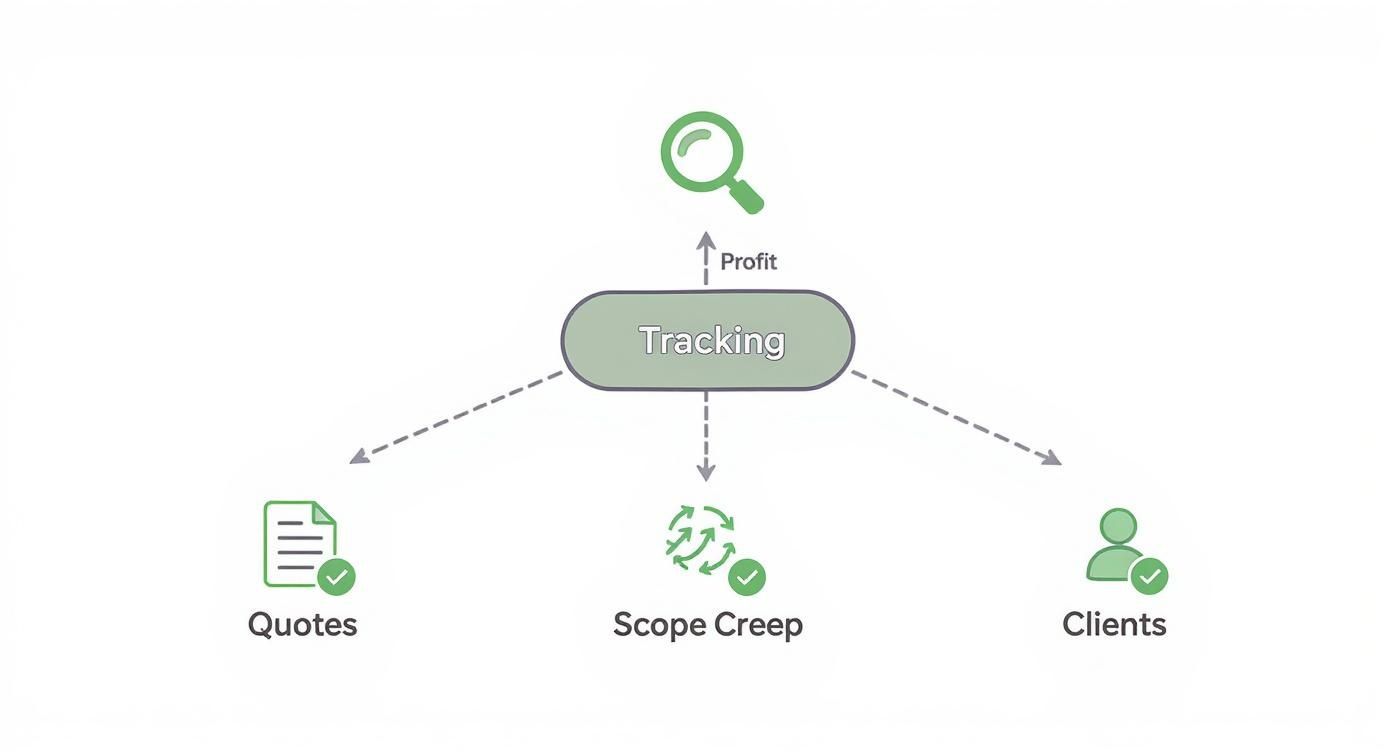
As you can see, accurate tracking is the foundation that allows you to manage your finances and client relationships with confidence.
Managing Remote and Hybrid Teams Effectively
Running a remote or hybrid team comes with its own set of hurdles, mostly around visibility and accountability. DeskCove tackles this head-on with features designed to build trust, not break it.
Activity level tracking offers a simple, non-intrusive way to see engagement without resorting to micromanagement. For roles where you might need a bit more confirmation, optional screenshots provide clear proof of progress. These tools give you the visibility you need to manage your team well, no matter where they’re logging in from.
This approach builds a culture of accountability and transparency, making sure everyone is on the same page and productive while still feeling trusted and autonomous. It's a modern solution for the modern workforce—the kind of tool that makes DeskCove the best time tracking for small business teams that are distributed but still deeply connected.
How to Introduce Time Tracking and Boost Team Morale
For many small business owners, the toughest part of adopting time tracking isn't picking the right tool—it's the worry about how the team will take it. Will they feel like they're being watched? Will it undermine the trust you've worked so hard to build?
These are completely valid concerns. But with the right approach, introducing time tracking can actually strengthen your team's morale instead of hurting it.
The secret is to frame the conversation differently from day one. This isn't about surveillance; it's about clarity. It’s not about looking over shoulders; it’s about protecting the team's most valuable resource: their time. When you present it the right way, it becomes a shared tool for building a healthier, more sustainable business for everyone involved.
Lead with Transparency and Collective Wins
Your rollout strategy needs to be built on a foundation of open communication. The goal is simple: get your team to see the new tool as an ally, not an enemy. Start by explaining the "why" behind your decision, focusing on the benefits that directly affect them.
Instead of saying, "We need you to start tracking your hours," try a different angle: "We need a clearer picture of our workload to protect everyone from burnout and to justify hiring more help when we need it." This simple shift changes the focus from individual monitoring to collective well-being.
The most successful rollouts position time tracking not as a top-down mandate, but as a shared instrument for fairness. It’s a way to ensure workloads are balanced, overtime is recognized, and administrative headaches are minimized for everyone.
Emphasize how this new process will solve problems everyone faces. For example, accurate data makes invoicing clients a breeze, which means less time spent digging for numbers and more time available for creative, impactful work.
Involve Your Team in the Process
One of the easiest ways to get your team on board is to make them part of the solution. Don't just announce a decision from on high; invite them into the conversation. Ask for their input on which features would actually be helpful and what their biggest concerns are about the whole idea.
Consider these practical steps for a more collaborative rollout:
- Run a Pilot Program: Pick a small, enthusiastic group to test the software first. Their feedback will be gold, and they can become champions for the tool when you introduce it to the entire company.
- Provide Clear Guidelines: Create a simple, straightforward document explaining what needs to be tracked and how. Make it explicit that the goal is to understand project time, not to scrutinize every coffee break.
- Focus on 'We', Not 'You': Always use language that reinforces this is a team effort. Talk about how "we" can use this data to improve our quotes and how "we" can get better at managing project timelines.
The evolution of time tracking really mirrors the broader shifts in how we work. With flexible schedules becoming the norm, 57% of business leaders have pointed to attracting talent as a major HR challenge. Modern systems address this by offering features like mobile access that empower employees to easily manage varied work hours—a huge factor in boosting morale. To see how these trends are shaping the modern workplace, you can find more details on tracking time and attendance for modern teams.
Answering Your Key Questions About Time Tracking
Jumping into time tracking for the first time can bring up a lot of questions. It's totally normal to feel a bit hesitant. This section is all about giving you clear, no-fluff answers to the most common worries we hear from small business owners. The goal? To swap that uncertainty for confidence.
We’re going to cover everything from the setup headaches you might be dreading to the real cost and how this all works with a modern, flexible team. Think of this as your personal FAQ, built to give you the clarity you need to move forward.
How Complicated Is It to Set Up and Use?
Let's be honest, one of the biggest roadblocks to adopting new software is the fear of a nightmare setup. But here's the good news: modern time tracking tools are built for people who have a business to run, not an IT department to manage. You don't need to be a tech wizard to get going.
Most quality platforms have a dead-simple onboarding process. You can usually get your account ready, invite your team, and start tracking projects in less than an hour. The best tools just make sense, with clean interfaces that don't require weeks of training to figure out.
The whole point of good time tracking software is to cut down on your admin work, not pile more on. It should be so easy that it becomes a natural part of the workday, almost like checking email.
Is Time Tracking Worth the Cost?
For a small business, every single dollar has a job to do. So, it's smart to ask if time tracking software is a real investment or just another monthly bill. The answer really comes down to the return you get on that investment (ROI). Sloppy time tracking quietly drains money from your business through lost billable hours and inefficient projects.
Think about it this way: if a tool costs $10 per user per month but helps you find and bill just one extra hour that would have been lost, it's already paid for itself several times over. But the real win is in the insights. When you can clearly see which projects are money-makers and which are bleeding you dry, you can make changes that directly pump up your bottom line. That's when the software stops being a cost and starts being a profit-driver.
Can This Work for My Remote and Hybrid Employees?
Managing a team that isn't all in one place has its own set of challenges, and this is where time tracking really proves its worth. The right software gives you the visibility you need to manage a remote or hybrid team well, without ever needing to micromanage.
It offers a clear, objective picture of what everyone is working on and how projects are moving along, no matter where your team is logging in from. This builds a culture based on trust and accountability. It ensures everyone is on the same page, workloads are fair, and people are recognized for their actual contributions—not just for being physically present. This makes it an essential tool for any modern, flexible business.
What Reports Should I Actually Be Looking At?
Data is useless if you don't know what to do with it. The goal isn't to get lost in a sea of spreadsheets. Instead, you want to focus on a few key reports that give you insights you can actually use.
- Project Profitability Report: This is your North Star. It tells you in black and white which projects are making you money and which are costing you.
- Team Utilization Summary: This report is your key to understanding workload balance. It's perfect for spotting who’s getting buried in work and heading for burnout, or who has room to take on more.
- Uninvoiced Hours Breakdown: Stop leaving money on the table. This report flags all the billable work that hasn't been invoiced yet, making sure your cash flow stays strong and healthy.
By zeroing in on these reports, you can turn raw time data into smart, strategic decisions that fuel your business's growth.
Ready to transform how your small business manages its time and profitability? With DeskCove, you can automate time tracking, get powerful insights, and give your team the tools to work smarter. Stop guessing and start knowing exactly where your most valuable resource is going.