Discover Top Solutions: best employee time tracking software for teams

The simple punch clock has come a long way. What used to just log hours is now a serious business intelligence tool. For any company today, especially if you’re running a remote or hybrid team, it’s the only way to get a real pulse on project health, team productivity, and where your resources are actually going.
Think of it less like a clock and more like a dashboard for your entire operation, giving you the live data you need to stay efficient and profitable.
Why Time Tracking Is No Longer Optional
Let’s be honest, the way we work has been turned upside down. With remote and hybrid teams becoming the norm, you need tools that create transparency and give you a clear, accurate picture of what’s happening. Old-school spreadsheets and manual time cards? They just can’t keep up anymore.
This isn’t just a small shift; it’s a complete overhaul of the workplace. An incredible 96% of companies worldwide are now using some form of time-tracking software. That's a huge jump from just a few years ago. With remote work now making up 48% of the global workforce—double what it was in 2020—the need for digital oversight is obvious. By 2025, experts predict that 70% of large companies will actively monitor their staff.
If you want to dig deeper into this trend, check out the latest employee monitoring statistics.
It’s So Much More Than a Punch Clock
Modern employee time tracking software is about so much more than just logging hours. It acts as the central nervous system for your business, connecting the effort your team puts in directly to the results you get. It finally gives you real answers to the tough questions that used to be pure guesswork:
- Are we actually making money on this client project?
- Where are the hidden bottlenecks that are slowing everyone down?
- Is the team’s workload fair, or are some people on a fast track to burnout?
- How can we quote new projects more accurately?
By swapping guesswork for hard data, this software solves some of the most common business headaches, from inaccurate payroll and out-of-control scope creep to productivity that just seems to vanish into thin air.
Time tracking gives you the clarity you need to manage your most valuable asset: your people. It draws a real-time map showing exactly where your team's hours are going, turning confusion into clear, actionable insights.
A Tool for Growth, Not Just Oversight
At the end of the day, bringing in the right time tracking software is a strategic move. It’s about building a culture where accountability and transparency are the norm, and where everyone on the team can see how their work contributes to the big picture.
When employees understand how their time leads to successful projects and fair pay, the tool stops being about oversight and starts being about empowerment. It gives your business the precision it needs to thrive, making sure every single hour worked is an hour invested in your bottom line.
Understanding the Core Features of Top Tier Software
Choosing the best employee time tracking software means looking beyond a simple feature list. It's about really understanding what a quality platform does and the practical value it brings to your business. The best tools are designed to solve the specific, often costly, problems that companies like yours face every day.
The right software doesn't just count hours; it delivers clarity and control. Think of it as ditching a clunky, error-prone spreadsheet for a smart, automated system that quietly protects your time and resources in the background. This single move is a game-changer for boosting both efficiency and profitability.
Automated Time Capture
Let's be honest, manual timesheets are a massive source of lost revenue. Employees forget to log hours, guess at their time, or waste valuable minutes trying to piece together their week. Automated time capture solves this problem by running quietly in the background, accurately recording activity without constant nagging or manual entry from your team.
For a design agency, this means every single minute spent on a client’s project gets logged—from the first brainstorm to the final tweak. This data ensures all billable hours are captured, stopping revenue leaks in their tracks and giving you precise data for invoicing. Over a year, this can easily add up to thousands of dollars in recovered income.
Activity Level Tracking
How do you know if your team is truly engaged or quietly heading for burnout? Activity level tracking gives you the insights you need by measuring keyboard and mouse usage. It’s not about watching every click; it's about seeing the bigger picture of productivity patterns.
This feature helps managers spot important trends. For instance, if a software development team’s activity levels consistently drop on Friday afternoons, it’s probably not laziness. It could be a sign that the weekly sprints are too intense, leaving the team completely drained. This data empowers a manager to adjust workloads and prevent burnout before it starts wrecking project deadlines.
Below is a quick visual that shows how modern time tracking software acts as a central hub, connecting remote work management and business intelligence to solve common operational challenges.
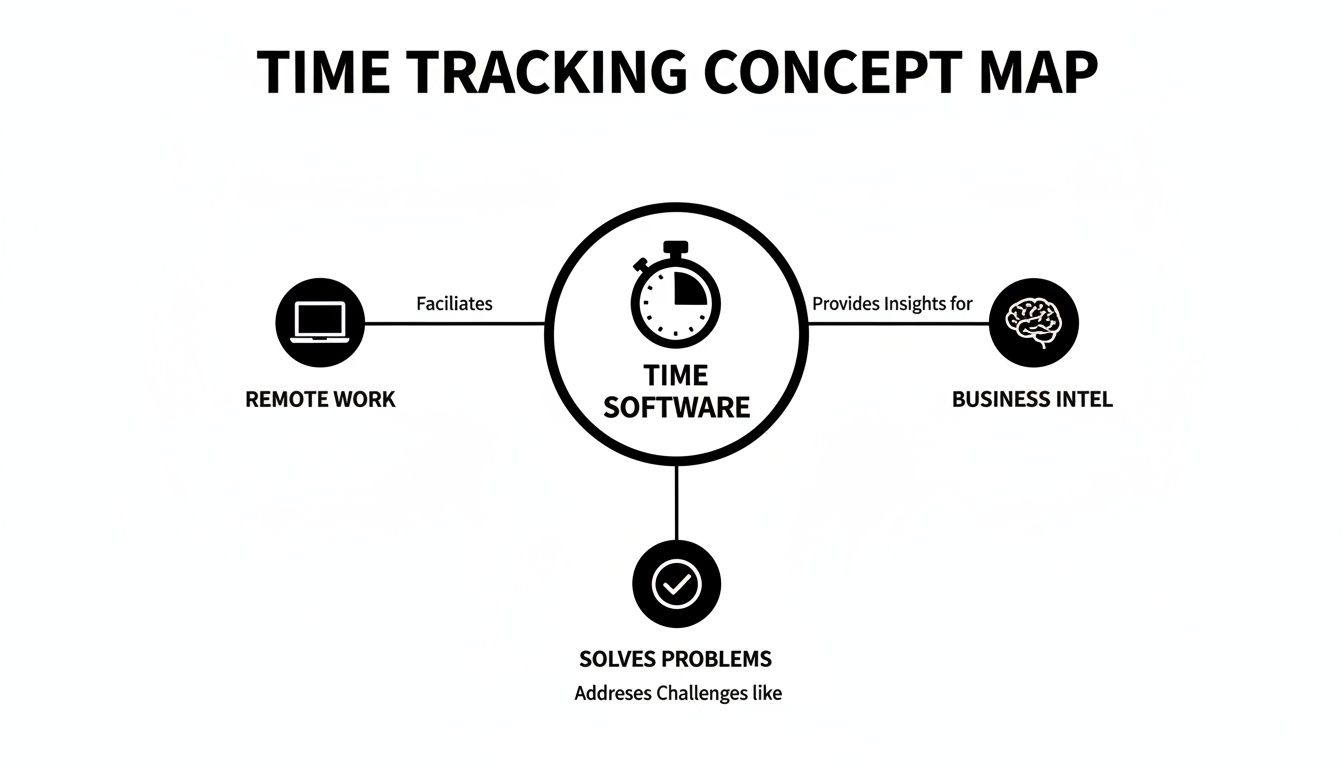
This map really highlights how time tracking has evolved. It’s no longer just a simple tool but a core component that powers smarter remote management and delivers the insights you need to make better decisions.
Project and Task Assignment
Without clear organization, time tracking data is just a jumble of numbers. The ability to assign time to specific projects and tasks is what transforms that raw data into powerful business intelligence. This is the feature that shows you exactly where your team’s efforts are going.
Imagine a marketing agency juggling several client retainers. By having the team assign time to specific tasks—like "Social Media Management for Client A" or "SEO Keyword Research for Client B"—the agency can instantly see which retainers are actually profitable. If a client is consistently eating up more hours than they’re paying for, you have concrete data to back up a conversation about renegotiating the contract.
The table below breaks down some of the most crucial features you'll find in modern time tracking software and explains the direct business problems they're designed to solve.
Essential Features of Modern Time Tracking Software
| Feature | What It Does | Key Business Benefit |
|---|---|---|
| Automated Time Capture | Runs in the background to log computer activity without manual input. | Prevents lost billable hours and eliminates inaccurate, manually entered timesheets. |
| Activity Level Tracking | Measures keyboard and mouse usage to gauge productivity patterns. | Helps identify burnout risks and engagement trends to proactively manage team wellness. |
| Project & Task Assignment | Allows time to be allocated to specific projects, clients, or tasks. | Provides clear data for project profitability analysis, accurate client billing, and future quotes. |
| Idle Time Detection | Flags periods of inactivity when a timer is left running. | Ensures billing accuracy by preventing non-work time from being charged to clients. |
| App & URL Tracking | Records the applications and websites used during work hours. | Offers insights into how time is spent, identifies distractions, and ensures focus on work-related tasks. |
| Integrations | Connects with other business tools like project management or payroll software. | Creates a seamless workflow, reduces double-entry, and syncs data across platforms. |
| Reporting & Analytics | Generates detailed reports on time usage, project costs, and team productivity. | Delivers actionable data for strategic decision-making, resource allocation, and performance reviews. |
These features aren't just bells and whistles; they are the engine that drives a more informed and efficient business.
Idle Time Detection
Breaks are a natural and necessary part of any workday. The problem is when unaccounted-for downtime starts adding up. Idle time detection helps separate active work from inactive periods by flagging when a user's computer has been idle for a set amount of time.
This isn't about micromanaging bathroom breaks. It’s about maintaining accuracy. For example, if an employee leaves a timer running while they head out for a long lunch, idle time detection will pause the clock. This simple action prevents non-billable hours from being accidentally tacked onto a client's invoice, which helps maintain trust and ensures you’re billing fairly. It also helps employees build a more accurate picture of their focused work sessions.
Together, these core features build the foundation for truly effective time management. They automate the tedious stuff, provide deep operational insights, and empower your team to work smarter. When you learn to master time tracking tools with integration, you can take these benefits even further, creating a truly connected workflow across all your business systems.
Taking Your Time Tracking to the Next Level
Once you’ve nailed down the basics, the best employee time tracking software really starts to shine with its more advanced features. This is where you move beyond just logging hours and start turning that raw data into a serious strategic advantage for your business.
These aren't just flashy add-ons. They're powerful tools that weave time data into the core of your operations, giving you a much clearer picture of what's actually going on. Think of it as moving from simply tracking time to strategically managing it.
Seamless Integrations for a Single Source of Truth
Picture your business software as a team of experts. If they aren't talking to each other, you get chaos. Integrations are the universal translator, letting your time tracker communicate directly with your project management, accounting, and payroll systems.
This creates a single source of truth where data flows automatically, eliminating tedious double-entry. For example, when you connect with a tool like Jira or Asana, any time logged against a task instantly updates the project's progress and budget right inside that platform. No more hounding people for timesheets.
The same goes for payroll systems like QuickBooks. Billable hours get compiled and sent over automatically, making sure payroll is accurate and on time, every time. This simple connection can free up countless hours that used to be wasted on manual data entry and fixing mistakes.
Transforming Data into Actionable Insights
Raw time data is one thing, but the real magic happens when you can make sense of it all through reporting and analytics. The best tools offer dashboards that turn those numbers into clear, visual stories about your business. This is how you stop reacting to problems and start making proactive, data-driven decisions.
Think of analytics as a high-powered lens for your business. It allows you to zoom in on specific projects to diagnose issues or zoom out to see broad productivity trends across the entire organization, revealing patterns you would otherwise miss.
With solid reporting, you can finally answer those big strategic questions that directly impact your bottom line:
- Is this project actually profitable? By comparing tracked hours against the budget, you can instantly see which clients and projects are your money-makers and which ones are secretly draining resources.
- What are our team's productivity trends? Are people more focused in the morning? Are meetings eating up half the week? Analytics can uncover peak work times and identify common time-wasters, helping you optimize workflows.
- Who is overworked and who has bandwidth? Reports on individual workloads help you distribute tasks more evenly, preventing burnout for some while making sure others aren't sitting idle. It’s all about maximizing your team’s efficiency.
Mobile and Offline Tracking for the Modern Workforce
Let's face it, work doesn't always happen neatly at a desk. For field agents, traveling consultants, or anyone working in a place with spotty Wi-Fi, mobile accessibility and offline tracking are non-negotiable.
A good mobile app lets your team track time right from their phones, whether they're at a client site, on a sales call, or just grabbing coffee. This ensures every minute of work gets captured, no matter where it happens.
Offline tracking is the real hero here. The software keeps logging time even without an internet connection and then automatically syncs up as soon as it's back online. This guarantees that not a single billable hour is lost to a technical glitch, giving you a complete and accurate record of your team’s hard work.
Balancing Productivity with Privacy and Trust
Let’s be honest: bringing up “employee time tracking” can make people antsy. It immediately sparks questions about privacy. The goal is to boost productivity and gain clarity, not to create a Big Brother-style surveillance culture.
Striking that balance is everything. And it all starts with building a foundation of trust through total transparency. This isn't about watching over shoulders; it’s about creating a system of mutual accountability. When you get it right, time tracking becomes a tool for fairness, better performance, and protecting everyone's work-life balance. The trick is to frame it as a collaborative tool, not a monitoring one.

The Cornerstone of Ethical Implementation Is Transparency
Before you even think about installing software, you need a clear, straightforward monitoring policy. This isn't a dense legal document to be buried in a handbook; it should be simple, easy to understand, and accessible to everyone on the team.
Think of it as the terms of service for your workplace tools. Your policy needs to nail the "what, why, and how" of your time tracking approach. A solid policy will get ahead of employee concerns and set expectations from day one—a vital first step when you decide to track remote employees.
Here’s what your policy must spell out, no exceptions:
- What is being tracked? Be specific. List out the data points, like app usage, URLs visited, activity levels, or time spent on projects. Precision prevents misunderstandings.
- Why is it being tracked? Tie the data directly to business goals. Explain it's for accurate client billing, fair payroll, better project estimates, or spotting workflow bottlenecks—not for nitpicking.
- How will the data be used? Reassure your team the information is for improving how you work and celebrating great effort, not for punishment.
- When is tracking active? Make it crystal clear that tracking only happens during paid work hours. Employees should have full control to switch it off during breaks or once their workday is done.
Navigating Compliance and Legal Boundaries
Beyond just building trust, doing this ethically is a legal must. Regulations like the General Data Protection Regulation (GDPR) in Europe and the California Consumer Privacy Act (CCPA) have strict rules on handling employee data. Getting this wrong can lead to some eye-watering fines.
These laws champion the idea of data minimization—basically, only collect what you absolutely need for a legitimate business reason. The best time tracking software lets you customize settings to match these rules, like disabling screenshots if they aren’t essential for your projects.
Getting your process legally buttoned-up isn't just about dodging penalties; it's about showing fundamental respect for your employees' rights. To ensure legal compliance and foster trust when collecting employee data through time tracking software, businesses should carefully consider the importance of data processing agreements.
This legal side of things circles right back to the need for that transparent policy. Informed consent is a huge part of most data privacy laws, which makes open communication a non-negotiable part of your plan.
Empowering Employees with Control and Access
The single most effective way to get your team on board is to pick software that empowers them instead of just watching them. Look for features that give your people a sense of ownership over their own productivity.
When employees feel like they're in the driver's seat, they’re far more likely to see the software as a helpful tool.
Here are the key employee-centric features you should be looking for:
- Employee-Controlled Timers: The simple ability for someone to manually start and stop their own timer gives them direct control over when their work is being logged. It's a small feature with a big impact on trust.
- Access to Personal Data: Everyone should be able to see their own productivity dashboard. This transparency lets them manage their own time, spot their own work patterns, and see exactly how their effort moves projects forward.
- Editable Time Entries: People make mistakes. Allowing employees to add or fix manual time entries shows you trust them and accounts for offline work or tasks that don't happen in front of a screen.
By focusing on these features, you completely change the dynamic from top-down oversight to personal empowerment. The software becomes less of a manager's tool and more of a personal productivity partner for everyone on the team.
How DeskCove Aligns with Your Business Needs
Knowing the key features of a great time tracker is one thing. Seeing how a specific tool actually solves your real-world business challenges is another. This is where DeskCove comes in, bridging the gap between theory and practical results. It’s built to perfectly match the criteria we’ve laid out in this guide—not just to track time, but to deliver clarity, efficiency, and insights you can act on.
Think of everything we've talked about—accurate time capture, privacy, seamless integrations, and powerful reporting—as the blueprint for an ideal solution. DeskCove was designed from the ground up to be that solution, offering a suite of features that address what modern teams truly need, whether you’re a small agency or a fast-growing enterprise.
Solving Core Problems with Smart Automation
One of the biggest headaches for any business is getting payroll and client billing right. DeskCove tackles this head-on with its automated time tracking and activity monitoring. It runs quietly in the background, capturing work hours without anyone needing to constantly start and stop a timer. This simple step eliminates the guesswork and forgotten entries that lead to expensive mistakes, ensuring your payroll is precise and your invoices are backed by solid proof.
This automated approach also paints a clear picture of team productivity. By looking at activity levels, managers can spot workload patterns and even potential burnout risks long before they become serious issues. It’s all about using data to support your team, not just to watch over them. You can learn more about how our platform can boost team efficiency with this top-rated staff tracker.
Unifying Your Workflow with Seamless Integrations
We’ve said it before: the best tools don’t create more work; they get rid of it. DeskCove truly shines here, offering seamless integrations with the project management and accounting software your team already relies on. By connecting with tools like Asana, Trello, and QuickBooks, DeskCove makes sure time data flows automatically right where it needs to go.
This breaks down data silos and kills the need for tedious, manual data entry. Time logged on a project in DeskCove can instantly update budget tracking in your PM tool, creating a single source of truth for project health and profitability. This kind of unified workflow is what empowers smart, data-driven decisions.
There's a reason the market for these solutions is booming. The global time tracking software market is projected to skyrocket from USD 3.8 billion in 2025 to a massive USD 16.1 billion by 2035. That’s a compound annual growth rate (CAGR) of 15.5% over the decade, driven largely by the massive shift to remote and hybrid work. You can find more details about this market growth on Fact.MR.
A Commitment to Ethical and Empowering Monitoring
As we covered earlier, when it comes to monitoring, trust is everything. DeskCove is built on a foundation of ethical monitoring. We give you customizable privacy settings that put you in complete control over what gets tracked. Features like optional screenshots and employee-controlled timers empower your team, reinforcing that the software is a tool for productivity, not surveillance.
DeskCove is designed to foster a culture of transparency and mutual accountability. By giving employees access to their own productivity data, you empower them to manage their time effectively and take ownership of their performance.
Our platform provides clear, easy-to-understand dashboards for everyone on the team, not just managers. This approach lines up perfectly with the best practices for building trust, making sure time tracking is seen as a benefit that helps everyone work smarter and find a better work-life balance. When you choose DeskCove, you’re not just getting software; you’re getting a partner in your business’s success.
Your Checklist for Choosing the Right Software
Alright, you've got the concepts down. Now comes the hard part: turning all that knowledge into a smart decision. To do that, you need a plan. This checklist isn't just a list of features to tick off; it’s a framework for asking the right questions so you can pick the software that actually fits your business.
Think of it as a series of gut checks. Each question is designed to connect a software feature directly to a real-world business outcome. This ensures your final choice isn't just a shiny new tool, but a strategic fit for how you actually work.
Core Evaluation Questions
Before you even think about signing a contract, run your top contenders through this gauntlet. A solid "yes" to these questions is a great sign that you're on the right track.
- Integrations: Will this software play nicely with our existing payroll and project management tools? We need a single source of truth, not another data silo.
- Reporting: Can I actually get the reports I need out of this thing? I’m talking about deep dives into project profitability, team productivity, and where our resources are really going.
- Privacy: What controls do my employees have? Can they use manual timers or see their own data? Building a culture of trust is non-negotiable.
- Scalability: Is the pricing model going to punish us for growing? We need something flexible that won’t hit us with surprise fees or lock features away when we add more people.
Here's a pro-tip: Involving your team is the single most important thing you can do. Sign up for a free trial and let a small group kick the tires. Their feedback on how it feels to use day-to-day will make or break your rollout.
Platform and Usability Considerations
Last but not least, think about your team’s daily grind. You need a tool that slots into their workflow, not one that throws a wrench in it.
This means double-checking compatibility with the computers they actually use. If your team lives and breathes the Apple ecosystem, for instance, you'll save a ton of headaches by looking at a dedicated review of the 12 Best Time Tracker Mac Apps. This final check ensures the software feels like a natural part of your team's toolkit. By working through these points step-by-step, you’ll be able to confidently pick a tool that truly works for you.
Frequently Asked Questions
Jumping into the world of employee time tracking can bring up a few questions. Let's tackle some of the most common ones to help you feel confident about your decision.
Is Employee Time Tracking Software Legal?
Yes, in most places, it's perfectly legal for a business to monitor activity on company-owned devices during work hours. But the specifics can definitely vary depending on where you are—think GDPR in Europe, for instance.
The real key to doing this right, both legally and ethically, is transparency. You need a clear, written monitoring policy that you share with every single employee. This policy should spell out exactly what you're tracking and why you're tracking it. When in doubt, a quick chat with a legal professional is always your best bet to ensure you're squared away with local rules.
How Can I Introduce Time Tracking Without Hurting Morale?
This is a big one, and the approach makes all the difference. Frame the software as a tool for fairness and clarity, not a "big brother" surveillance tactic. You have to communicate the "why" behind your decision. Explain how it helps ensure accurate payroll, leads to fair client billing, and helps the team balance workloads more effectively.
Even better, get your team involved in the selection process. Look for a platform that has employee-friendly features, like options for manual time entries or personal dashboards they can review. When the focus is on using data to improve how you work and celebrate team wins, employees are much more likely to see it as a benefit for everyone.
What Is the Difference Between Time Tracking and Project Management Tools?
It’s easy to get these two mixed up since they often work hand-in-hand, but their main jobs are quite different. Here’s a simple way to think about it:
Time tracking software is the "gas gauge" for your projects—it tells you exactly how much fuel (time) you're using. Project management software is the "GPS"—it maps out the destination and the best route to get there.
Time tracking software is laser-focused on measuring the hours spent on tasks. This is crucial for things like payroll, invoicing clients, and figuring out where your team’s effort is really going. On the other hand, project management software is all about planning and execution—assigning tasks, setting deadlines, and keeping the team collaborating smoothly.
The real magic happens when you integrate the two. When your time data flows directly into your project plans, you get a complete picture of your operations, allowing you to manage budgets, timelines, and resources like a pro.
Ready to see how a tool that champions both efficiency and trust can transform your team's productivity? Discover how DeskCove delivers the powerful, flexible, and transparent time tracking your business is looking for. Start your free trial today.