What Is Activity Monitoring And How Does It Really Work

At its core, activity monitoring is the process of capturing, recording, and analyzing what users do on a computer or network. Think of it as a digital dashboard for your team's work, showing where everyone's time and effort are actually going. This data helps you move past guesswork and get an objective look at the health of your operations.
Understanding What Activity Monitoring Really Means
Activity monitoring isn’t about watching over someone’s shoulder. It's a system designed to observe and log user behavior in a digital workspace to give you real, objective data on how work gets done. Instead of relying on gut feelings about productivity, you get a clear picture.
Consider it less like surveillance and more like a tool for gaining visibility into your digital workflows. It helps leaders spot hidden bottlenecks, understand how resources are being allocated, and make sure their teams have what they need to succeed.
As remote and hybrid work become the norm, understanding these digital workflows is no longer just a niche security task—it's a fundamental part of modern business management. The goal is to turn raw data on computer usage into insights that drive efficiency and operational clarity. For a deeper dive, our guide on what computer monitoring is covers more on this foundational concept.
To get a clearer picture, let's break down the key components of activity monitoring.
Activity Monitoring at a Glance
This table offers a quick summary of the core components and goals of a typical activity monitoring system.
| Component | What It Is | Primary Goal |
|---|---|---|
| Data Capture | The automatic collection of user actions, such as application usage, websites visited, and time spent on tasks. | To gather raw, objective data on digital work patterns without manual input. |
| Data Analysis | Processing the captured data to identify trends, patterns, and anomalies in productivity and workflows. | To transform raw data into understandable metrics and actionable insights. |
| Reporting | Presenting the analyzed data in visual formats like dashboards, charts, and reports for managers and team members. | To provide clear, accessible visibility into team performance and operational efficiency. |
Essentially, these three pillars work together to provide a comprehensive and data-backed view of how work is accomplished in a digital environment.
The Growing Importance in Modern Business
The massive shift to digital-first operations has turned activity monitoring into a key strategic tool. It helps answer critical business questions that used to be incredibly difficult to nail down, such as:
- Project Timelines: Are our project estimates realistic, or do certain tasks consistently run over schedule?
- Workload Balance: Is work spread out evenly, or are a few team members overloaded while others have capacity to spare?
- Tool Usage: Which software subscriptions are actually essential for daily work, and which ones are just collecting dust?
- Workflow Inefficiencies: Where are the most common delays or interruptions happening in our processes?
Activity monitoring takes abstract ideas like "productivity" and "efficiency" and turns them into concrete, measurable data points. By looking at patterns in app usage, project hours, and team workflows, managers can finally make decisions based on evidence, not assumptions.
A Rapidly Expanding Market
This growing reliance on data-driven management is clearly reflected in the market’s explosive growth. Activity monitoring is now a major global industry, with market estimates ranging from USD 2.7–4.5 billion and some forecasts predicting it could hit USD 7.0 billion by 2030.
This surge is driven by the rise of hybrid work, increasing regulatory pressure for data protection, and the need for better visibility in zero-trust security models. This isn't just a fleeting trend; it’s becoming a core part of how modern, distributed businesses operate and protect themselves.
Exploring Different Activity Monitoring Methods
To really get a handle on what activity monitoring is, you have to look at how the data is collected. Think of it like a mechanic diagnosing a car—they don't just use one tool. They have a whole set, and each one gives them a specific piece of information about the car's performance. The same goes for monitoring digital work.
These methods aren't an either/or situation. They often work together, layering insights to build a complete picture of your team's operational health. The real trick is picking the right combination that lines up with what you’re trying to achieve—whether that’s getting project costs spot-on, helping your team work smarter, or staying on the right side of compliance rules.
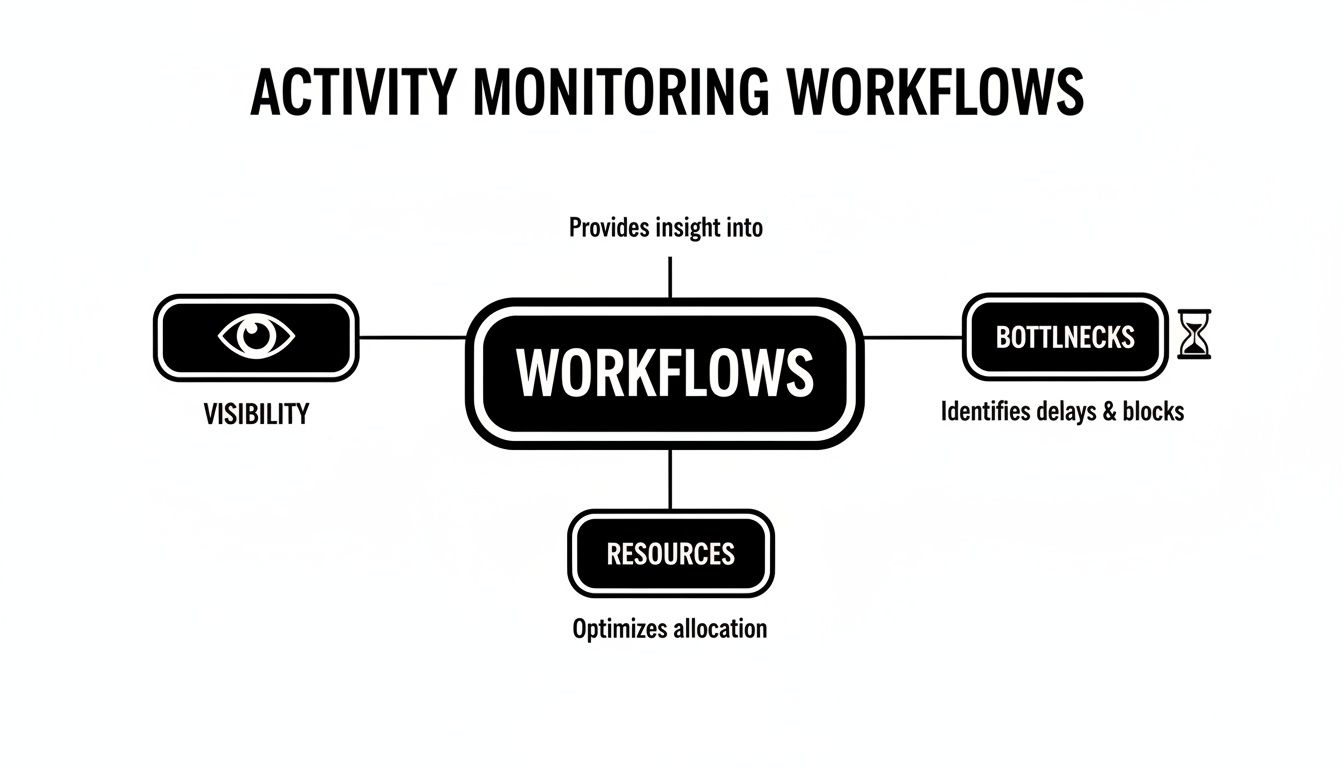
As you can see, getting that visibility into how work actually flows is the critical first step. Once you can see what's happening, you can start spotting the snags and figuring out how to use your resources more effectively.
Automatic Time Capture
The most foundational method is automatic time capture. Instead of making everyone manually start and stop a timer, this tech just works quietly in the background. It logs the time an employee is actively engaged with their computer by detecting keyboard strokes, mouse movements, and application use.
This simple shift from manual to automatic cuts out the guesswork and the tedious admin of filling out timesheets. It gives you a much more honest log of when work is actually getting done, which is a game-changer for billing clients, calculating project costs, and just understanding overall work hours without being intrusive.
Application and URL Tracking
Building on that foundation, application and URL tracking gives you a much more granular view of a person's digital day. This method records which specific software and websites are being used and for how long. It's how you get answers to crucial questions, like:
- Are we actually using those expensive software subscriptions we're paying for?
- How much of our day is spent in meetings versus deep, focused work in our core apps?
- Which websites are vital for research, and which ones are just digital rabbit holes?
This kind of data is gold for managers. It helps you optimize your tool stack, spot where people might need more training, and make sure your digital resources are actually helping the team hit its goals. When your team is remote, understanding these patterns is non-negotiable, and many specialized employee activity monitoring tools for remote work are built around this capability.
Visual Capture Methods
For certain jobs or industries, visual capture methods like screenshots or screen recordings can add an essential layer of context and proof. You'll typically see these in fields with strict compliance needs, detailed training requirements, or where precise quality assurance is a must. A financial services firm, for example, might use screenshots to verify that all regulatory steps were followed when handling client data.
It's important to be upfront about this one, though. Visual capture methods carry some serious privacy baggage. Their use absolutely must be communicated transparently and limited to very specific, justifiable business needs to keep employee trust intact.
For organizations thinking about more specialized monitoring, digging into resources on proactive insider threat detection tools can offer a deeper look into those advanced approaches. Ultimately, choosing the right method is a balancing act—you need visibility, but you have to respect privacy. The goal should always be to support your team, not create a culture of digital shoulder-surfing.
Unlock Better Productivity and Smoother Operations
Let’s move past the textbook definitions. The real magic of activity monitoring happens when you see abstract data turn into real-world business improvements. This is where the numbers on a screen start leading to smarter decisions, streamlined workflows, and a team that’s hitting its stride. It gives you a clear, evidence-based picture of how work actually gets done.
Suddenly, you’re not guessing about operational efficiency anymore—you know. By seeing exactly where time is being spent, you can zero in on the areas that need your attention.
Uncover Hidden Workflow Inefficiencies
Every team has processes that have slowly become clunky over time. Activity monitoring acts like a diagnostic tool, shining a light on those hidden bottlenecks that quietly drain time and money.
Imagine a marketing team is spending 30% of its week wrestling with a manual reporting task. The monitoring data would flag this immediately, showing that a huge chunk of valuable time is going toward a low-impact activity. That single insight can spark a search for an automation tool or a process redesign, freeing up your team for the strategic work they were hired to do.
Ensure Fair Workload Distribution
It’s incredibly common for workloads to become lopsided. Some team members get buried under tasks while others have room to spare. Activity monitoring gives you an objective look at who is working on what, and for how long.
For example, a dev manager might see that one programmer is consistently logging far more hours on a project than their peers. That data is a starting point for a conversation. Is the project more complex than planned? Does the developer need more support? This kind of visibility helps you rebalance workloads and prevent burnout before it even starts.
Activity monitoring transforms operational management from an art into a science. It gives you the hard data needed to validate assumptions, reallocate resources with confidence, and build more accurate, predictable workflows.
Improve Project Bidding and Timelines
One of the most powerful uses for this data is creating rock-solid project bids and timelines. When you can analyze how long similar tasks actually took in the past, you can build estimates grounded in reality, not just wishful thinking.
This data-driven approach has a direct impact on profitability and client satisfaction. When you know a certain type of project consistently takes 100 hours of design and 150 hours of development, you can price your services correctly and set deadlines you can actually meet.
Beyond project management, this detailed tracking provides a verifiable audit trail that’s critical for security and compliance. In fact, quantitative studies have linked activity monitoring to a 30%–60% improvement in incident detection and response times. Having a clear record of user actions helps organizations shrink the window of time that breaches go undetected, which can dramatically lower the costs tied to security events. You can explore more research on user activity monitoring's impact to see how this plays out.
Navigating Privacy And Building Employee Trust
Let's be honest: bringing up "activity monitoring" can make people nervous. That’s why getting the approach right on privacy and trust isn't just important—it's everything. The most successful, healthy rollouts are always built on a foundation of complete transparency. This should never be a secret operation.
When your team understands the why behind it—to make workflows smoother, ensure workloads are fair, and help everyone hit their goals—the conversation shifts. It stops feeling like Big Brother and starts feeling like a tool for mutual success. The goal is a partnership, not a surveillance state.
Creating A Clear Monitoring Policy
A formal, written policy is your cornerstone for building that trust. This document needs to spell out exactly what you're monitoring, how that data is being used, and who gets to see it. Ambiguity is the enemy here, so be crystal clear.
Your policy should give your team direct answers to their biggest questions:
- What data is collected? Be specific. List things like application usage, websites visited, and active vs. idle time.
- Why is this data collected? Connect the dots for them. Explain that it’s for things like accurate client billing, spotting process bottlenecks, or improving project estimates.
- How is the data used? Clarify if the data is aggregated for team-level insights or if it will be part of individual performance discussions.
- Who can see the data? Define the access controls. Make it clear that only direct managers or specific administrators can view the information.
Just writing the policy isn't enough. You have to communicate it openly and give your team a real chance to ask questions. It shows respect and proves the system is a tool for improvement, not punishment. You can find more practical tips in our guide on how to monitor remote employees the right way.
Balancing Business Needs With Employee Privacy
Striking the right balance between operational visibility and individual privacy is the tightrope you have to walk. This isn't just about company values; it's about legal standards, which are increasingly demanding a more thoughtful approach to collecting employee data.
The principle of data minimization is your guiding star. It simply means you should only collect the data that is absolutely necessary to achieve a specific, stated goal. Ditch the "collect everything" mindset—it’s a fast track to broken trust and privacy risks.
For example, if your goal is just to figure out which software licenses you can cut, you don't need to capture screenshots. Always pick the least invasive method that gets the job done.
This approach sends a powerful message to your team: their privacy matters. It helps create a positive work environment, free from the shadow of micromanagement. When the focus is on team-level trends and workflow analytics instead of individual scrutiny, you build a culture where performance and trust can actually grow together.
How Managers Turn Monitoring Data Into Action
Raw data from activity monitoring is just a collection of numbers and timelines. On its own, it’s not much more than digital noise. The real magic happens when managers learn to translate those numbers into smarter, evidence-based decisions that actually move the needle.
It's all about shifting from just collecting data to actively applying it to solve real-world problems.
This isn't some niche practice anymore. Activity monitoring has become routine in large companies, with around 70% reporting they actively monitor their staff. It's especially common in hybrid setups, where about three-quarters of employers keep an eye on remote or hybrid team activity. This shows a clear shift from a specialized security tool to a mainstream management practice.
From Insights To Strategy Across Departments
The true power of this data is just how versatile it is. Leaders from completely different parts of the business can look at the same information and pull out unique, valuable insights to guide their own teams.
-
A Project Manager might notice that a certain project phase consistently takes 20% longer than estimated. That’s not a critique of the team; it’s a bright, flashing signal to adjust future timelines and resource planning before the next project veers off course.
-
A Sales Manager, on the other hand, can spot the daily habits that set their top performers apart. If they see a pattern—like spending more time in the CRM and less on administrative tasks—they can build a data-driven training program to help the entire team level up.
At its core, using this data is about understanding performance and finding ways to improve it. It offers managers a practical toolkit for how to measure productivity of employees (without being a creep) while building a more supportive and efficient work environment.
A great way to visualize this is to see how different departments can use the same well of data for their specific goals.
Applying Monitoring Data Across Departments
| Department | Primary Goal | Example Insight |
|---|---|---|
| Project Management | Improve project predictability and resource allocation. | "Phase 2 of our projects consistently runs over budget by 15%. We need to re-evaluate our initial time estimates for this stage." |
| Sales | Replicate top-performer habits across the team. | "Our top 10% of salespeople spend 3 hours more per week in the CRM than the team average. Let's make CRM usage a training focus." |
| Operations | Reduce unnecessary software spend and optimize tools. | "Team A and Team B are both paying for project management tools with 90% overlapping features. We can consolidate and save." |
| HR/People Ops | Identify early signs of burnout or overwork. | "Several employees are consistently logging in after 9 PM. We should check in on their workload and well-being." |
This table shows it's not a one-size-fits-all approach. The context of the department and its unique challenges are what give the data meaning and make it actionable.
A Practical Example In Operations
Let's walk through a real-world scenario. Imagine an operations lead is reviewing the company's monthly software expenses. They have a nagging feeling the team is paying for redundant tools but can't prove it.
By digging into the application usage reports, the lead makes two quick discoveries. First, two different teams are using separate, paid project management tools for the exact same function. Second, a very expensive premium design software license is only being touched for about an hour each month.
This isn't just about tracking time; it's about connecting digital activity directly to business outcomes. Managers can use these insights to optimize budgets, refine processes, and empower their teams with the right tools and support.
Armed with this hard data, the operations lead can now act with confidence. They consolidate everyone onto a single project management platform and downgrade the pricey design license to a more cost-effective plan.
The result? Immediate and significant savings. This little story is a perfect example of how you can translate data points into strategic actions that boost the bottom line and make work smoother for everyone.
Common Questions About Activity Monitoring
When you start looking into activity monitoring for your team, a few questions always pop up. It’s totally normal. Getting straight answers is the only way to build trust and make sure everyone feels comfortable, so let’s tackle the big ones head-on.
Activity Monitoring Versus Surveillance
One of the first things people ask is whether "monitoring" is just a nicer word for surveillance. On the surface, they can seem similar, but their purpose and how they're used are completely different.
Think of it like this: surveillance is all about watching what specific individuals are doing, usually for security or to catch someone breaking a rule. It’s focused on catching people in the act. Activity monitoring, on the other hand, is about understanding how work gets done across the team. It uses combined, big-picture data to answer questions like, "Where are we getting stuck in our process?" or "Are we giving people enough time to finish their projects?"
The real difference is the focus. Good activity monitoring looks at the system to make the whole team more effective. Surveillance targets the individual to enforce rules. The goal is insight, not oversight.
What A Monitoring Tool Can Actually See
Another major concern is just how much these tools can track. Can they see everything you’re doing on your computer? The short answer is no—at least, not any professional, ethically built software.
Reputable activity monitoring tools are designed to look only at work-related digital footprints. This usually includes things like:
- The apps and websites used during work hours.
- How much time is spent on a particular project or task.
- General activity levels based on mouse movements and keyboard clicks (not what you’re typing).
These systems are not built to spy on personal information. They don’t record keystrokes, they don't read your emails, and they have no business accessing your personal files. A good company policy will always spell these boundaries out clearly so every employee knows exactly what is and isn't being tracked.
How To Implement Monitoring Without Breaking Trust
This is the big one. How do you introduce a tool like this without making everyone feel anxious or micromanaged? The whole thing comes down to one simple word: transparency.
Bringing your team into the conversation from day one is non-negotiable. You have to be completely open about what you're doing and, more importantly, why you're doing it. The goal isn't to play "gotcha." It's to make work better—to balance workloads, prove you need to hire more people, or fix processes that are causing frustration.
To get this right and keep trust intact, stick to these steps:
- Communicate Openly: Talk about the plan before it ever happens. Explain the business reasons and what’s in it for the team.
- Create a Clear Policy: Put it all in writing. A formal, easy-to-understand policy that details what’s monitored and why leaves no room for confusion.
- Focus on Team Trends: Make it clear that you're looking at team-level and project-level patterns, not trying to micromanage individuals.
- Use the Least Invasive Method: Always pick the monitoring approach that gets you the insights you need with the absolute minimum amount of data collection.
When transparency leads the way, activity monitoring stops being a source of division and becomes a tool that actually helps everyone grow and work better together.
Ready to gain clear insights into your team's workflows and boost productivity? DeskCove provides the tools you need to understand how work gets done, optimize processes, and support your team's success. Discover how you can turn data into action by visiting https://deskcove.com.