How to Monitor Remote Work Effectively

When you're managing a remote team, the old ways just don't work. The real goal isn't just to track what people are doing; it's to foster an environment where productivity thrives without making everyone feel like they're under a microscope. Let’s be honest, management styles built on seeing people at their desks are obsolete in a distributed workforce.
This guide is all about moving past outdated surveillance. We're going to focus on what actually drives success: tangible output, team engagement, and employee well-being. It’s about gaining real insight, not just increasing oversight.
Shifting from Oversight to Insight in Remote Work

The Modern Approach to Remote Monitoring
A truly effective remote monitoring strategy isn't about one magic tool. It's built on a foundation of three core pillars that work together to create a culture of accountability and high performance.
- Setting Clear Expectations: This is non-negotiable. When every team member knows exactly what success looks like for their role, they have the autonomy to manage their own time and hit their goals.
- Using Supportive Technology: The right tools aren't for spying. They should provide clear data on project progress and highlight potential roadblocks, acting as a resource for the team, not a surveillance camera.
- Maintaining Open Communication: Data without context is useless. Regular, honest conversations build trust and turn monitoring from a top-down judgment into a collaborative process for improvement.
The big idea here is to treat monitoring as a tool for support. When your team sees it as a way to spot bottlenecks, ask for help when needed, and proudly showcase their results, it becomes a positive part of the workflow, not a source of stress.
Of course, it's crucial to see both sides of the coin. Before you roll out any new tools or policies, it’s smart to weigh the pros and cons of employee monitoring to make sure your approach fits your company culture.
From Presence to Performance
The single biggest mental leap for managers is to stop valuing "presence" and start valuing "performance." In an office, it's easy to fall into the trap of thinking that seeing someone at their desk means they're being productive. With a remote team, that's not just impossible—it's completely irrelevant.
Instead, your entire focus needs to shift to tangible outcomes. Did that project milestone get hit on time? Is the work quality meeting our standards? Are our clients happy?
These are the questions that define a successful remote team. By learning how to monitor remote work with a laser focus on results, you empower your team to do their best work, no matter where they are.
Defining What Success Looks Like for Your Remote Team
Before you can even think about monitoring remote work, you have to ask a fundamental question: What does "success" actually look like for your team? Without a shared definition, you're just tracking activity, not progress. This means getting away from counting hours and focusing on what truly matters—tangible results.
The bedrock of any fair and effective monitoring system is transparent, measurable goals. This isn’t a top-down mandate. Real power comes from collaborative goal-setting, which builds a sense of ownership and accountability. When your team helps create their own benchmarks, they're naturally more invested in hitting them.
This graphic breaks down some key performance indicators that zero in on results instead of just busywork.
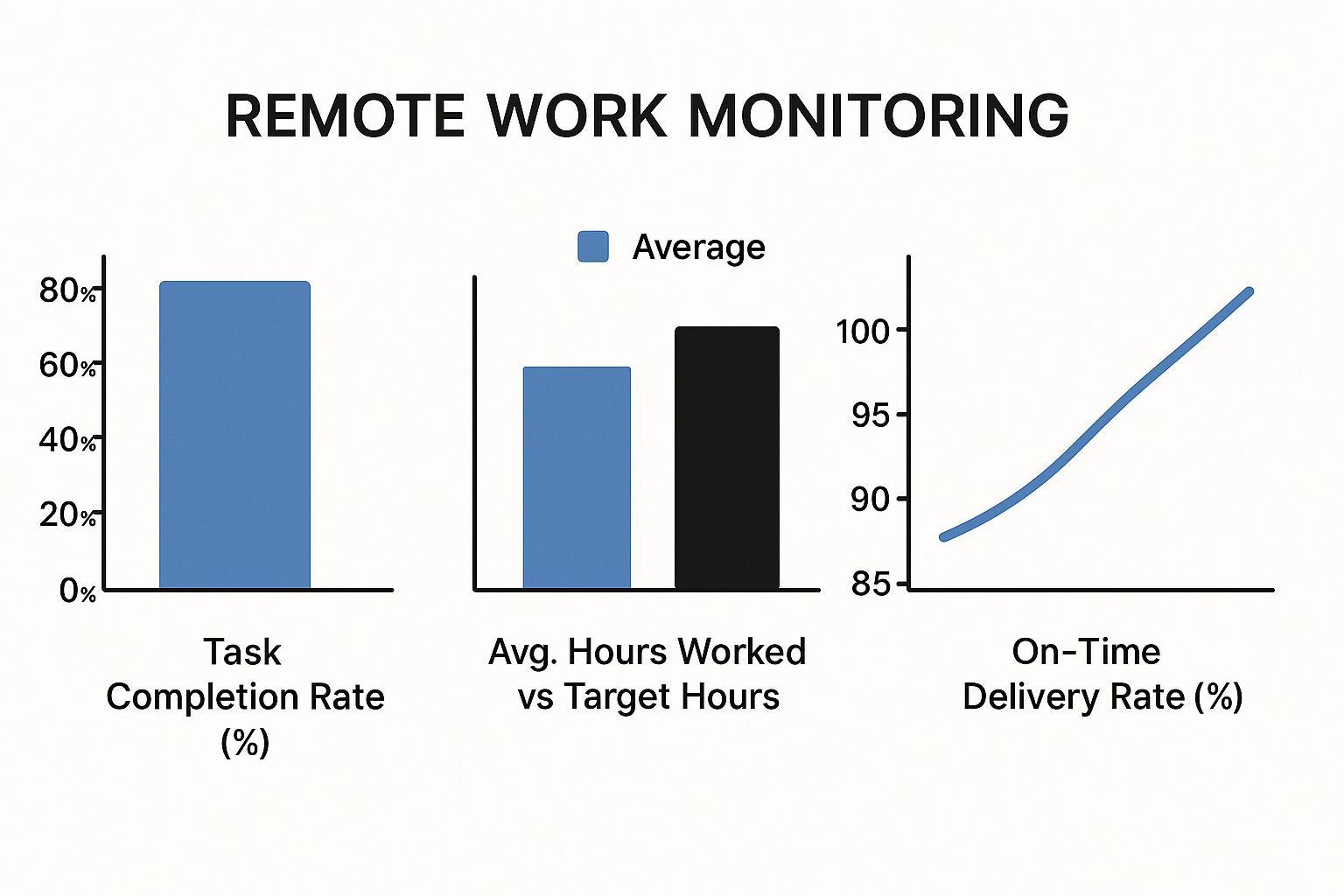
As you can see, metrics like task completion rates and on-time delivery paint a much clearer picture of productivity. You get the insights you need without having to micromanage every minute of the day.
Creating Role-Specific Goals
Let’s be honest: generic goals are useless. Success for a software developer is completely different from success for a customer support agent or a marketing specialist. Your Key Performance Indicators (KPIs) and Objectives and Key Results (OKRs) have to be tailored to the specific role.
Here are a few real-world examples:
- For Software Developers: Success might be measured by story points completed per sprint, low bug rates, and hitting project deadlines.
- For Marketing Teams: Think lead generation numbers, campaign conversion rates, or growth in social media engagement.
- For Customer Support: You'd look at things like customer satisfaction scores (CSAT), average response times, and first-contact resolution rates.
When you define these role-specific metrics, you build a clear and fair system for everyone. It cuts through the ambiguity and lets people focus their energy on what drives results for their position.
Choosing Your Metrics: Output vs. Activity Tracking
The type of metric you choose to track sends a powerful message about your company culture and the level of trust you have in your team. This decision is crucial. At a high level, you have two main approaches to performance tracking.
| Metric Type | Focus | Examples | Best For | Potential Pitfalls |
|---|---|---|---|---|
| Output-Based | Measures the results and outcomes of work. | Projects completed, sales closed, articles published. | Roles with clear, measurable deliverables; experienced teams. | Can miss the effort and process improvements made along the way. |
| Activity-Based | Measures the actions taken during work hours. | Hours logged, emails sent, calls made, keystrokes. | Highly-regulated industries or entry-level training. | Encourages "looking busy" over actual productivity; can feel like micromanagement. |
While every approach has its place, a focus on output is almost always better for team morale and autonomy. Of course, remote work isn't without its hurdles. Businesses face a staggering productivity loss from distractions, estimated at $600 billion annually in the U.S. alone. On top of that, 75% of employees believe they need better remote work tools, which points to a clear gap in the current tech stack. You can dive deeper into these challenges and opportunities by checking out these remote work statistics on archieapp.co.
Ultimately, the goal is to create a system where monitoring supports your team, not polices them. When goals are clear, collaboratively set, and measured by meaningful results, the need for invasive activity tracking just melts away. Trust is built, and performance naturally follows.
Choosing the Right Remote Monitoring Tools
Picking the right technology is probably one of the most critical decisions you'll make when figuring out how to monitor your remote team. The market is absolutely flooded with options, from dead-simple time trackers to incredibly sophisticated performance analytics platforms. The real goal isn't just to grab any tool; it's to find one that actually fits your team's culture, budget, and what you're trying to accomplish.
Make the wrong choice, and you end up with intrusive "bossware" that breeds distrust and anxiety. Nobody wants that. But the right software can foster transparency, set clear expectations, and give you the kind of data that leads to genuinely helpful conversations about performance and roadblocks. It should always feel like a tool for support, not surveillance.
Different Types of Monitoring Software
It's important to understand that these tools aren't one-size-fits-all. They generally fall into a few key categories, and knowing the difference is the first step to making a smart decision.
- Time Tracking Tools: These are the most straightforward. They focus on logging work hours, tracking breaks, and sometimes letting you assign time to specific projects. They're fantastic for ensuring payroll is accurate, billing clients correctly, and just getting a baseline of where the hours are going.
- Project Management Hubs: These platforms give you incredible visibility into who's doing what. You can see task progress, track deadlines, and get a clear picture of a project's health. The focus here is on output, not just activity.
- Performance Analytics Platforms: This is the more comprehensive category. These tools often bundle time tracking with application and URL usage data, productivity analysis, and automated reports. They provide a much deeper look into work patterns, helping you spot high-achievers and, just as importantly, team members who might be struggling or heading for burnout.
If you want to get into the weeds on specific platforms and their features, we've put together a detailed guide on the best remote work monitoring software available.
Key Features to Prioritize
As you start comparing your options, there are a few core features you'll want to keep an eye out for. A good solution has to strike a balance between what management needs to see and what makes employees feel trusted and respected.
The best tools provide insights without invading privacy. They should automate the tedious parts of reporting so you can spend more time on meaningful management—like coaching and removing obstacles for your team.
Here's a quick checklist of must-have features:
- Automated and Customizable Reports: The software should be able to generate reports that are actually easy to read. Look for data on productivity trends, time spent on projects, and application usage. The ability to customize these reports is huge—it lets you zero in on the metrics that actually matter to your business.
- Integration Capabilities: A tool that can talk to your other systems (project management, payroll, communication apps) is a massive time-saver. It prevents you from having data locked away in separate silos and makes your entire workflow smoother.
- User-Friendly Interface: This is non-negotiable. If a tool is clunky or confusing, your team simply won't use it consistently, and you'll never get the data you need. A clean, intuitive design is essential for getting everyone on board.
- Privacy Controls: Look for features that put employees in the driver's seat, like manual start/stop timers or the option to delete personal time that was tracked by mistake. Transparency is everything, so tools that let employees see their own data are always the better choice.
The adoption of these tools isn't just a small trend. Research shows that 60% of companies with remote employees are now using some form of monitoring software. And the results speak for themselves—a whopping 81% of those companies reported a tangible increase in worker productivity. Choosing the right tool isn't just a tech decision; it's an investment in your team's success and your company's culture.
Building an Ethical and Legal Monitoring Framework
How you introduce monitoring can make or break the trust you have with your remote team. Just installing software without laying a transparent, ethical foundation is the quickest way to kill morale and open your company up to legal trouble. Your entire approach needs to be framed around support and process improvement—never micromanagement.
A solid framework helps you navigate the tricky legal side of things and sidestep potential business litigation tied to employee privacy. It all starts with a formal, written policy that leaves zero room for interpretation.
Crafting Your Remote Work Monitoring Policy
A clear, comprehensive policy is your single most important asset here. This document needs to be straightforward, easy to understand, and available to everyone on the team at all times. Think of it less as a legal formality and more as a commitment to being open and honest.
Your policy has to spell out several key things to get everyone on the same page. It’s basically a charter for how data will be used respectfully and with a clear purpose.
Here's what it should always include:
- What is being tracked? Get specific. List the exact types of data you’re collecting, like application usage, URLs visited, time on projects, or screenshots.
- Why is it being tracked? Explain the business reasons. Maybe it's for accurate client billing, making sure workloads are distributed fairly, or spotting workflow bottlenecks.
- How will the data be used? Make it clear that the goal is to improve processes and offer support, not to punish anyone.
- Who has access to the data? Define who can see the monitoring data—like direct managers or HR—to keep it confidential.
- When does monitoring occur? Specify that tracking only happens during designated work hours and on company devices.
The core idea is simple: no surprises. An employee should never have to guess if they’re being monitored or what information is being gathered. When the rules are clear, it gets rid of the fear and anxiety that comes with the unknown.
Communication and Consent
Just writing the policy isn’t enough. How you communicate it is equally important. Announcing a new monitoring system in a cold, impersonal email is a recipe for disaster. This calls for a more thoughtful and empathetic rollout.
Schedule a team meeting specifically to walk everyone through the new policy. Explain the "why" behind it, and most importantly, open the floor for questions. This conversation is essential for getting buy-in and tackling concerns head-on. An open forum shows your team you actually care about their perspective.
For many companies, getting written consent isn't just a good idea; it's a legal must. After the meeting, have each employee sign an acknowledgment form stating they’ve read, understood, and agreed to the policy. This step formalizes the agreement and protects both the employee and the business. It's also a crucial part of how you can master compliance with labor laws using time tracking software and avoid legal headaches. This structured approach turns monitoring from something suspicious into a mutually understood tool for everyone's success.
Using Monitoring Data for Constructive Conversations
Pulling reports is the easy part. The real work—and the real value—comes from turning that data into conversations that actually help your team. When you get this right, monitoring data becomes a collaborative tool, not just a way to keep tabs on people.
Think of the data as a diagnostic tool, not a report card. Your reports can highlight what’s working beautifully in your processes and, just as importantly, where things are starting to break down. This shift in perspective is what elevates monitoring from simple oversight to genuine insight. It changes the conversation from, "Why was your activity low?" to a much more helpful, "How can we make this process work better for you?"

Interpreting Productivity Reports
Before you sit down with an employee, you need to know what the data is truly saying. My advice? Look for patterns over time, not isolated incidents. A single slow afternoon is usually meaningless, but a consistent trend over a week or two is absolutely worth a closer look.
Keep an eye out for trends like these:
- Persistent Bottlenecks: Do you see tasks getting stuck at the same point in the workflow again and again? That’s probably a process problem, not a people problem.
- Signs of Burnout: If you notice a gradual drop in activity paired with longer hours logged in, you might be looking at an employee who is overwhelmed and on the fast track to burnout.
- Process Inefficiencies: Is a team member spending a crazy amount of time on administrative tasks? That’s a huge opportunity to find a more efficient tool or automate something.
When you spot these larger trends, you can walk into a conversation with helpful observations, not accusations.
From Data Points to Dialogue
How you bring up the data changes everything. If you lead with a negative stat, you’re going to put your employee on the defensive immediately. It’s human nature.
Instead, lead with genuine curiosity. Your goal is to solve a problem together, and that framing can turn a tense confrontation into a productive brainstorming session.
Let's break down two ways to handle the exact same situation.
The Confrontational Approach (Don't do this):
"Your activity metrics were down 20% last week. Why aren't you getting your work done?"
This is accusatory. It automatically assumes the employee is slacking and shuts down any chance of an honest conversation about what's really going on.
The Constructive Approach (Do this instead):
"I was looking at the project report and noticed tasks in the design phase seem to be taking longer lately. I'm wondering if there's a bottleneck in our feedback process we could fix together?"
See the difference? This approach focuses on the process, not the person. It invites them to share their perspective and makes them part of the solution. This is how you build trust. To make sure monitoring data always leads to better dialogues and stronger team bonds, it’s crucial to improve communication across the board.
The ultimate goal is to use data as a starting point for a conversation, not the end of one. When employees see that monitoring is being used to help them succeed and clear obstacles out of their way, they become partners in improving productivity for the entire team. This supportive feedback loop is the hallmark of a healthy and high-performing remote work culture.
Common Questions on Monitoring Remote Employees
When you're trying to figure out how to monitor a remote team, a few key questions always seem to pop up. Managers are walking a fine line, trying to keep productivity high while not eroding the trust they’ve worked so hard to build. Let's get straight to the point and tackle the most common concerns.
Is It Legal to Monitor Employees Working from Home?
For the most part, yes. It is generally legal for employers to monitor their company-owned equipment and the networks they provide. The waters get a little murky, though, when personal devices enter the picture.
The absolute non-negotiable here is having a clear, written policy. Every single employee needs to have read it and signed off on it.
This policy has to be crystal clear about what you're monitoring, how you're monitoring it, and why. Before you roll out any new tools or rules, it's always smart to have a quick chat with a legal professional. They can make sure your policy is squared away with all local and national labor laws.
How Can I Monitor Without Creating a Culture of Mistrust?
This is the big one, and the answer lies in a simple shift: focus on performance, not presence. When you introduce any kind of monitoring, be completely transparent about why you're doing it.
Frame it as a tool to help the team. Explain that it’s about ensuring workloads are fair, spotting where people are getting stuck, and offering support—not about watching their every move.
Focus on output-based metrics, like completed tasks or project milestones, rather than activity metrics like keystrokes. When you use the data to start supportive, problem-solving conversations, it actually builds trust instead of creating fear.
Don't forget that trust and flexibility are huge motivators. A recent study showed that 46% of U.S. remote-capable workers would likely quit if their remote work options were taken away. On the flip side, 61% of remote workers feel they get more done at home. You can dig into more stats about remote work preferences and productivity on archieapp.co.
What Are the Biggest Mistakes to Avoid?
The most damaging blunders almost always come down to poor communication and a lack of fairness. If you want to avoid disaster, steer clear of these three major pitfalls:
- A Lack of Transparency: There's no faster way to destroy morale than by installing monitoring software in secret. Be open and honest from the get-go. Always.
- Focusing on the Wrong Metrics: Tracking things like "time online" or mouse movements just encourages "productivity theater." People will look busy, but they won't actually be effective.
- Inconsistent Application: If you apply monitoring rules to some employees but not others, you’re asking for resentment and claims of favoritism. The rules need to be the same for everyone, applied fairly across the board.
Ready to improve your remote team's productivity with a tool built on transparency and trust? DeskCove provides the insights you need to support your team and drive results without micromanagement. Learn more and get started at https://deskcove.com.