Effective Time Tracking for Remote Employees | Boost Productivity

Let’s be honest: when you first hear "time tracking for remote employees," it's easy to picture a manager hunched over a screen, watching every mouse click. But that's a tired, old-school view. Done right, it’s not about surveillance at all. It's about trust, clarity, and measuring what actually matters: results.
By shifting the focus from hours clocked to outcomes delivered, companies can build a system that supports everyone. Managers get the project visibility they need, and employees get the recognition they deserve—all while protecting that crucial work-life balance.
Why Time Tracking Is a Game-Changer for Remote Teams

Forget the myth that time tracking is just about punching a digital clock. In a remote world, it’s one of the best tools we have for creating a workplace that’s transparent, fair, and incredibly productive. The goal isn’t micromanagement; it's about getting everyone on the same page.
Think of it like a fitness tracker for your team. A Fitbit doesn’t just count your steps—it shows you patterns in your activity, sleep, and overall health, giving you the data to make smarter choices. In the same way, time tracking for remote employees gives you insights to spot where the team shines, flag burnout risks before they become a problem, and celebrate real progress.
Shifting Focus from Hours to Outcomes
This is the biggest win. Time tracking helps you move away from measuring "butts in seats" and toward measuring "outcomes achieved." This is a massive deal for remote teams, where you can't just look across the office to see who's busy.
When you see how time is actually being spent across projects, the conversation shifts from, "Are you working?" to, "Are we working on the right things?" This empowers employees with more autonomy over their schedules. As long as the work gets done well, it doesn't matter if they did it between 9-to-5 or worked a split day.
"When implemented correctly, time tracking becomes a record of value creation. It gives employees a tangible way to showcase their contributions and helps managers ensure workloads are distributed fairly, preventing the burnout that can silently cripple remote teams."
A Tool for Clarity and Trust
For managers, not having the team physically present can create a lot of uncertainty. Good time tracking clears that fog. It gives you a clear view of project progress and where your resources are going, answering critical questions without needing to constantly ping people:
- Project Health: Are we on track and within budget?
- Resource Allocation: Is our team’s time going toward our biggest priorities?
- Workload Balance: Is anyone on the team consistently overloaded?
For employees, this isn't about being watched—it's about protection. It creates a concrete record of their effort and helps safeguard their personal time. It draws a clear line, ensuring their hard work is seen and that they aren't expected to be "on" 24/7. This transparency builds a powerful foundation of trust, getting managers and their teams pulling in the same direction.
The Real ROI of Tracking Remote Employee Time
When we talk about return on investment (ROI), it's easy to get stuck on the obvious financial wins. But the real value of tracking time for your remote team goes so much deeper than the balance sheet. It’s about plugging those tiny, invisible leaks in productivity, creating a culture of trust, and making sharper decisions that actually fuel growth.
Think of untracked time like a slow drip from a faucet. A single drop seems harmless, but over time, it adds up to a huge waste. Those quick client calls, the urgent emails, the brief check-ins—they all go undocumented. Individually, they're just moments. Collectively, they're a significant chunk of unbilled hours that are quietly eating into your profits.
Uncovering Hidden Productivity Drains
Every single minute spent on a task contributes to the final product. When those minutes aren't captured, you're not just losing time; you're losing revenue and the data you need to run your business effectively. Good time tracking software acts like a net, catching all these small but crucial contributions.
This goes way beyond just billing clients more accurately. It’s about finally understanding the true cost of a project. When you see that a "simple" task actually took hours of back-and-forth communication, you get a much clearer picture of profitability. That clarity lets you quote future projects with confidence.
"Accurate time tracking transforms abstract effort into tangible data. It ensures that the silent, often-overlooked work that keeps projects moving forward is recognized, valued, and properly compensated, strengthening both your financial health and team morale."
This attention to detail has a massive economic impact. The U.S. economy loses an estimated 50 million productive hours every day from undocumented tasks. For a single employee, unrecorded activities like email management can cost a company up to $50,000 in lost productivity each year. It's no wonder that many businesses see a positive ROI within just six months of automating their time tracking—the gains show up fast.
Strengthening Morale and Retaining Talent
For anyone working remotely, getting paid fairly and on time is a huge part of job satisfaction. Time tracking takes the guesswork out of payroll. It ensures every minute of overtime and every project-specific hour is logged and compensated correctly. In a competitive market, that kind of reliability is key to building trust and holding onto your best people.
When your team knows their hard work is being accurately recorded, it validates their effort and eases the "out of sight, out of mind" anxiety that can creep in with remote work. It also gives them an objective record of their contributions, which is incredibly valuable during performance reviews. This also keeps you on the right side of legal and ethical obligations. You can master compliance with labor laws using time tracking software, protecting both your business and your employees.
This creates a powerful feedback loop:
- Fair Compensation: Employees get paid for the work they actually do, which naturally boosts morale.
- Increased Trust: Transparent processes prove that the company is committed to fairness.
- Higher Retention: A happy, well-compensated team is a team that sticks around.
Making Smarter Data-Driven Decisions
Maybe the biggest ROI of all is the insight you gain. Time tracking data isn't just a list of hours; it's a goldmine for managers who want to lead proactively instead of just reacting to problems. It helps you answer the big questions about how your team really operates.
By analyzing time logs, you can spot which projects are resource hogs, identify bottlenecks before they derail your timeline, and get a real sense of your team's capacity. This data is the foundation for strategic capacity planning, helping you balance workloads and assign the right people to the right tasks.
Ultimately, it prevents burnout by showing you when someone is consistently overloaded, letting you step in before it becomes a crisis. Tracking time isn't just about logging hours—it’s about fine-tuning the very engine that runs your business.
Choosing The Right Time Tracking Software
Picking the right software for your remote team is a big deal. Get it right, and you'll streamline everything. Get it wrong, and you’re just creating frustrating bottlenecks for everyone. The thing is, not all time tracking tools are built the same, and what works for an in-office crew often falls flat for a distributed one.
You need to look beyond a simple start-stop timer. The goal is to find a solution that feels less like a micromanager and more like a helpful assistant. It should be dead simple for employees to use, give managers the clear insights they need, and slide right into your existing workflow without causing a fuss. A clunky, confusing tool will just get ignored, leading to bad data and defeating the whole point.
Core Features That Matter for Remote Teams
It’s easy to get lost in a long list of shiny features when you're shopping around. For a remote team, though, a few capabilities are absolutely non-negotiable. These are the foundational pieces that guarantee accuracy, efficiency, and fairness, no matter where your people are logging in from.
First and foremost, prioritize automation. Manual time entry is a recipe for mistakes—people forget to start timers, guess at their hours, or can't remember what they worked on three days ago. Automated tracking tools that run quietly in the background capture activity without needing constant input, which means you get far more reliable data.
This infographic shows the real-world returns you can expect from a well-chosen system, hitting on everything from better billing to a more stable team.
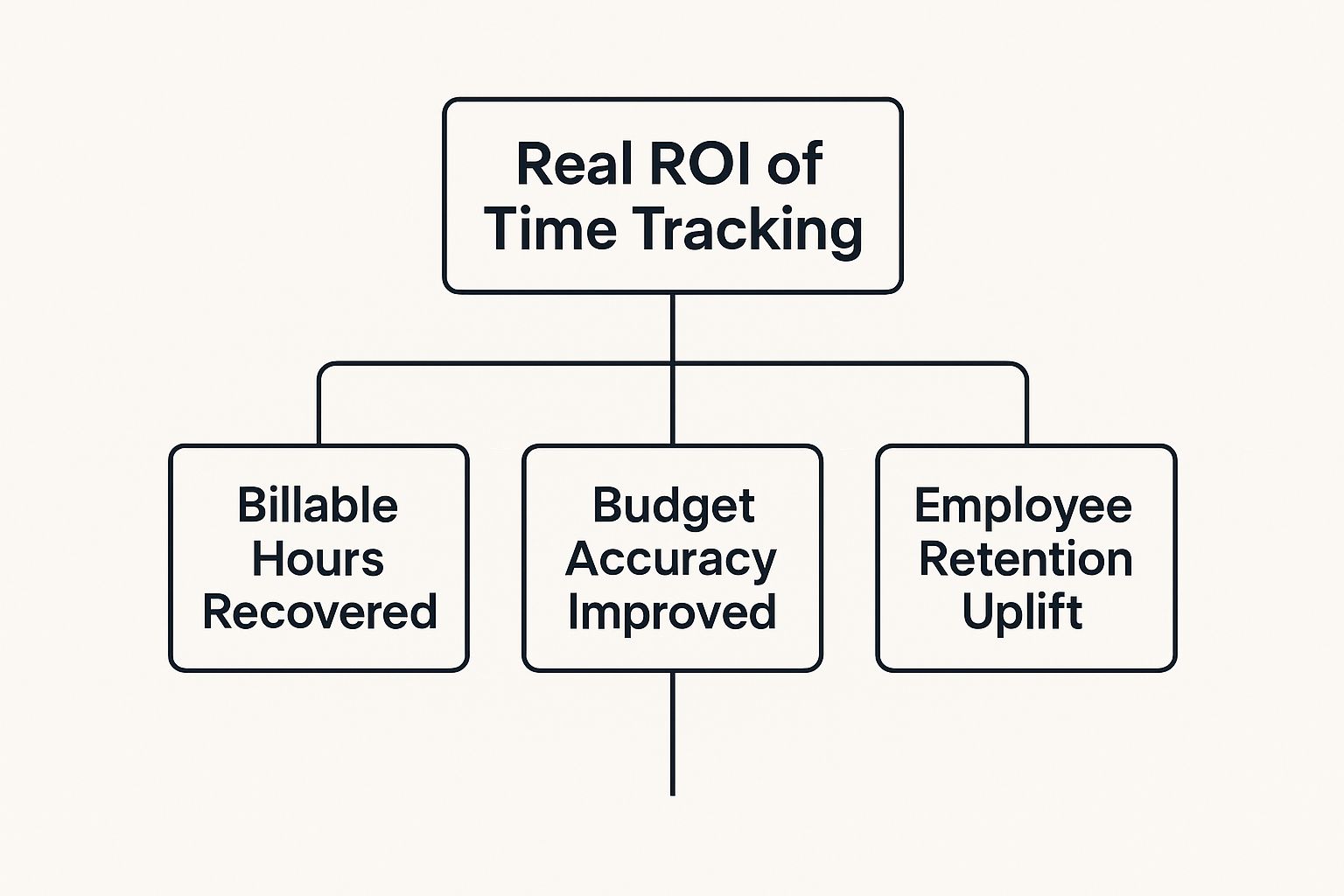
As you can see, the benefits go way beyond just logging hours. They translate into measurable financial and cultural wins for the whole business.
Must-Have Remote-Friendly Functionality
Looking past the basics, certain features are tailor-made for the realities of a distributed team. These are the functions that tackle common remote work headaches like different locations, flexible schedules, and the need for everyone to see what's going on with projects.
One of the most critical is multi-device access. Your team works on desktops, laptops, and maybe even their phones. A good tool has to work seamlessly on any platform they use. Just as important is an offline mode, which makes sure time is still tracked accurately even with a spotty internet connection, syncing up the data once the connection is back.
Here’s a quick look at some essential features to put on your checklist:
- Automatic Time Zone Syncing: This is a lifesaver for global teams. It automatically converts everyone's logged hours into a single, unified time zone for reports. No more confusing manual calculations for payroll or project updates.
- Project and Task-Specific Tracking: Vague time logs are pretty much useless. The ability to tie time directly to specific projects, tasks, or clients gives you the detailed data you need for accurate billing, budget tracking, and seeing which jobs are actually profitable.
- Privacy-Focused Monitoring: Trust is everything. While some monitoring can be helpful, you have to choose tools that respect employee privacy. For example, you can learn about the ins and outs of time tracking with screenshots to see how you can balance transparency with trust, making sure the feature is used for clarity, not surveillance.
To help you compare your options, here’s a breakdown of the key features and why they’re so important for remote teams.
Key Time Tracking Software Features for Remote Teams
| Feature | What It Does | Why Remote Teams Need It |
|---|---|---|
| Automated Time Capture | Runs in the background, tracking app and URL usage to automatically log work hours. | Reduces manual entry errors and frees up employees from constantly starting/stopping timers. |
| Multi-Device & Offline Sync | Works across desktops, web, and mobile, and tracks time even without an internet connection. | Supports team members wherever they work, ensuring no time is lost due to poor connectivity. |
| Project & Task Tracking | Allows users to assign logged time to specific projects, tasks, or clients. | Provides clear visibility into resource allocation, profitability, and project progress. |
| Time Zone Syncing | Automatically converts logged time from different locations into a single, standard time zone. | Eliminates payroll and reporting errors for globally distributed teams. |
| Privacy Controls | Offers customizable settings, like screenshot blurring or optional monitoring features. | Builds trust by giving employees control over their privacy while maintaining accountability. |
| Third-Party Integrations | Connects with project management, payroll, and accounting software (e.g., Jira, Asana, QuickBooks). | Creates a seamless workflow, automates data entry, and speeds up billing and payroll cycles. |
Choosing a tool with this mix of features ensures you're not just tracking hours, but building a more efficient, transparent, and connected remote work environment.
Integrations and Scalability
A time tracking tool should never be an island. Its real strength is unlocked when it connects with the other software you use every day. Smooth integrations with project management platforms like Asana or Jira and accounting software like QuickBooks are a must.
When your time tracking data automatically flows into your payroll and invoicing systems, you eliminate hours of manual data entry, reduce the risk of costly errors, and speed up your entire billing cycle. This connectivity is what turns a simple tracking tool into a powerful business operations hub.
Finally, think about where you're headed. The tool you pick today needs to be able to grow with you. Look for flexible pricing plans and scalable features that let you start with what you need now and add more horsepower as your company expands. When you're ready to compare, you can explore top employee attendance tracking software solutions to get a feel for what’s out there.
How to Introduce Time Tracking Without Hurting Morale

Here’s the thing about bringing in time tracking for remote employees: the software you pick is secondary. The real test is the conversation you have with your team. If they see it as a surveillance tool, you can bet morale is going to take a nosedive.
The secret is to frame it as a tool for collaboration—something designed to make everyone's work life better, not a top-down mandate. A rushed, poorly explained launch can easily create fear and resentment, shattering the very trust that makes remote work, well, work. Get it right, though, and it becomes a tool that actually strengthens your team culture.
Start with the Why, Not the What
Before a single person logs their first hour, you need to get crystal clear on the "why." This isn't about watching over their shoulders; it's about backing them up.
Frame the whole conversation around solving the real challenges of remote work. Explain how this data will help protect their work-life balance, make sure workloads are fair, and give you concrete proof of all the amazing work they're doing. When the "why" is about fairness and clarity, the "what" (the tool itself) is much easier to get on board with.
The goal here is to shift the narrative from monitoring to understanding. It’s about finding insights to help the team thrive, not about catching people making mistakes.
Craft a Clear and Transparent Policy
Nothing kills trust faster than ambiguity. Before you launch anything, write up a straightforward policy that answers every single question your team might have. This document needs to be the absolute source of truth.
Your policy has to spell out:
- What is being tracked: Is it just project hours? App usage? Be specific.
- Why it's being tracked: Connect every metric back to a real benefit, like more accurate payroll or smarter project budgets.
- Who can see the data: Define who has access to reassure people their information is being handled with respect.
- How the data will be used: Make a promise that this is for constructive purposes like resource planning, not for punishment.
Thinking through the different ways you can track remote employees and their work will help you build a policy that strikes the right balance. Being completely upfront about these details from day one is non-negotiable.
Focus on Positive Productivity Insights
Position time tracking as a tool for getting better, not just for keeping tabs. The data you gather can uncover some incredibly powerful trends that benefit everyone.
For instance, reports show that many employees working from home feel more productive than they did in the office. It also showed that remote workers often gain extra productive minutes per day, often because they're dealing with fewer social distractions. You can dig into more of these insightful remote work statistics to see the full picture. Use insights like these to show your team that the goal is to protect their focused, deep work—the stuff that really drives results.
Provide Training and Create a Feedback Loop
Never, ever just drop a new tool on your team and walk away. Schedule a proper training session to walk everyone through the software. Show them how it actually makes their workflow simpler, not more complicated, and give them plenty of time to ask questions.
Most importantly, open up a clear channel for feedback. Encourage your team to share their concerns, ideas, and experiences, especially in the first few weeks. Acting on that feedback shows you’re listening and that this is a partnership. It turns the rollout into a collaborative effort and reinforces a culture of mutual respect.
The Future of Remote Work and Time Management

As remote and hybrid work settles in for the long haul, moving from a temporary fix to a permanent fixture, smart time management has become an essential skill for any business. The conversation is no longer just about clocking in and out for payroll. It’s about leveraging time data to build a stronger, more competitive company.
This shift isn't happening in a vacuum. It's being driven by a massive change in the global talent market. The freedom to work from anywhere isn't a niche perk anymore—it's a core expectation that's reshaping how companies operate and grow.
Powering Hybrid Team Fairness and Productivity
In a hybrid setup, with some folks in the office and others dialing in from home, keeping things fair is a huge challenge. This is where time tracking data becomes your best friend. It gives you an objective way to measure performance, focusing on actual output instead of just physical presence.
This information helps managers spread the workload evenly and give credit where it's due, regardless of an employee's location. By seeing how time is spent on key projects across different environments, leaders can ensure remote team members get the same support and opportunities as their in-office colleagues. It's a data-driven defense against proximity bias and a crucial step toward a truly inclusive culture.
And make no mistake, the global move toward remote work is only picking up steam. Some predictions suggest a significant jump in remote-capable digital jobs by 2030. That could translate to millions of people working from anywhere in fields like IT, finance, and healthcare. You can discover more insights about remote work trends that show just how critical sophisticated time tracking is to supporting this global shift.
From Operational Tool to Strategic Asset
The smartest companies are already thinking beyond simple efficiency. They're treating time data as a strategic asset for forecasting, planning, and long-term growth. This is where you find the real competitive edge of time tracking for remote employees.
By digging into historical time data, businesses can:
- Forecast Project Timelines Accurately: Get a real sense of the effort needed for different projects, which leads to more realistic deadlines and budgets.
- Identify and Justify New Hires: Use hard data to show when teams are stretched too thin and build a solid case for bringing on more help.
- Spot Skill Gaps: See where tasks are consistently taking longer than they should, signaling a need for more training or specialized talent.
This strategic use of time data moves your business from reacting to putting out fires to proactively preventing them. Instead of scrambling to deal with missed deadlines or team burnout, you can see them coming and make smarter decisions that fuel sustainable growth.
Bringing these tools on board is more than just an operational choice. It's about future-proofing your business to thrive in a world where talent is distributed globally. Smart time management, backed by clear, actionable data, is the key to building a nimble and productive organization that's ready for whatever comes next.
Got Questions About Remote Time Tracking? Let's Clear Them Up.
Even when you see the upside, jumping into time tracking for a remote team can feel a little daunting. Questions about the rules, team morale, and finding the right software are completely normal. The best way to move forward with confidence is to tackle these concerns head-on, making sure everyone is on the same page.
This section is all about answering the most common questions managers and team leads have. Think of it as your practical guide to getting remote time management right from the start.
Is It Actually Legal to Track a Remote Employee's Time?
Yes, absolutely. In most places, it's not just legal to track an employee's hours—it’s often a legal requirement. This is especially true for non-exempt employees who qualify for overtime pay. Laws like the Fair Labor Standards Act (FLSA) in the U.S. demand accurate records of hours worked to make sure everyone is paid correctly.
The real key here is transparency and respect for privacy. Standard time tracking that logs hours against specific projects is perfectly fine. Where things get tricky, both legally and ethically, is with more invasive methods like constant screen recording or logging every keystroke. Depending on your local privacy laws, that can be a big problem.
Our best advice? Always have a clear, written policy. This document should spell out exactly what you're tracking, why you're tracking it, and who can see the data. Open communication and a straightforward policy are your best defense against any potential legal headaches.
How Do I Keep My Team from Feeling Micromanaged?
This is probably the most important question of all, and the answer comes down to one thing: your approach. If you roll out time tracking like it's a new surveillance system, you’re guaranteed to hurt team morale. The goal is to frame it as a tool for support, not for watching over their shoulders.
Start by highlighting how it benefits them directly. Explain that the data helps you protect their work-life balance by spotting when workloads get too heavy, preventing burnout before it starts. Make it clear that it ensures they get paid for every hour they put in and gives them a concrete record of their incredible contributions come review time.
Here’s how to build trust and sidestep that "micromanaged" feeling:
- Bring Your Team In: Ask for their thoughts on which tool to use or how to set up the tracking categories. When they help build it, they'll feel ownership.
- Focus on the Big Picture: Remind everyone that the goal is to understand how projects are progressing and where resources are going—not to monitor daily activity.
- Choose Non-Invasive Software: Pick a tool that prioritizes project and task data over constant, individual monitoring.
- Lead with Trust: State outright that you trust them to manage their own time. The software is just there to help them—and you—work smarter.
When your team sees the system as a way to create fairness and clarity for everyone, that fear of being micromanaged just melts away. It becomes another tool in the toolbox for working better together.
What Features Really Matter in Time Tracking Software?
Picking the right software is a make-or-break decision for any remote team. The best tools are simple, reliable, and slide right into your existing workflow without creating a bunch of extra admin tasks. Complexity is the biggest roadblock to getting your team on board, so look for a clean, user-friendly interface they can pick up in minutes.
For a team that's spread out, a few features are absolute must-haves. Automated time capture is one, as it cuts down on the hassle of manual entries and makes your data far more accurate. You'll also need the ability to assign time to specific projects and tasks—that’s how you get real insights into budgets and where your team's effort is going.
But if there's one feature that stands above the rest, it’s strong integration capabilities. Your time tracking tool needs to talk to your other systems, like your payroll and project management software (Asana, Jira, or QuickBooks). This kind of automation saves an incredible amount of administrative time and stops costly data entry mistakes in their tracks. Many top platforms offer free trials or scalable plans, so you can start small and add more features as your team and needs grow.
Give your remote team a tool built for clarity and trust. DeskCove offers automatic time tracking, insightful productivity reports, and seamless integrations to help you manage projects and support your team—without the micromanagement. See how it can simplify your workflow and provide the insights you need to grow. Discover more at DeskCove.