How to Track Employee Productivity Effectively Without Micromanaging

To really get a handle on employee productivity, you have to start by defining what "productive" actually means for each role in your company. It’s about focusing on outcomes, not just activity.
This means setting clear, role-specific key performance indicators (KPIs) that tie directly back to your bigger company goals. When you do this, everyone knows exactly what success looks like, which creates a system that’s both fair and transparent.
Defining Productivity Beyond Busywork
The very first step is to shift your mindset away from old-school metrics like hours logged or tasks checked off a list. Real productivity isn't about looking busy; it's about creating value.
You need a solid definition of what "productive" looks like for every single role, because a one-size-fits-all approach is doomed from the start. What a software engineer produces is worlds away from the output of a sales rep.
Think about it: a marketing team’s success isn’t just about the raw number of emails they send. It’s about the quality of the leads they generate, their conversion rates, and the ROI on their campaigns. Likewise, an engineering team's value is better measured by how quickly they can ship features or resolve bugs, not by the lines of code they write.
Defining these outcome-based metrics is the bedrock of a high-performance culture built on trust, not surveillance.
Setting Role-Specific KPIs
To put this into practice, you need to sit down with each team and hash out clear, measurable KPIs that directly push the company's main objectives forward. This isn't a top-down directive. A collaborative approach gets everyone on board and helps them see how their day-to-day work fits into the bigger picture.
It's all about moving from tracking effort to tracking results. We're seeing more and more companies make this shift.
Take a look at this table to see what I mean. It shows how you can redefine metrics for a few common roles to focus on tangible outcomes instead of just the work being done.
Shifting from Activity Metrics to Outcome Metrics
| Role | Old Metric (Activity-Based) | New Metric (Outcome-Based) |
|---|---|---|
| Customer Support | Calls handled per hour | Customer Satisfaction (CSAT) scores & first-contact resolution rates |
| Content Creation | Number of articles published | Organic traffic, time on page & leads generated from content |
| Project Management | Number of tasks completed | On-time project delivery rates & budget adherence |
By focusing on the results, you empower your team to discover the most efficient paths to hitting their goals. This is where innovation and autonomy thrive.
The conversation naturally shifts from "How long did you work?" to "What did you accomplish?" and that changes everything.
This data-driven approach helps clarify what really matters. For instance, the chart below tracks weekly goal completion against daily task output.
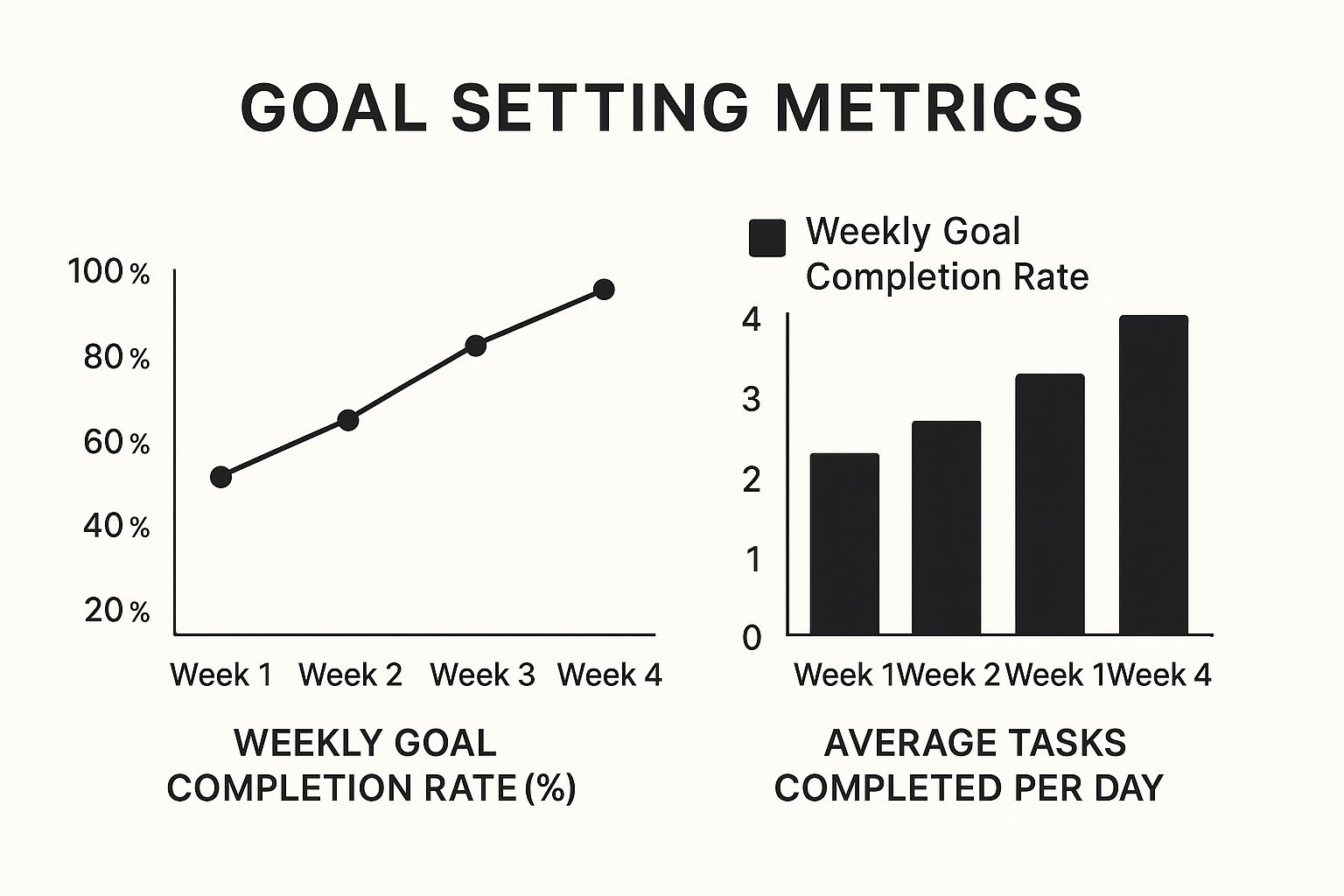
As you can see, simply completing more tasks doesn't always lead to hitting more goals. It really drives home the importance of focusing on high-impact work.
Aligning Individual Goals with Company Vision
Making sure individual goals line up with the company's vision is absolutely critical. In 2024, global employee productivity growth was a sluggish 0.4%, and employee engagement sat at an alarmingly low 21%.
This widespread disengagement is estimated to have cost a staggering $438 billion in lost productivity worldwide. These numbers highlight just how urgent it is to find a more meaningful way to measure performance. You can discover more insights about employee productivity statistics on archieapp.co.
When people see a direct line between their work and the company's success, they become more invested. And invested employees are productive employees.
Choosing Productivity Tools That Empower Your Team
The right piece of tech can offer incredible insight into how work actually gets done. On the flip side, the wrong tool can feel like a digital leash. Navigating the crowded market of tracking software is all about finding a solution that builds trust, not suspicion. Your goal should be to uncover workflow bottlenecks and resource gaps—giving your team useful data, not creating a culture of surveillance.

This distinction has never been more important. Employee monitoring is now a mainstream business practice, with a staggering 96% of companies using some form of time-tracking software. It’s estimated that 71% of employees worldwide are digitally monitored at work. That figure includes 73% of hybrid or remote workers and 75% of those in physical offices.
Aligning Tools with Your Goals
First things first: you have to match the tool to the job. Not all productivity platforms are built the same, and what works beautifully for a creative agency might completely derail a software development team. Start by defining what you actually need to measure based on the outcome-focused KPIs you've already set.
- Project Management Hubs: Tools for tracking progress on specific projects and tasks. They bring much-needed transparency, showing who is doing what and when it’s due.
- Time Tracking Software: Platforms such as DeskCove are designed to give you clear data on how time is being spent across different tasks and apps. This is invaluable for accurate billing, project costing, and spotting those sneaky time-sinks.
- Workforce Analytics Platforms: These are the heavy hitters. They offer deeper insights into work patterns and collaboration trends by analyzing anonymized metadata, helping you spot potential burnout risks before they become a problem.
If you want to get a better handle on visualizing tasks and smoothing out your workflows, exploring something like Kanban board project management can make a huge difference. These methods often plug right into the tools you're already considering.
The best tool doesn't just track—it clarifies. It should make it easier for employees to see how their work contributes to the team's success and helps managers provide better support, not more oversight.
Key Features That Build Trust
When you’re demoing software, keep an eye out for features that empower your people and respect their privacy. A tool that feels intrusive will kill morale and torpedo the very productivity you’re trying to improve. Focusing on features that support autonomy is non-negotiable.
Here are the essentials to look for:
- Intuitive Dashboards: The data has to be easy for both managers and employees to understand at a glance. If you need a data scientist to interpret a report, it’s not working.
- User-Controlled Tracking: Giving employees the power to start and stop tracking fosters a sense of autonomy and trust. It’s a small thing that makes a big difference.
- Privacy Controls: Look for options like screenshot blurring or the ability to disable tracking during breaks. Being transparent about what is being monitored and why is absolutely critical.
- Seamless Integrations: The tool needs to fit into your existing workflow, not create a new one. It should connect easily with the project management and communication platforms your team already relies on.
- AI-Powered Insights: Modern AI can offer smarter, less intrusive insights. Instead of just logging hours, these tools can identify patterns, suggest more efficient workflows, and highlight achievements without feeling like micromanagement.
Ultimately, picking the right software is about finding a partner in productivity. A well-chosen tool can balance performance with employee trust.
Rolling Out Tracking with Transparency and Buy-In
How you introduce a productivity tracking system is just as important as the system itself. If you get this wrong, a clumsy, top-down rollout can crush morale, breed distrust, and sink the entire initiative before it even starts.
The secret? Frame the change as a tool for everyone's growth, not a way to micromanage individuals. And that begins with clear, honest communication.

Before you install a single piece of software, you have to get out ahead of the narrative. Explain the "why" behind this decision. Employees are naturally wary of being monitored, so it's your job to address their concerns before they can fester.
Communicating the Shared Benefits
Your entire communication plan should revolve around shared benefits. You need to shift the conversation away from management oversight and toward team empowerment. This isn't about catching people slacking off; it’s about making work better for the whole team.
Get specific about how the data will lead to positive outcomes:
- Fairer Workloads: Show how insights can pinpoint overloaded team members, allowing you to rebalance assignments and prevent burnout. Nobody wants to see their colleagues drowning in work.
- Fixing Annoying Problems: Frame it as a way to spot those systemic bottlenecks that frustrate everyone. This is about finding and fixing the things that slow the whole team down.
- Targeted Support, Not Punishment: Emphasize that the goal is to see where people might need more resources or training to succeed. It's about helping people who are struggling, not penalizing them.
This approach flips the script, turning tracking from a perceived threat into a supportive tool. For a complete picture, it’s also useful to understand the pros and cons of employee monitoring so you can tackle potential downsides head-on.
When employees understand that the goal is to help them succeed and make their jobs easier, they are far more likely to embrace the change. Transparency isn't just a best practice; it's the only path to genuine buy-in.
Involving Employees in the Process
True transparency isn't just telling people what's happening—it's giving them a voice. Involving your team in the rollout is a powerful way to build trust and ensure the system you choose actually works for the people who will be using it every day.
A great way to do this is by creating a pilot program. Grab a small group of volunteers from different departments and let them test-drive the system. Their feedback will be pure gold for refining the process before you go company-wide.
You also need to create a clear policy document that addresses common concerns directly. This should be written in plain English, not corporate jargon, and be easy for anyone to find and read.
Make sure your policy covers these non-negotiable points:
- What exactly is being tracked? Be crystal clear. List the specific data points you're collecting (like application usage or time on projects). Just as important, state what you are not tracking (like personal messages or keystrokes).
- Who gets to see the data? Define access levels. Will employees see their own data? Will managers only see aggregated team data? Be upfront about it.
- How will the data be used? Hammer this point home: the information is for improving processes and providing support, not for punishment.
- What are the privacy safeguards? Detail the measures you're taking to protect employee privacy. This could include data anonymization or making sure tracking is disabled during breaks.
By making your team active participants instead of passive subjects, you create a sense of shared ownership. This collaborative approach shows respect and proves you see them as partners in the company’s success, not just cogs in a machine.
Turning Productivity Data Into Actionable Insights
Collecting employee productivity data is one thing; knowing what to do with it is something else entirely. Raw numbers don't mean much on their own. The real magic happens when you transform that data into a clear story about how your team works and—more importantly—where you can make things better. This is how you shift from simply tracking time to actively boosting performance.

A smart analysis goes way beyond just looking at hours logged. It's about connecting the dots to uncover critical trends. You might spot the early signs of burnout or identify a hidden bottleneck in a process that's secretly slowing everyone down. The goal here is always to use data to support your team and refine your systems, not to point fingers.
Spotting Trends and Patterns
Before you can spot anything unusual, you need to know what "normal" looks like. The first move is to establish a clear baseline for your team's productivity. Once you have that benchmark, you can start identifying deviations that actually mean something.
Is one team member suddenly taking longer to finish projects? Is a specific task consistently running over budget for the whole team? These aren't failures; they're opportunities disguised as problems. A sudden dip in output from a star performer might be a red flag for burnout. An uptick in time spent on non-essential apps could mean they need better tools or clearer priorities.
Data tells a story. A manager’s job is to listen to that story and ask the right questions. Is the workflow inefficient? Is someone overloaded? Or do we need to provide more training?
A fascinating case study from the pandemic highlighted a weird paradox. HCL Technologies discovered that even though their employees were working about 2 extra hours per day, overall productivity actually dropped by 8% to 19%. When they dug in, they found the culprit was an explosion of meetings and communication overhead in the new remote setup. That’s a crucial insight that looking at hours alone would have completely missed.
A Real-World Scenario in Action
Let's walk through a practical example. Imagine a project manager, Sarah, sees that her design team is consistently missing deadlines for a major client. Instead of jumping to conclusions, she digs into the productivity data.
Here’s what she found and what she did about it:
- Reallocated Resources: The data showed her senior designer, Alex, was spending a whopping 60% of his time on minor revisions for a different project. This left him almost no time for the high-impact creative work he was hired to do. Sarah immediately reassigned those minor tasks to a junior designer, freeing up Alex to focus where he provides the most value.
- Justified a New Hire: Looking at the team's aggregated data, Sarah discovered everyone was collectively losing over 15 hours a week to admin tasks like file management and reporting. This was a massive, system-wide roadblock. She used this hard data to build a rock-solid business case to hire a project coordinator, saving the entire team precious creative time.
- Provided Specific Coaching: Sarah also noticed a junior designer was spending twice as long as his peers on initial mockups. She set up a one-on-one. By walking through his workflow data together, they pinpointed a knowledge gap with a specific software feature. A quick training session was all it took to cut his mockup time in half.
In every instance, the data wasn't a weapon; it was a diagnostic tool. By analyzing the right metrics, Sarah was able to support her team, fix broken workflows, and ultimately get better results for the client. This is exactly how you measure productivity metrics to optimize business outcomes.
Using Data for More Constructive Performance Reviews
Let's be honest: performance reviews can be stressful. For everyone. They often feel subjective, leaving employees defensive and managers struggling to deliver meaningful feedback. But what if you could change that entire dynamic?
Integrating objective productivity data is the key. It shifts the conversation away from vague feelings and "I think you could be doing better" toward a collaborative, forward-looking discussion about actual growth. When you ground your feedback in facts, the guesswork disappears, and you can focus on real problem-solving.
This approach gives you a solid foundation to build upon. Instead of trying to recall events from months ago, you can point to concrete numbers—things like project completion rates, task turnaround times, or customer satisfaction scores. This evidence-based feedback makes the conversation less personal and much more focused on the work itself.
Pairing Quantitative and Qualitative Insights
Now, data on its own doesn’t paint the full picture. The real magic happens when you blend those quantitative metrics with genuine, qualitative feedback. The numbers tell you what happened, but the human conversation explains why it happened.
For example, the data might show a dip in an employee’s output last quarter. A manager flying blind might jump to conclusions about performance.
But a quick chat could reveal that the employee was quietly mentoring a new hire or wrestling with a particularly nasty, undocumented part of your codebase. Those are hugely valuable contributions that simply don't show up in raw output figures.
This balanced approach ensures your reviews are both fair and truly comprehensive. It acknowledges all the subtle, day-to-day efforts while still pinpointing real opportunities for improvement in a supportive way.
By combining data with conversation, you shift the focus from "Here's what you did wrong" to "Let's look at this together and figure out how to move forward." That one simple change can build a culture of trust and continuous improvement.
Framing the Conversation for Growth
How you present the data is everything. The goal isn’t to use it as a weapon or a final verdict on someone’s performance. It’s a starting point for a productive dialogue. Frame the entire conversation around mutual goals and support, turning the review into a career development session.
Here are a few ways to kickstart these constructive conversations:
-
To Celebrate Wins: "The data shows you've boosted your client retention rate by 15% this quarter. That’s incredible. Walk me through what you did differently—I'd love to see if we can share your strategy with the rest of the team."
-
To Address Challenges: "I noticed the data shows projects are stalling in this particular phase. What roadblocks are you hitting? Let's brainstorm some ways we could clear the path for you."
-
To Set Future Goals: "Your project completion rates are consistently high, which is great to see. Looking at this, what kind of new challenges or responsibilities are you interested in? Let's talk about what's next for you here."
This technique keeps the conversation collaborative from the get-go. It shows your team you’re invested in their success, not just in grading their work. Ultimately, this transforms performance reviews from a dreaded annual chore into one of the most powerful tools you have for building a stronger, more capable team.
Frequently Asked Questions About Productivity Tracking
Even with the most thoughtful rollout, you're going to get questions. It’s just part of the process. How you handle those questions about employee productivity tracking is what really matters. Think of it less as a hurdle and more as a chance to show your team you're committed to being open, honest, and supportive.
Let's walk through some of the most common questions that pop up from both managers and employees.
Is Employee Productivity Tracking Legal?
In short, yes. In most regions, tracking employee productivity is perfectly legal as long as it's for legitimate business purposes. But—and this is a big but—the laws can vary wildly from one country to another, and even between states. These laws often get very specific about privacy, consent, and the exact types of data you're allowed to collect.
This is not an area to guess. It's absolutely critical to understand the specific regulations that apply to your business.
The golden rule here is transparency. You need a clear, written policy that anyone can access. It should spell out exactly what you track, why you're tracking it, and how that data is being used and kept safe.
What Happens to the Data That's Collected?
This is usually the number one concern for employees, and for good reason. The data should really only serve one purpose: to help improve how work gets done and to support the team. It should never, ever be a tool for punishment or invasive surveillance.
Here’s what that looks like in the real world:
- Finding Workflow Problems: The data can shine a light on systemic bottlenecks or clunky processes that are slowing everybody down.
- Balancing the Workload: It can quickly show if a few team members are constantly swamped, giving managers the insight needed to reallocate tasks more fairly.
- Guiding Coaching Efforts: Managers can use the information to offer targeted support and training right where it’s needed most.
The focus should always be on big-picture, team-level trends and insights—not on dissecting every single click an individual makes. This approach protects privacy while still giving you the information needed to make work better for everyone.
Will Tracking Harm Employee Morale?
It absolutely can, but only if it’s handled badly. If you want to avoid a nosedive in morale, your implementation has to be transparent and built around your employees' well-being. When tracking is framed as a way to catch people messing up or to micromanage, you're guaranteed to create a culture of fear and distrust.
On the flip side, when you introduce it as a tool to reach shared goals—like preventing burnout, ensuring workloads are fair, and clearing frustrating roadblocks—it can actually give morale a boost.
Getting your employees involved, listening to their feedback, and being completely upfront about the "why" are non-negotiable. That's how you ensure the system is seen as a supportive tool, not a punitive one. For more answers to common questions about these tools and how they're used, an external resource like ahead.love's FAQ section can provide additional perspectives.
At DeskCove, we believe understanding productivity is about empowering teams, not just monitoring them. Our tools are built to give you clear, actionable insights that help you create more efficient workflows and champion your team's growth—all while putting employee privacy first. See how you can build a culture of trust and high performance by visiting https://deskcove.com.