Mastering Employee Attendance Tracking Software

Gone are the days of paper timesheets and clunky punch cards. Today, employee attendance tracking software automates the entire process of tracking when your team starts and stops work. It’s a digital solution that creates a far more accurate, efficient, and insightful system for managing work hours, leave, and even payroll.
More than just a tool, this kind of software is a cornerstone for solid compliance and smart workforce management.
What Is Employee Attendance Tracking Software?
Think of employee attendance tracking software as the central hub for your team's time. It goes way beyond being a simple digital punch clock; it's a real strategic asset for the business. At its core, the software systematically records and manages every aspect of employee work hours—arrivals, departures, breaks, and time off.
This automation is specifically designed to get rid of the tedious, error-prone work of manual data entry. Instead of chasing down paper timesheets or fixing spreadsheet formulas, businesses can capture precise time data without lifting a finger. The real magic happens when this raw data is turned into actionable business intelligence.
From Simple Timekeeping to Strategic Insight
On the most basic level, the software makes sure people get paid correctly for the hours they put in. Simple enough. But its capabilities stretch much, much further. The technology creates a clear, auditable trail of work hours, which is absolutely critical for staying compliant with labor laws and regulations.
This shift from manual tracking to automated systems isn't just a trend; it's a fundamental change in how modern businesses operate. The goal is to free up valuable time for HR teams, letting them focus on big-picture initiatives and employee well-being instead of getting buried in administrative paperwork.
Modern solutions are packed with features that offer deeper insights into how your workforce operates. For instance, managers can quickly spot trends in absenteeism or tardiness, allowing them to step in and help before it becomes a bigger issue. This data-driven approach helps optimize schedules, get a handle on overtime costs, and improve overall efficiency.
A Growing Market for a Critical Need
As companies of all sizes adapt to new ways of working—from hybrid models to fully remote teams—the demand for these systems is skyrocketing. The global employee attendance tracking software market was valued at around $3.06 billion and is expected to climb to $5.58 billion by 2033, growing at a compound annual growth rate of 6.55%. That kind of growth tells you just how essential these tools have become.
To give you a clearer picture of what these systems do, here’s a quick breakdown of their core functions and the impact they have.
Core Functions of Attendance Tracking Software at a Glance
| Core Function | What It Does | Primary Business Impact |
|---|---|---|
| Time Tracking | Records employee clock-ins, clock-outs, and breaks. | Ensures accurate payroll and labor cost tracking. |
| Leave Management | Manages requests for paid time off, sick leave, and holidays. | Streamlines approvals and provides clear visibility into staffing. |
| Scheduling | Helps create and manage employee work schedules. | Optimizes staffing levels and reduces scheduling conflicts. |
| Reporting & Analytics | Generates reports on attendance patterns, overtime, and labor costs. | Provides data-driven insights for better decision-making. |
| Compliance | Maintains accurate records to adhere to labor laws (like FLSA). | Minimizes legal risks and potential penalties. |
Understanding these functions is the first step. To really grasp the full scope, it helps to explore the essential aspects of time and attendance. This foundational knowledge shows how these platforms actively support growth, accountability, and productivity in any industry.
Essential Features Your Attendance System Needs
Let’s be honest, not all employee attendance tracking software is created equal. While a basic clock-in/clock-out button is a start, a truly effective system is packed with specific features that solve real business problems. These are the components that transform the software from a simple digital timesheet into a strategic tool for managing your workforce.
Think of it like building a house. You can have walls and a roof, but it's not a functional home without plumbing, electricity, and windows. In the same way, the right features turn a basic attendance tracker into a powerful asset that saves time, cuts costs, and gives you critical insights.
Automated and Flexible Time Tracking
The very foundation of a great system is its ability to capture time accurately and automatically. Manual timesheets are a breeding ground for human error, which can snowball into major payroll headaches. Automation is key—it ensures every single minute is accounted for with precision.
But automation alone isn't enough; it has to be flexible enough to fit how your team actually works. A one-size-fits-all approach just doesn't cut it for modern, diverse teams.
Look for a system that gives employees multiple ways to clock in:
- Web-Based Clock-Ins: This is perfect for your office-based staff or remote employees working from a computer.
- Mobile Apps with Geofencing: An absolute must-have for field teams or staff who travel between job sites. Geofencing ensures they are physically present when they start their shift.
- Biometric Scanners: Options like fingerprint or facial recognition are the gold standard for preventing "buddy punching," where one employee clocks in for another. This one feature can dramatically slash time theft.
If top-tier security and accuracy are a priority, you can learn more about how biometric time clock systems improve workforce management in our detailed guide. It's an almost foolproof method for attendance verification.
Seamless Payroll Integration
This might be one of the most critical features of all: the ability to connect directly with your payroll software. Without it, your HR team is stuck manually transferring hours from one system to another—a tedious, mind-numbing process that’s just begging for costly mistakes. A single typo could mean overpaying an employee or, even worse, underpaying them and creating compliance nightmares.
A seamless integration means that approved timesheet data flows directly into your payroll system with just a few clicks. This automation not only saves countless admin hours but also ensures payroll is 100% accurate, every single time.
This connection turns a multi-step, error-prone chore into a streamlined, automated workflow. The time and money you save just by preventing payroll errors often pays for the entire software.
Robust Reporting and Analytics
A powerful attendance tracking system doesn't just collect data; it helps you make sense of it. Raw clock-in and clock-out times are just numbers on a screen. The real magic happens in the reporting and analytics features, which turn that raw data into strategic business intelligence.
Your managers should be able to easily pull reports that show what's really going on.
Look for essential reports like:
- Attendance Trends: Quickly spot employees who are habitually late or frequently absent.
- Overtime Monitoring: Keep an eye on overtime hours in real-time to manage labor costs before they get out of hand.
- Labor Costing: Assign hours to specific projects or clients, giving you a crystal-clear view of project profitability.
These insights let you make decisions based on facts, not guesswork. For instance, if a report shows excessive overtime in one department, it might be a clear signal that you need to hire more staff or rethink workloads. It helps you shift from a reactive to a proactive management style.
Intuitive Leave Management
Trying to manage time-off requests through a jumble of emails, sticky notes, and spreadsheets is pure chaos. A top-tier attendance system solves this with a built-in leave management module that centralizes the entire process.
Employees should be able to submit requests for vacation, sick leave, or personal time right in the software. Managers get instant notifications and can approve or deny requests on the same platform. This creates a clean, transparent workflow where everyone can see upcoming leave, preventing scheduling conflicts and making sure you always have enough people on deck.
How Attendance Software Transforms Your Business
It's one thing to understand the features of employee attendance tracking software, but it's another thing entirely to see how it directly impacts your bottom line. This isn't just about logging hours. It's about actively reshaping how your business operates and getting a real, tangible return on your investment. Think of it as turning time—your most valuable resource—into a well-managed asset that actually drives profitability.
This shift doesn't happen by accident. It’s built on three core pillars: reclaiming lost time, generating direct cost savings, and solidifying your operations with a foundation of legal compliance. Each one builds on the last, creating a more efficient, secure, and profitable company.
Enhancing Operational Efficiency
Just think about the hours your managers or HR team burn every single month. They're stuck chasing down timesheets, fixing simple data entry mistakes, and manually crunching overtime numbers. That administrative black hole sucks up time that could be spent on things that actually move the needle—like employee development, recruiting great talent, or improving the company culture.
Automating your attendance tracking wipes out these repetitive tasks almost instantly. The efficiency gains are immediate and massive.
- Freed-Up Resources: Managers get to stop being timekeepers and start being leaders. They can focus on guiding their teams and making sure projects succeed.
- Reduced Administrative Load: Your HR department can finally pivot from tedious paperwork to high-value, people-focused initiatives.
- Faster Workflows: Time-off requests, schedule approvals, and even payroll processing become smooth and simple, removing the bottlenecks that slow everything down.
This level of automation is a game-changer. If you want to explore this idea further, checking out the Top Business Process Automation Benefits can offer more ideas on streamlining your workflows.
Achieving Significant Cost Savings
Every single minute of inaccurate time tracking is money walking out the door. Whether it's from accidental overpayments, runaway overtime, or even deliberate time theft like "buddy punching," these small leaks can add up to a serious financial drain over time. Employee attendance tracking software is designed to plug these leaks with precision.
By making sure every timesheet is accurate down to the minute, the software acts as a direct guard for your payroll. It gets rid of the guesswork and human error that always lead to costly mistakes. For many businesses, a good system pays for itself purely by preventing these common issues.
Here's a quick example: Imagine a company with 50 employees. If each person loses just 10 minutes a day from late starts or early finishes, that’s over 8 hours of lost productivity every single day. Attendance software makes this waste visible and manageable, turning that lost time back into productive work.
Improving Compliance and Mitigating Risk
Trying to navigate the tangled web of labor laws and regulations is a massive headache for any business. One small mistake in tracking overtime or providing legally required breaks can spiral into costly audits, hefty fines, and messy legal battles. Manual records aren't just prone to error; they're also incredibly difficult to defend during an audit.
This is where attendance software provides its most critical function. It creates an unchangeable, digital, and easily searchable record of all work hours. This data becomes your proof of compliance, offering powerful protection against legal challenges. You can master compliance with labor laws using time tracking software and put a shield around your business.
The growing need for these benefits is fueling some incredible market expansion. The global time and attendance software market, valued at USD 4.36 billion, is projected to hit USD 13.87 billion by 2035. That explosive growth is a clear sign of how crucial this technology has become. By putting this kind of system in place, you’re not just optimizing your operations—you're building a more resilient and secure foundation for your entire business.
Choosing the Right Software for Your Company
Picking the right employee attendance tracking software can feel like searching for a needle in a haystack. There are countless options out there, each one promising to solve all your problems, and it’s easy to get overwhelmed. But getting this choice right is crucial if you want a smooth rollout that actually delivers real results for your business.
The secret is to look past the flashy marketing and focus on what your business genuinely needs. Think of it like buying a car. A two-seater sports car looks great, but it’s completely impractical for a construction crew. In the same way, the perfect software for a 10-person remote startup will look very different from what a 500-employee manufacturing plant requires.
Assess Your Unique Business Needs
Before you even start browsing vendor websites, take a good look inward. The most critical first step is to map out the specific challenges and workflows inside your own company. Getting a crystal-clear picture of your needs will be your compass, guiding you straight to the right solution.
Start by thinking about the makeup of your workforce:
- Office-Based Teams: Is a simple web-based clock-in enough, or would a centralized kiosk in the breakroom work better?
- Field or Mobile Employees: Do you absolutely need GPS tracking or geofencing to confirm your team is on-site?
- Hybrid or Remote Teams: How are you going to track hours and productivity for people working across different locations and time zones?
This decision tree infographic can help you visualize how different types of companies might approach their search based on size, budget, and must-have features.
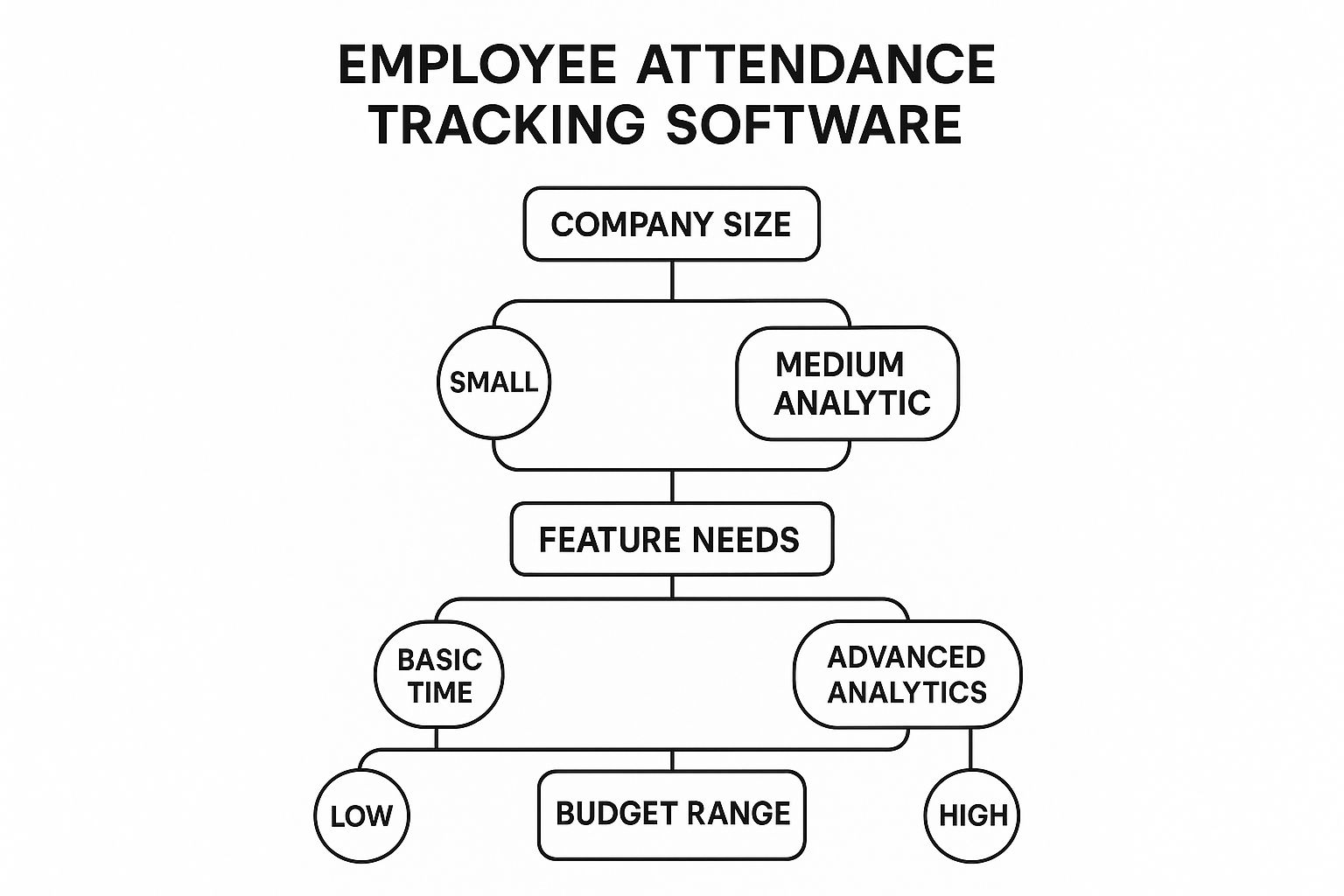
As you can see, once you define your core operational needs, the path forward becomes much clearer, making it far easier to weed out the tools that just won't work for you.
Prioritize Scalability and Growth
A classic mistake is picking a system that only fixes today's problems. Your business isn't static, and your software needs to be able to grow with you. A solution that’s perfect for 20 employees could become a frustrating bottleneck by the time your team hits 100.
Scalability isn't just about adding more users. It’s about the software’s ability to handle increased complexity, offer more advanced features as you need them, and integrate with other systems you may adopt in the future.
Think about where you'll be in five years. Are you planning to open new offices? Expand into different states with unique labor laws? Choosing a scalable platform from the start means you won't have to go through this whole stressful selection process all over again in a few years.
Champion the User Experience
Let's be honest—even the most powerful software is completely useless if nobody on your team wants to use it. The user experience (UX) for both your employees and managers is a massive factor in whether the software gets adopted successfully.
If clocking in is a complicated, five-step headache, employees will get frustrated and find ways around it. Likewise, if your managers can't easily pull reports or approve time-off requests, they'll just go back to their old spreadsheets, defeating the whole purpose of the investment.
Look for clean, intuitive interfaces that don’t require a user manual. A great system should feel almost effortless right from day one. In most cases, the best workforce management software is the one that makes everyone's job simpler, not more complicated.
Create a Vendor Comparison Checklist
So, you've got a shortlist of potential software vendors. Now it's time to dig in and ask the tough questions. Don't just take their marketing materials at face value; you need to ask direct questions that get to the heart of your specific needs. This puts you in the driver's seat.
Here’s a simple checklist to help you compare your options and make a smart, informed decision.
| Evaluation Criteria | Vendor A | Vendor B | Vendor C |
|---|---|---|---|
| Seamless Payroll Integration | ☐ | ☐ | ☐ |
| Reliable Customer Support | ☐ | ☐ | ☐ |
| Robust Data Security | ☐ | ☐ | ☐ |
| Easy Onboarding Process | ☐ | ☐ | ☐ |
| Transparent Pricing (No Hidden Fees) | ☐ | ☐ | ☐ |
| Mobile App for On-the-Go Teams | ☐ | ☐ | ☐ |
| Scales with Business Growth | ☐ | ☐ | ☐ |
By methodically checking each potential tool against your list of non-negotiables, you can confidently pick an employee attendance tracking software that not only solves your current headaches but is ready to support your company for years to come.
A Smooth Rollout for Your New System

Picking the right employee attendance tracking software is a huge step, but it's only half the journey. The real make-or-break moment is the rollout. A clumsy launch can cause confusion, throw a wrench in daily workflows, and lead to serious pushback from your team—undermining your investment before you see a single benefit.
But with a bit of strategy, you can ensure a smooth transition that gets everyone on board and starts delivering results from day one. Think of it less like a disruptive overhaul and more like a carefully planned upgrade that simply makes everyone's job easier. The key is to manage the process with crystal-clear communication and a solid game plan.
A successful launch isn't just about flipping a switch; it's about getting your data, your systems, and most importantly, your people ready for a positive change.
Secure and Accurate Data Migration
Your first big technical step is moving all your existing employee data into the new system. This is where the rubber meets the road. Any mistakes here can snowball into major payroll and HR headaches later on, so getting it right is non-negotiable.
The goal is a clean, seamless transfer of every piece of essential information—no lost data, no corrupted files.
- Start with a Data Audit: Before you even think about moving anything, clean up your current records. Get rid of duplicate entries, fix outdated information, and make sure everything is formatted consistently.
- Perform a Test Migration: Work with your software provider to run a small-scale trial run. Migrating data for a single department or a small group will help you spot any mapping issues or glitches before you commit to the full transfer.
- Verify the Results: Once the full migration is done, double-check everything. Run a sample payroll report to confirm that hours, pay rates, and leave balances have all landed in the right place.
Taking a methodical approach here prevents a world of hurt and ensures your new software starts on the right foot with clean, reliable data.
Choose Your Launch Strategy: Phased or Full
Next up, you need to decide how you'll go live. You've got two main options, and the right choice really depends on your company's size, complexity, and how comfortable your team is with new tech.
A phased rollout means you introduce the software one department or team at a time. This is a great way to minimize risk, as any initial hiccups are contained to a small group. It also lets you collect feedback and fine-tune your training before rolling it out to everyone.
A full launch, often called a "big bang" approach, means the entire organization starts using the new system on the same day. While it’s faster and gets everyone on the same page at once, it demands flawless planning and total confidence that your system is configured perfectly.
For most companies, a phased rollout is the safer, more manageable bet. It gives you room to breathe and make adjustments along the way.
Develop a Clear Communication and Training Plan
You could have the best employee attendance tracking software on the planet, but if your team doesn’t get why you’re using it or how it works, it’s doomed to fail. A proactive communication and training plan is absolutely essential for getting everyone on board.
Your goal here is to build excitement and understanding, not just hand down a new set of rules.
- Communicate the "Why": Kick things off by explaining how this benefits them. Talk about easier time-off requests, more accurate paychecks, and a clear view of their own hours. Frame it as a tool that helps them, not just a way for management to keep tabs.
- Provide Hands-On Training: Set up training sessions that are tailored to different groups (employees, managers, HR). Ditch the boring lecture and focus on the practical, real-world tasks they'll be doing every day.
- Offer Ongoing Support: Create a simple resource hub with quick-start guides, FAQs, and the contact info for a designated support person. This makes sure no one feels stranded after the initial training wraps up.
Managing Attendance for Remote and Hybrid Teams
The classic 9-to-5 workday has fundamentally changed. With teams scattered across different cities, time zones, and home offices, the old ways of tracking who’s working when are simply broken. Managing a distributed workforce isn't about giving up on accountability; it's about finding a smarter way to balance trust and transparency.
This is exactly where employee attendance tracking software comes in. It’s not about watching every mouse click. Instead, it’s about creating a fair and clear system for logging work hours, no matter where an employee is physically located. These tools give you the structure to make sure everyone is paid correctly for their time.
Fostering Accountability from Anywhere
For managers of remote teams, the biggest headache is often maintaining visibility without destroying trust. The right software solves this by shifting the focus from physical presence to actual output and accurate time logs. It builds a foundation of accountability that empowers everyone involved.
Here are a few key features that make this possible:
- Secure Web and Mobile Clock-Ins: Employees can log their hours from any device, whether they’re at their kitchen table, a coworking space, or on the move.
- GPS Verification and Geofencing: For field teams or hybrid employees who need to be at specific job sites, this feature adds a layer of confirmation when they clock in.
- Project-Based Time Logging: Staff can assign their hours to specific tasks or projects. This gives managers a clear picture of productivity and how work is distributed, without needing constant status updates.
Ultimately, these tools change the conversation from, "Are you at your desk?" to, "Is the work getting done effectively?" This approach cultivates a culture of independence and responsibility, which is the lifeblood of any successful flexible work setup.
Supporting a Distributed Workforce with Data
You can't manage what you can't see, and for remote teams, data is everything. Employee attendance software gives managers the insights they need to support their people properly. By seeing workload patterns and logged hours, they can spot potential burnout before it happens or rebalance tasks to keep things fair.
This move toward digital tracking isn't just a fleeting trend. It’s a direct answer to the challenges of modern work, built to boost productivity and cut down on absenteeism in distributed teams.
The market growth tells the same story. The attendance management software industry was valued at around USD 2.5 billion and is expected to hit USD 5.2 billion by 2033. This surge shows just how vital these tools have become for companies adjusting to new ways of working. You can read more about attendance software market forecasts to get the full picture of this industry-wide shift. By adopting this technology, businesses can build a productive, accountable, and supportive culture for every team member, no matter where they call their office.
Frequently Asked Questions
It's completely normal to have questions when you're looking at something as central to your business as employee attendance tracking software. You’re likely wondering about the legal side of things, how it actually works, and if it will play nicely with the systems you already use.
Let's clear up some of the most common questions that pop up for business owners and HR managers.
Is This Kind of Software Legal to Use?
Yes, absolutely. For most businesses, not only is it perfectly legal to track your employees' work hours, but it's often a legal requirement. Think of regulations like the Fair Labor Standards Act (FLSA)—accurate timekeeping is your best defense if a wage or hour dispute ever comes up.
The key thing to watch, however, is how you track that time. If you're considering biometrics like fingerprint scanners or facial recognition, you'll need to be aware of stricter privacy laws that some states and countries have on the books. It's always a smart move to have a quick chat with a legal expert to make sure your chosen method is fully compliant with local rules.
How Does It Prevent Buddy Punching?
"Buddy punching"—where one employee clocks in for a coworker who's running late or absent—is a classic form of time theft that manual systems are powerless against. This is where modern employee attendance tracking software really shines.
By using technology for verification, you simply take away the opportunity for dishonest time reporting. This one change can save a company thousands of dollars a year in wages paid for hours that were never actually worked.
Here are a few ways it stops buddy punching in its tracks:
- Biometric Scanners: Fingerprint or facial recognition makes it physically impossible for someone else to clock in for another person.
- Geofencing: Mobile apps can be set up to only allow clock-ins from a specific location, like your office building or a particular job site.
- IP Address Restrictions: For employees clocking in on a computer, you can lock it down so they can only do it from your office's specific IP address.
Will It Integrate with My Payroll System?
This is one of the most critical features you should be looking for, and the short answer is yes. Most reputable attendance tracking platforms are built from the ground up to integrate seamlessly with popular payroll software.
Think about the old way: your HR team would spend hours manually typing data from timesheets into your payroll system. Every entry was a chance for a typo or a miscalculation. With an integration, all the approved hours flow directly from one system to the other with just a click. This connection doesn't just save a ton of administrative time; it virtually eliminates the risk of costly payroll mistakes.
Ready to put attendance headaches and low productivity behind you? DeskCove offers a powerful, user-friendly solution to track time, manage projects, and keep your remote teams accountable. See how our employee attendance tracking software can transform your business. Learn more at https://deskcove.com.