How to Estimate Project Time and Beat Deadlines
To get a project time estimate right, you need to do more than just guess. It’s about methodically breaking down the work, picking the right estimation technique—like bottom-up or PERT—and then smartly building in a buffer for the curveballs you know are coming. This transforms your estimate from a hopeful shot in the dark to a data-backed forecast, laying the groundwork for a project that actually finishes on time.
Why Most Project Time Estimates Are Wrong
Let’s be real for a minute: project delays are a universal headache. A missed deadline is never just a missed deadline. It triggers a painful chain reaction of eroded stakeholder trust, busted budgets, and a team that’s completely burned out and frustrated. Nailing your estimates isn’t just a nice-to-have; it's a career-defining skill for any manager.
So, where do things go wrong? Too many estimates are built on pure optimism instead of cold, hard reality. We all fall victim to the planning fallacy—that pesky cognitive bias where we lowball the time a task will take, even when we have a clear memory of similar tasks running long in the past. It’s here that the process becomes both an art and a science, a delicate dance between hard data and seasoned judgment.
The Real-World Impact of Poor Estimation
Inaccurate timelines aren't just an inconvenience; they're a primary cause of project failure. A 2018 study from the Project Management Institute (PMI) found that 25% of professionals cited inadequate time estimation as a key reason their recent projects failed. That number really drives home how crucial realistic forecasting is.
When an estimate is off, the fallout can be brutal:
- Budget Overruns: Time is money. When the clock keeps ticking, so do the costs for labor, resources, and overhead.
- Reduced Quality: To hit an impossible deadline, teams have no choice but to rush. That means cutting corners, skipping steps, and shipping subpar work.
- Damaged Reputation: Consistently missing deadlines destroys credibility, both for you and your entire organization.
- Team Burnout: Nothing drains a team faster than the constant pressure of an unrealistic timeline. It's a surefire recipe for stress and high turnover.
Mastering how to estimate project time isn't about predicting the future with a crystal ball. It's about creating a realistic roadmap that guides your team, manages stakeholder expectations, and ultimately ensures you deliver on your promises.
A classic mistake, especially for teams juggling a lot, is underestimating the sheer complexity of everything on their plate. Getting good at strategies for managing multiple projects simultaneously can make a huge difference in your forecasting accuracy. By ditching the wishful thinking for a structured approach, you build a reputation for rock-solid, reliable delivery. This guide will walk you through the core principles to get you there.
Blueprint Your Project with a Work Breakdown Structure
You can't accurately estimate what you can't clearly see. Before you even think about a timeline, you have to deconstruct the entire project into tangible, manageable pieces. This is the foundational process that turns a vague concept into a real plan, and it's your first step toward estimating project time with any confidence.
This is where the Work Breakdown Structure (WBS) comes in. Don't think of it as some stuffy corporate formality; it’s your best tool for getting absolute clarity and control over the work ahead. A WBS is simply a hierarchical breakdown of everything your team needs to do to hit your project goals and deliver what's required.
From Big Ideas to Small Tasks
Creating a WBS means breaking down a large project into smaller, more digestible components. You start at the very top—the final project outcome—and then drill down into more and more detail. The goal is to get to a level where you can confidently assign resources and estimate the time needed for each individual piece of work.
Let’s say you're launching a new feature for a software application. A high-level view just isn't enough to build an estimate from. You need to break it down.
- Level 1 Project: New User Dashboard Feature
- Level 2 Deliverables: UI/UX Design, Backend Development, Frontend Development, QA Testing, Launch Marketing.
- Level 3 Work Packages: Under "UI/UX Design," you might have "Wireframing," "Mockup Creation," and "Prototype Testing."
- Level 4 Activities: And under "Wireframing," you'd list specific tasks like "Draft initial layout concepts" and "Gather stakeholder feedback on wireframes."
This granular approach makes sure nothing critical gets overlooked. When tasks are invisible, their associated time is too, which is a classic recipe for schedule overruns.
A common pitfall is stopping the breakdown too early. A task like "Build Frontend" is still way too broad to estimate accurately. You have to keep breaking it down until you have tasks that a single person or small team can complete in a clear, measurable timeframe.
Finding the Sweet Spot for Detail
So, how deep do you go? The key is finding that sweet spot between getting enough detail for an accurate estimate and getting lost in the weeds of micromanagement. A solid rule of thumb is the 8/80 rule: a single work package should take no less than eight hours and no more than 80 hours of effort.
This keeps tasks from being so tiny they're a pain to track, or so huge they're basically mini-projects hiding their own risks. Striking this balance is what makes a WBS truly useful. For a deeper dive, you can explore more on how work breakdown structures simplify project management and bring order to complex initiatives.
Why Involving Your Team Is Non-Negotiable
Building a WBS should never be a solo mission. In fact, involving your team at this stage is one of the most powerful moves you can make for your project's success. The people who will actually do the work have the most realistic grasp of what each task entails.
When you bring them into the process, a few critical things happen:
- Uncover Hidden Tasks: Your developers, designers, and marketers will instantly point out the "in-between" tasks you might have missed—things like code refactoring, data migration, or creating specific ad creatives.
- Build Ownership and Buy-in: When team members help build the plan, they feel a sense of ownership. They're far more committed to a timeline they had a hand in creating.
- Improve Estimate Accuracy: They can give you much sharper time estimates for tasks in their wheelhouse, replacing your educated guesses with data backed by real-world experience.
Ultimately, a well-crafted WBS transforms a daunting project into a clear series of achievable steps. It becomes the blueprint for your timeline, resource allocation, risk assessment, and communication—setting the stage for every estimation technique that follows.
Choosing the Right Estimation Technique
Once you have a solid Work Breakdown Structure (WBS) in place, you can finally move on to the real meat of the process: picking your estimation technique. Let's be clear, there’s no silver bullet here. The best method really boils down to your project's complexity, how much historical data you can dig up, and just how accurate you need to be.
Nailing this choice is a huge step toward learning how to estimate project time without pulling your hair out. The WBS is your foundation, turning a huge, intimidating project into a series of smaller, more digestible tasks you can actually wrap your head around.
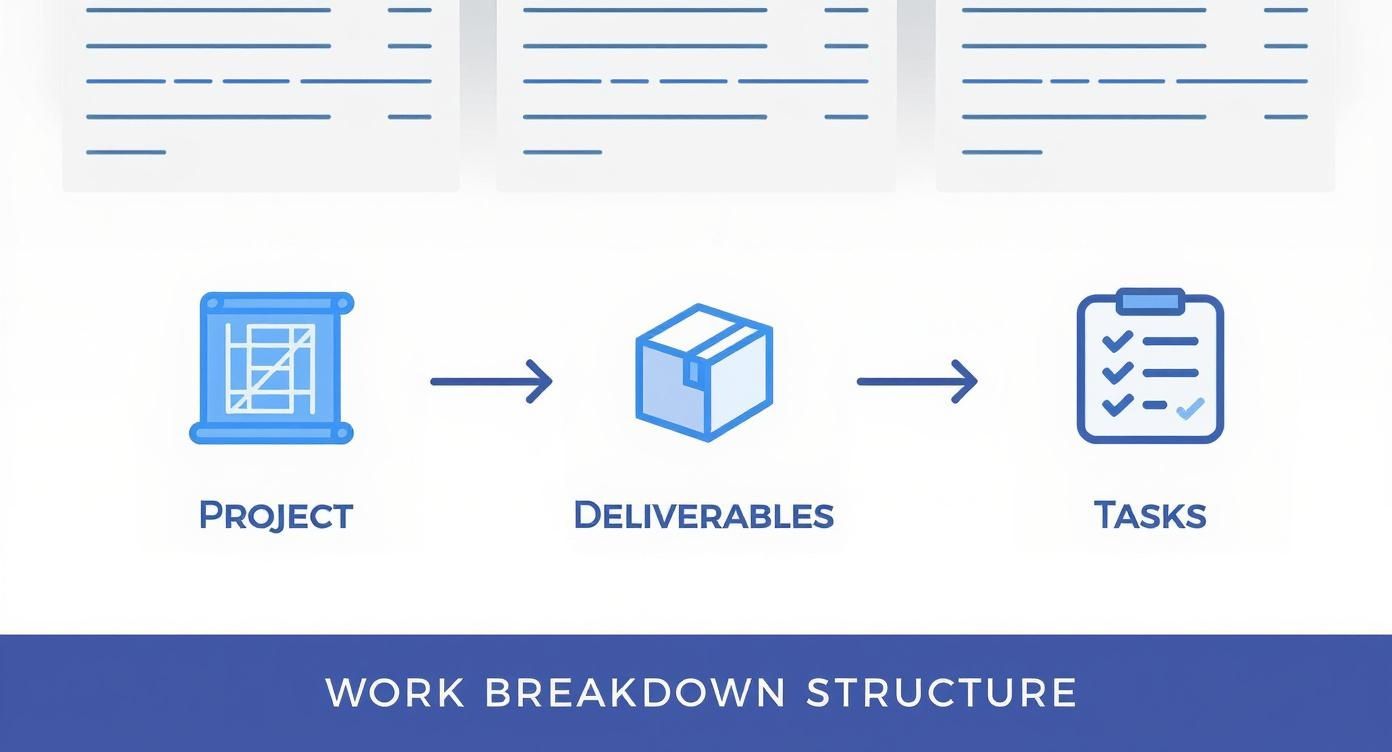
This breakdown is what makes almost every reliable estimation method possible. It turns "build a new app" into a checklist you can actually work with.
Top-Down vs. Bottom-Up Estimation
The two big-picture approaches you'll hear about most are top-down and bottom-up. Think of them as two different ends of a telescope.
Top-Down Estimation (Analogous) is the "back-of-the-napkin" approach. You look at a similar project you've done before and use its timeline as a starting point. If the last website you built took 400 hours, you might pencil in a similar number for the new one. It's fast, doesn't require a ton of detail, and is perfect for those early conversations when a stakeholder just wants a ballpark figure.
The catch? It's an educated guess at best. If the new project has any hidden quirks or unique demands, your estimate can be wildly off.
Bottom-Up Estimation is the complete opposite and is the direct payoff for creating a great WBS. You take each tiny task from your breakdown and estimate the time it will take. Then, you just add it all up. Simple in concept, but powerful in practice.
This method is far more accurate because it’s built from the ground up, based on the actual work that needs to get done. It takes more effort upfront, but the timeline you get is defensible and realistic. Plus, getting the team members who will actually do the work involved in the estimation process leads to much stronger buy-in.
The Power of Three-Point Estimation (PERT)
One of the biggest mistakes I see is asking someone, "How long will this take?" and just accepting the first number they give you. That single number is a single point of failure. In fact, the classic single-point estimation method has a success rate of less than 30%. To create timelines that can withstand a little turbulence, you need to embrace uncertainty.
This is where Three-Point Estimation shines. Instead of asking for one number, you ask for three:
- Optimistic (O): The absolute best-case scenario. No interruptions, no unexpected bugs, just smooth sailing.
- Most Likely (M): The realistic guess. This is the number you’d probably give if you could only pick one, accounting for a few minor hiccups.
- Pessimistic (P): The worst-case scenario. Murphy's Law is in full effect, and everything that can go wrong, does.
With those three figures, you can use the PERT (Program Evaluation and Review Technique) formula to get a weighted average. The formula smartly gives more weight to the "most likely" scenario.
PERT Formula: Expected Time = (O + 4M + P) / 6
Let's say you're estimating a "Develop user login module" task.
- Optimistic (O) = 16 hours
- Most Likely (M) = 24 hours
- Pessimistic (P) = 40 hours
Plugging those into the formula: (16 + 4*24 + 40) / 6 = (16 + 96 + 40) / 6 = 152 / 6 = 25.3 hours.
Notice how that final number is a bit higher than the "most likely" estimate? That's your built-in buffer for reality. It changes the conversation from a fragile guess to a strategic discussion about risk.
When to Use Parametric Estimation
Parametric Estimation is for when you have solid data and repeatable work. It’s a more statistical approach where you use a known metric from past projects to calculate a new estimate.
For example, if you know from experience that your content team edits 100 words in 0.5 hours on average, you can confidently estimate that a 5,000-word article will take 25 hours to edit. This is especially useful in software, where a deep understanding of the typical mobile app development timeline can give you the key variables needed for this kind of math.
This method can be incredibly accurate, but it lives and dies by the quality of your historical data. It’s most common in fields like construction (cost per square foot) or software development (time per story point).
To make the choice a little easier, I've put together a table comparing these techniques. And if you want to go even deeper, you can explore other project estimation techniques as well.
Comparison of Project Time Estimation Techniques
This table breaks down the four main estimation techniques, helping you see at a glance which one might be the best fit for your current situation.
| Technique | Best For | Required Inputs | Accuracy Level |
|---|---|---|---|
| Analogous (Top-Down) | Early-stage estimates, quick ballpark figures when data is limited. | Historical data from similar past projects. | Low |
| Bottom-Up | Detailed planning when accuracy is critical and project scope is clear. | A complete Work Breakdown Structure (WBS). | High |
| Three-Point (PERT) | Projects with high uncertainty or risk, especially in R&D or tech. | Optimistic, Most Likely, and Pessimistic estimates for each task. | Medium to High |
| Parametric | Scalable and repetitive tasks with reliable historical data. | Key project parameters and historical performance data. | High |
In the real world, most seasoned project managers mix and match. You might start with a top-down estimate to get a project approved, then switch to a detailed bottom-up plan using three-point estimates for each task to build the final schedule. This hybrid approach gives you the best of both worlds: the speed of high-level guessing and the accuracy of detailed planning.
How to Build Buffers and Plan for Risks
Let's be honest: an estimate without a buffer is just a guess waiting to fail. I've yet to see a project that's completely immune to unexpected delays, scope changes, or those frustrating roadblocks that pop up out of nowhere. A huge part of learning how to estimate project time is ditching the rose-colored glasses and building a realistic cushion for uncertainty.
This isn't about pulling a random number out of thin air. Slapping a generic 20% buffer onto your timeline is a lazy habit that can quickly undermine your credibility. Instead, we're going to take a smart, data-driven approach to risk planning that creates a justifiable safety net stakeholders will actually understand and respect.
Contingency vs. Management Reserves
First, it’s critical to understand the two main types of buffers. They address different kinds of uncertainty and are managed completely separately.
-
Contingency Reserve: This is for the "known unknowns." These are the risks you can identify and anticipate during planning. Think of a key developer getting sick, a third-party API having an outage, or stakeholder feedback taking a week longer than promised. This buffer is part of your baseline schedule and is managed directly by the project manager.
-
Management Reserve: This is for the "unknown unknowns." These are the major, unforeseeable events completely outside your project's control, like a sudden company-wide budget freeze or a major shift in market strategy. This buffer is not part of your project baseline and requires a sign-off from senior management to be used.
For most of your day-to-day project estimation, your focus will be on building a solid contingency reserve.
A well-calculated buffer isn't a sign of weakness; it's the mark of a seasoned project manager who knows reality rarely follows a perfect plan. Think of it as your project’s insurance policy against predictable disruptions.
Conduct a Simple Risk Assessment
To build a buffer that actually makes sense, you have to know what you’re buffering against. A risk assessment doesn't need to be some exhaustive, multi-week process. A simple workshop with your team can uncover most of the potential threats you'll face.
Start by brainstorming potential risks for your project. Get everything on the table, from technical hurdles and resource constraints to external dependencies. Once you have a list, you can evaluate each risk using a simple probability and impact matrix.
This tool is incredibly helpful for prioritizing which risks deserve your attention and, by extension, the biggest time buffer. You'll score each risk on two key factors:
- Probability: How likely is this to happen? (e.g., 1=Very Unlikely, 5=Very Likely)
- Impact: If it does happen, how bad will the delay be? (e.g., 1=Insignificant, 5=Catastrophic)
Multiplying these two scores gives you a clear risk rating. A risk with high probability and high impact (like a score of 25) demands a much more significant contingency plan than one with a low score. For instance, the risk of a senior developer leaving mid-project might have a low probability but a catastrophic impact, which means you need a serious plan B.
This challenge of schedule overruns is especially pronounced in certain sectors. A McKinsey report highlighted that 81% of public sector IT projects run over schedule, compared to a still-high 52% in the private sector.
Building a Data-Driven Buffer
Once you’ve identified and prioritized your risks, you can assign a time buffer to the highest-scoring items. Instead of guessing, try to quantify the potential delay. For example, if a key software integration has a high risk of failure, estimate the actual time needed for a manual workaround. That specific time estimate becomes the contingency for that risk.
When you sum the buffers for your top risks, you get a total contingency reserve that is directly tied to specific, plausible scenarios. This makes your timeline far more defensible when stakeholders inevitably push back. You can clearly explain, "We added 16 hours to this phase to account for the risk of X, which we've rated as highly probable." That kind of transparency builds trust and highlights your foresight.
This proactive approach also helps you manage one of the most common project threats. Learning how to reduce project scope creep effectively is essential, as unplanned changes are a primary reason buffers get eaten up. With a clear, risk-based buffer in place, you create a much stronger foundation for managing those inevitable change requests.
Validating Estimates and Creating a Feedback Loop
An estimate is just a bunch of numbers on a spreadsheet until your team and stakeholders actually believe in it. The last, and maybe most important, step in learning how to estimate project time is turning that forecast into a plan everyone can get behind. This means presenting your timeline, being totally transparent about how you got there, and confidently explaining the buffers you’ve built in.
This is usually when the pressure cooker gets turned on. Stakeholders might push back, ask for impossible timelines, or suggest cutting corners to speed things up. Knowing how to handle this conversation without sacrificing the project's quality is a skill you'll hone over time. It’s all about shifting the discussion from, "Can we do it faster?" to, "What trade-offs are we all willing to accept?"
Presenting Your Timeline with Confidence
When you walk into that meeting, don't just throw the final number on the screen. Tell the story of the estimate. Walk them through the Work Breakdown Structure you created, explain the method you used (like Bottom-Up or PERT), and show them exactly how you calculated the contingency based on real, specific risks.
Being this transparent accomplishes two huge things:
- It builds credibility: It proves your timeline isn’t just a wild guess. It's a thoughtful forecast rooted in a clear process and actual data.
- It heads off questions: By explaining your logic upfront, you answer most of their objections before they even have a chance to ask.
If a stakeholder insists on a shorter timeline, your first answer shouldn't be "no." Instead, present them with clear choices. For example, explain that to hit a tighter deadline, you'd need to either reduce the project's scope ("We can meet that date, but we'll have to cut the advanced reporting feature") or add more resources ("We could make that work if we bring on another developer"). This simple pivot reframes you as a strategic partner, not a roadblock.
An estimate is a conversation starter, not a final verdict. Use it to get everyone aligned on what's truly possible with the current scope, time, and resources. It's your single best tool for managing expectations.
The Power of an Estimation Feedback Loop
Want to know the secret to getting better at estimating? Stop guessing and start measuring. This is where you create a feedback loop—a simple system for comparing your estimates against the actual time your team spends on tasks. This isn't about micromanaging or breathing down your team's neck; it's about collecting priceless data that will make every single one of your future estimates sharper.
This simple process turns every project into a learning opportunity. Over time, you’ll build a rich, internal history of how long work actually takes your team to complete. That kind of specific, real-world data is infinitely more valuable than any generic industry benchmark.
Using Time Tracking to Refine Your Skills
Setting up a feedback loop is much easier than it sounds. It all comes down to using a straightforward time-tracking tool to capture real-world effort. The goal is to make it painless for your team to log their hours against the specific tasks you already outlined in your WBS.
Here’s how this data completely changes your estimation game:
- It Pinpoints Bottlenecks: You might suddenly realize that tasks like "QA Testing" or "Client Revisions" consistently take twice as long as you thought. That's a massive flashing sign to adjust your formulas for the next project.
- It Gives You Historical Data: When a similar project pops up, you're not relying on fuzzy memory or a rough guess anymore. You can pull up hard data showing that a comparable feature took exactly 120 hours of development time last quarter.
- It Improves Your Team's Estimates: When team members can see their own data, their ability to estimate new tasks skyrockets. They're no longer relying on gut feelings; they're using their own hard evidence.
- It Justifies Your Timelines: Historical data is your best weapon against pressure to slash estimates. You can walk into any meeting and say with confidence, "Based on our last three projects like this, a task of this complexity has never taken less than 40 hours."
Think of it like this: without tracking your actuals, every new estimate starts from zero. With a feedback loop in place, each project builds on the last, creating a cycle of continuous improvement that makes your team more predictable, reliable, and ultimately, more successful.
Frequently Asked Questions About Time Estimation
Even with the best techniques, certain questions always pop up when you're in the trenches of project management. Learning how to estimate project time is an ongoing process, and these common queries can help clarify the practical challenges you'll face along the way.
How Do You Estimate Time For a Project You Have Never Done Before?
This is a classic challenge. When you’re staring at a project that's completely new territory, you have to get creative and blend a few strategies. I always start with Analogous Estimation, looking for projects that feel similar in size or complexity, even if they’re from a totally different field. The goal isn't perfect accuracy, but finding a rough benchmark to get you started.
Next, you absolutely must lean on expert judgment. Bring in people who have been down this road before, whether they're internal colleagues or external consultants. Their insights are gold for spotting the landmines you can't see yet.
Finally, your Work Breakdown Structure (WBS) is your lifeline. Break that massive, unknown project into the smallest, most granular tasks you can think of. For each of these tiny tasks, apply a Three-Point Estimate (Optimistic, Pessimistic, Most Likely) to bake in the high level of uncertainty.
When you're dealing with the unknown, your contingency buffer isn't just a good idea—it's non-negotiable. For a novel project, build in a significantly larger buffer than you normally would. It’s for the "unknown unknowns" that are almost guaranteed to surface.
What Is the Best Way to Handle Pressure to Reduce an Estimate?
We've all been there. A stakeholder looks at your carefully calculated timeline and asks for it to be done faster. The gut reaction is to just start cutting numbers, but that's a recipe for disaster. Instead, reframe the conversation around trade-offs. Your job is to make the consequences of that shorter timeline crystal clear.
You want to present the decision as a strategic choice with direct impacts on scope, quality, or resources. This completely shifts the dynamic. You're no longer the roadblock; you're a strategic partner helping them make an informed decision.
Here are a few ways I like to frame it:
- Scope: "We can definitely hit that new deadline, but it means we'll need to remove Feature X and push Feature Y to the next phase. Are we all aligned on that?"
- Resources: "That timeline is achievable, but it will require bringing another developer onto the team for the next six weeks. I can get the cost estimate for that."
- Quality: "If we accelerate that quickly, we'll have to cut our standard QA testing period in half. That significantly increases the risk of post-launch bugs we'll have to fix later."
This approach puts the ball in their court and forces a real discussion about priorities. It makes stakeholders accountable for the decision, ensuring everyone understands what's being sacrificed to hit the new target.
How Often Should I Re-Estimate During a Project?
Your initial estimate isn't a sacred document set in stone. Think of it as a living forecast that should evolve as the project does. Re-estimation needs to be a regular part of your management rhythm, not a one-and-done activity.
For projects running with an Agile methodology, this process is naturally baked in. Estimates are constantly being refined during sprint planning as the team learns more about the work. It's just part of the flow.
In more traditional or Waterfall projects, you should plan to formally review and adjust your timeline at key milestones or phase gates. More importantly, any time a major change request gets approved or a significant, unforeseen issue pops up, it’s time to re-evaluate the entire timeline. This proactive approach keeps your schedule a useful, realistic tool from start to finish.
Ready to stop guessing and start measuring? DeskCove provides the simple, powerful time-tracking tools you need to build a feedback loop, refine your estimates, and deliver projects with confidence. See how actual data can transform your project planning by visiting https://deskcove.com today.