How to Track Billable Hours Like a Pro

Figuring out how to track billable hours boils down to three simple things: deciding what actually counts as billable, picking a method and sticking with it (like software or even a spreadsheet), and getting into the habit of logging time as you go. This isn't just about paperwork; it's the bedrock of a transparent and profitable business.
Why Accurate Time Tracking Is a Game Changer
Let’s be honest, tracking billable hours can feel like a real chore. But it's so much more than a box you tick before sending an invoice. Think of it as the central nervous system of your entire service-based business. When you let it slide, you’re not just risking a few missed dollars—you're flying blind.
Every un-tracked five-minute phone call, every quick email you fire off… it all adds up. Spread that across a team and an entire year, and those "lost" minutes can easily turn into thousands of dollars in revenue left on the table. This isn't a hypothetical; it's what happens when freelancers and agencies try to piece together their workweek from memory.
Beyond Billing: Uncover Hidden Business Insights
Sure, getting paid for every minute is the main goal, but accurate time logs are also your secret weapon for making smarter business decisions. This data gives you a crystal-clear picture of where the time really goes, which is invaluable for quoting new projects and planning your team's workload.
For instance, you might feel like "initial client onboarding" is a time sink. Your time data will prove it. You'll see a clear pattern across projects, allowing you to adjust future quotes with confidence instead of just guessing.
This kind of detailed insight helps you answer the tough questions:
- Who are my most profitable clients? Sometimes the client with the biggest invoice also demands the most non-billable hand-holding.
- Where are our workflow bottlenecks? The data might show your design team spends 30% of their time on revisions, pointing to a fuzzy briefing process that needs fixing.
- How can we accurately forecast our workload? With historical data, you can predict how many hours the next project will actually take, preventing you from overcommitting your team and causing burnout.
Accurate time tracking shifts your mindset from just 'getting paid' to strategically building a more efficient and sustainable business. It’s the difference between constantly reacting to problems and getting ahead of them.
Building Unshakable Client Trust
Transparency is everything in a client relationship. When you send an invoice backed by a detailed, accurate time log, you kill any ambiguity right out of the gate. A vague invoice just begs for questions and skepticism.
A detailed breakdown, on the other hand, screams professionalism. It shows the client exactly what they paid for—the research phase, the client calls, the draft revisions, all of it.
This level of detail doesn't just justify your bill; it showcases the real value and effort you're putting in. Clients can see the expertise at work, which builds confidence and turns a one-off project into a long-term partnership.
Ultimately, learning why you should integrate time tracking into your workflow now is less about watching the clock and more about proving your value. It turns an administrative headache into a powerful strategic advantage.
Choosing Your Tracking Toolkit: Manual vs. Automated
Once you're committed to tracking your hours, the next big decision is how. You’re essentially at a fork in the road with two main paths: the old-school manual route with spreadsheets or the modern approach with automated software.
This isn't just a minor choice; it fundamentally shapes your daily workflow. Let's be honest about the options.
The manual method, usually a simple spreadsheet, is the default for many freelancers and small teams just getting their feet wet. Its biggest appeal? It’s free and you can start right now without learning new software. A basic time log can be up and running in minutes.
But that simplicity is deceptive. Manual tracking is a magnet for human error. A forgotten entry on a chaotic Friday or a tiny typo in a formula can snowball into inaccurate invoices and, ultimately, lost money. It also eats up precious time you should be spending on actual billable work.
The Case for Manual Time Tracking
If you're a one-person shop with just a couple of clients, manual tracking can absolutely work—for a while. The secret is discipline. You need an unshakable habit of logging your time immediately after finishing a task, not hours later when the details get fuzzy.
Manual tracking still makes sense in a few specific situations:
- Zero Budget: When you literally have no money for software, a spreadsheet is a practical, no-cost starting point.
- Simple Projects: If your work involves a few big, straightforward tasks instead of dozens of little ones, manual entry is less of a headache.
- Low Entry Volume: Tracking five entries a day is manageable. Trying to track thirty is a recipe for mistakes and burnout.
The biggest weakness of manual tracking isn't the spreadsheet itself—it's that it relies entirely on perfect human memory and discipline. One busy week is all it takes to derail your system, forcing you to guess your hours and leave money on the table.
Embracing Automated Solutions
This is where automated time tracking tools really shine. These platforms are built from the ground up to solve the problems that come with manual methods. They give you start-and-stop timers, capture your activity in the background, and spit out detailed reports with a few clicks.
This move toward automation isn't just a small trend. The global market for time tracking software was valued at a whopping USD 5.23 billion in 2023 and is expected to more than double to USD 12.3 billion by 2030. That growth says it all: businesses, especially in our remote and hybrid world, need reliable tools.
The image below highlights just how much of a difference the switch can make.
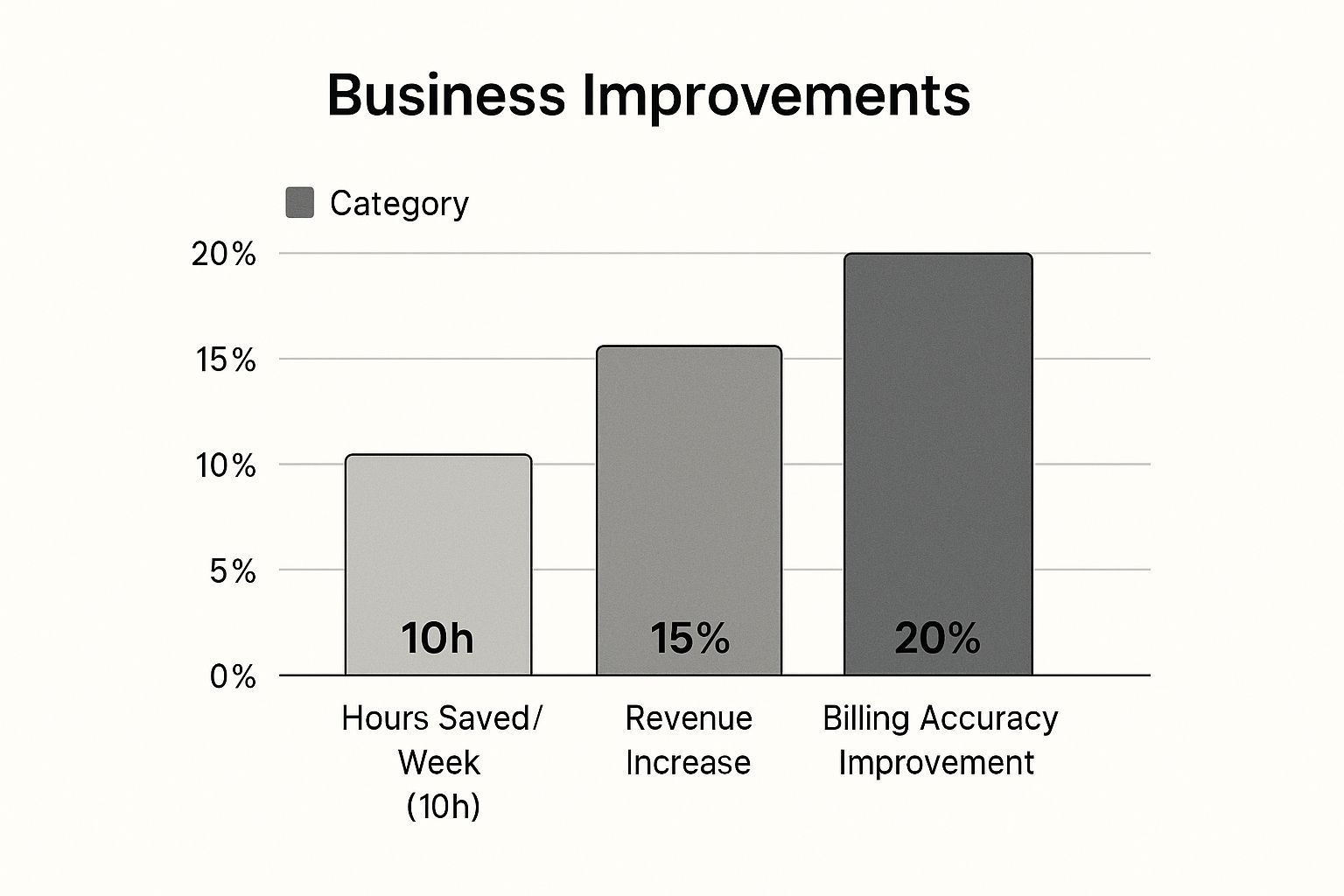
As you can see, the improvements go way beyond just saving time—they directly impact revenue and billing accuracy.
Yes, automated tools come with a subscription fee and a short learning period, but the return on that investment is often immediate. They get rid of the guesswork, give you solid proof to back up your invoices, and free up your mental energy for high-value client work. If you're ready to move on from manual entry, learning how to automate manual processes is a massive step toward better productivity.
Manual vs. Automated Time Tracking: A Head-to-Head Comparison
To make the choice clearer, let’s put these two approaches side-by-side. Think about your own needs for accuracy, your budget, and where you see your business going in the next year as you look over this table.
| Feature | Manual Tracking (e.g., Spreadsheets) | Automated Tracking (e.g., DeskCove) |
|---|---|---|
| Accuracy | Low to moderate; highly dependent on user discipline and prone to error. | High; captures time precisely with timers and background monitoring. |
| Time Investment | High; requires constant manual data entry, review, and calculations. | Low; timers and automated logging drastically cut down admin work. |
| Cost | Free to start; hidden cost is in lost time and unbilled hours. | Monthly or annual subscription; ROI comes from accuracy and efficiency. |
| Reporting | Limited; reports must be created by hand, making deep analysis hard. | Powerful; generates detailed, customizable reports on projects and clients. |
| Scalability | Poor; becomes a mess as your team or client list grows. | Excellent; easily scales with your business, supporting more users. |
| Client Transparency | Basic; provides a simple list of tasks and hours with little detail. | High; offers detailed breakdowns and activity logs that build client trust. |
Ultimately, the best toolkit depends on where your business is today and where you want it to be tomorrow. A spreadsheet might get you by for now, but an automated system is a long-term investment in your profitability, accuracy, and professional growth.
Setting Up Your Billable Hours System
Getting your time-tracking in place is where good intentions meet real work. Whether you’re sketching out spreadsheets or onboarding an automated platform, the initial setup is crucial. Nail this step, and you’ll save yourself from late-night reconciliations and lost billables down the road.
That clean, visual layout isn’t just eye candy. It guides you through defining projects, assigning team members, and kicking off time entries—all in a few clicks. In other words, modern tools turn what used to be a headache into a clear, step-by-step flow.
Defining Your Billable And Non-Billable Activities
Before anyone logs a minute, agree on what counts as billable. This is your shield against client disputes and inconsistent entries. Without it, every teammate makes their own call—and that’s a fast track to confusion.
A shared time-entry policy is your single source of truth.
Think of billable work as anything that delivers value directly to your client’s project. Meanwhile, non-billable time covers the overhead of running the show.
• Clearly Billable Activities:
– Direct Project Work: Design, writing, coding—tasks that create the final deliverable.
– Client Communication: Scheduled calls, meetings, and substantive emails.
– Project-Specific Research: Digging into solutions or strategies for a client’s unique needs.
– Revisions and Edits: Iterations driven by feedback.
• Typically Non-Billable Activities:
– Internal Team Meetings: Sync-ups that don’t move a client project forward.
– General Admin Tasks: Invoicing, proposals, file organization.
– Fixing Your Own Mistakes: Time spent correcting internal errors.
– Sales and Networking: Business development activities are an investment, not a client charge.
Once you’ve nailed this list, document it and share it with everyone. Then there’s no guesswork—just clear categories that keep revenue on track.
Structuring Your Projects And Tasks
With your activity policy locked down, it’s time to slice big initiatives into bite-sized pieces. A generic label like “Website Build” doesn’t tell you—or your client—much. Break it down into clear phases so every entry lands in the right bucket.
- Discovery & Strategy (Initial workshops and research)
- UX/UI Design (Wireframes, mockups, prototypes)
- Frontend Development (Visual coding)
- Backend Development (Server logic and databases)
- Content Integration (Text, images, media)
- Quality Assurance & Testing
- Client Handoff & Training
This approach brings two big wins:
• Faster, more accurate time entries for your team.
• Transparent, itemized invoices that build trust and minimize questions.
Setting Your Billable Rates And Increments
Finally, lay out the financial ground rules. Your billable rate needs to reflect expertise, overhead, and the value you deliver. It’s common to have different rates for strategy versus execution or senior versus junior team members.
Then decide your billing increment—the smallest chunk of time you’ll invoice. Most firms settle on a six-minute increment (0.1 hour). Here’s how that plays out:
• A 3-minute task → 0.1 hours
• An 11-minute task → 0.2 hours
• A 20-minute task → 0.4 hours
Billing in six-minute increments balances precision with practicality.
That way, you never give away free work on quick tasks, and your invoicing math stays straightforward. Be sure to spell out both your rates and increments in your client agreement before the first minute is even tracked. This upfront clarity keeps everyone aligned and protects your bottom line.
Nailing the Art of Flawless Time Tracking
Keeping your daily time logs accurate isn't just about good bookkeeping—it's about honest, stress-free billing. The secret? Log your time as the work happens.
This simple habit eliminates the memory gaps that creep in by the end of the day. It’s far more effective than trying to piece together your hours later, which almost always results in leaving money on the table.

Why Tracking in Real-Time Just Works
Think of real-time tracking like a fitness tracker for your workday; it sharpens your focus and keeps you honest. For instance, when you name an entry with a clear description the moment you finish a task, you’re building a rock-solid defense against future invoice questions.
This small step means sending cleaner invoices that don't get held up by client pushback. It’s about being proactive, not reactive.
- Immediate Timers: Simply starting and stopping a timer as you switch tasks ensures no billable minute gets lost in the shuffle.
- Descriptive Notes: A few words about what you did ("Drafted Q3 marketing proposal – sections 1 & 2") keeps clients informed and confident in your billing.
- Automated Reminders: If you’re using software, let it nudge you. Those little reminders to log your time are what build unbreakable habits.
Of course, even the best systems need a quick check-up. I recommend a quick weekly review of your logs to catch any weirdness like duplicate entries or missing project tags. These small five-minute checks prevent big headaches before you even think about invoicing.
Dodging Invoice Disputes Before They Happen
Detailed task descriptions are your best armor against billing disputes. A line item that reads “Email follow-up on Q2 report” is infinitely better than just “Email.” That clarity gets invoices approved faster, period.
When clients see that every minute is accounted for, it reinforces trust and showcases your professionalism. That confidence is what leads to smoother contract renewals and more referrals down the line.
“Clear time entries are worth their weight in gold when it comes to client trust.”
Every tiny mistake in your logs can plant a seed of doubt. By regularly reconciling your entries, you ensure everything is accurate and defensible. This isn't tedious admin work; it's bolstering your billing defenses.
And it's not just us saying it—the market for reliable tracking is booming. The time tracking software market hit roughly USD 3.38 billion in 2024 and is projected to skyrocket to USD 11.48 billion by 2032, growing at a 16.5% CAGR.
Part of a bulletproof system also involves documenting key decisions and outcomes. To truly master flawless time tracking, having a clear record of completed tasks and decisions is essential; an effective action items meeting minutes template provides this crucial documentation. This kind of resource plugs right into a professional tracking workflow.
Automation is your friend here. Let a tool handle the background activity capture, and you can stop wrestling with manual entries for good.
How to Handle Those Quick Tasks and Pesky Research Hours
What about all those quick five-minute emails? They add up fast. Decide on a consistent rule: either charge a flat 0.1-hour increment or batch similar small tasks into a single entry. Whatever you choose, stick with it to avoid underbilling yourself.
And that essential research you do? It absolutely deserves its own line item. Tag it clearly so your reports—and your clients—see the value it brings to the project. Transparency around investigative work is always appreciated.
| Task Type | Billing Increment | Pro Tip |
|---|---|---|
| Email Follow-up | 0.1 hour | Batch similar emails to reduce entries |
| Research Session | 0.3 hour | Note sources and key findings |
| Ad Hoc Call | 0.2 hour | Include the agenda in the description |
Remember to tweak your system now and then. A quick quarterly survey with your team can uncover ways to refine your billing increments or task descriptions.
Ultimately, your logs should be more than just invoice fodder—they’re a source of strategic insight. Use reports to spot where your time is really going and identify efficiency gaps. That data is gold for creating smarter project quotes and more realistic budgets.
“When you treat time data as strategic, you unlock business growth.”
So there you have it: a bulletproof daily routine. Start logging as you work and audit your entries often. This discipline will not only maximize what you earn but also strengthen the trust your clients have in you.
Learning how to track billable hours with this kind of precision is what separates the pros from the amateurs. Up next, we’ll dive into how to turn these detailed logs into clean, professional invoices that clients are happy to pay on time.
Turning Your Time Logs Into Invoices
Tracking your time meticulously is a great start, but it's only half the job. The real goal is turning those logged hours into paid invoices. This is where all that diligent record-keeping really pays off, transforming raw data into a clear, professional invoice that a client is happy to pay—and pay quickly.
Think about it: a vague invoice with a single line for "Project Work" is just asking for questions, delays, and maybe even a dispute. Your invoice should tell the story of the value you delivered. It needs to be a direct reflection of the detailed logs you’ve kept, leaving zero room for confusion.
Crafting Invoices That Get Paid Faster
The secret to a great invoice is simple: transparency. You want to give enough detail to justify every dollar without overwhelming your client with a wall of text. The best way to do this is to make sure each line item on your invoice corresponds to the tasks you defined when you started the project. This creates an undeniable link between the work they approved and the bill they're receiving.
To minimize the back-and-forth, here’s what every professional invoice should have:
- Detailed Task Breakdowns: Don't just write "Consulting." Get specific with things like "Q3 Strategy Workshop" or "Competitor Analysis Research." This shows exactly where their money went.
- Dates of Service: Always list the specific dates you performed the work for each task. This helps the client line up your invoice with their own project timeline.
- Hours Logged Per Task: Be precise. Show the exact hours—or even fractions of an hour, like 0.5 or 1.2—spent on each item.
- Your Billable Rate: Clearly state your hourly rate for each task. This is especially important if you use different rates for different types of work or team members.
- Total Amount Due: Make the final math easy to follow. A clear subtotal for services, plus any additional expenses, makes it simple for them to process.
This level of detail does more than just get you paid. It reinforces your professionalism and builds a foundation of trust with your clients that is hard to shake.
From Administrative Task to Strategic Advantage
Don't stop at invoicing. Your time tracking data is a goldmine of business intelligence that can steer your most important decisions. By generating reports from your time logs, you can move beyond just billing for your work and start optimizing how you work.
Think of your time logs as a diagnostic tool for your business's health. The reports you generate are the results, showing you what’s working, what’s not, and where you can improve.
For example, running a profitability report can instantly show you which clients or projects are your real moneymakers. You might be surprised to find that a client with a lower hourly rate is actually more profitable because the work is straightforward and rarely needs revisions. That kind of insight is invaluable when deciding which types of clients to chase next.
Unlocking Business Insights With Time Data
Analyzing your time logs helps you answer the tough questions that drive real growth and efficiency. This is where you graduate from simply knowing how to track billable hours to using that data as a powerful business strategy.
These reports can quickly reveal:
- Project Profitability: See exactly which projects came in under budget and which went over. This is critical for tightening up your quoting process for future work.
- Team and Individual Efficiency: Pinpoint which team members excel at certain tasks and identify where someone might need more training or better resources. For more on this, check out our guide to boost productivity with employee time tracking.
- Scope Creep Patterns: Easily spot when projects consistently demand more hours than you estimated. This gives you hard data to bring to the client when you need to discuss adjusting the scope or budget.
Once your time logs have been successfully converted into paid invoices, the next logical step for many is figuring out how that income fits into the bigger financial picture. A crucial part of that is finding effective tax-saving strategies for freelancers and small business owners. Managing your money properly after you get paid is just as important as sending the invoice in the first place. By using your time data for both billing and deep business analysis, you complete the full cycle—turning every tracked minute into a strategic asset.
Common Questions About Tracking Billable Hours
Even with the slickest system, you're going to run into weird situations and tricky questions. It just comes with the territory. Knowing how to handle these common gray areas is what separates the pros from the amateurs, ensuring you're always fair, consistent, and professional.
Let’s dig into some of the questions that pop up most often.
What Activities Are Truly Billable?
This is the big one. The golden rule is refreshingly simple: if it directly moves a client's project forward, it's billable. This isn’t just about the time you spend with your hands on the keyboard designing or coding. It’s much broader than that.
Here’s a quick gut-check list for what typically counts:
- Direct Work: This is the obvious stuff—any time spent designing, writing code, creating content, or executing the core tasks the client is paying you for.
- Client Communication: We're talking about scheduled meetings, project check-in calls, and any substantial emails that require a thoughtful, strategic response.
- Project-Specific Research: Time spent digging into solutions, analyzing a competitor’s approach, or gathering data that's essential for the project's success is absolutely billable.
- Revisions: Implementing changes based on client feedback is part of the job and part of the clock.
What's not billable? Think of it as the cost of doing business. Things like internal admin tasks, general networking, or—and this is a big one—fixing your own mistakes usually don't make it onto the client's invoice.
How Should I Track Time for Fixed-Price Projects?
Even though you’re not invoicing by the hour, tracking your time on fixed-price projects is completely non-negotiable. Seriously. It’s the only reliable way to know if a project was actually profitable. Without that data, you're just throwing darts in the dark when you quote your next job.
By 2025, tracking employee time has become standard practice, with about 96% of companies worldwide using it to log hours and understand productivity. This isn't just for hourly work; it’s about gathering business intelligence. For example, one study found remote employees logged more hours but saw productivity drop by 8-19% due to communication overhead—a critical insight for costing any project. You can find more of these employee monitoring statistics over at Apploye.
For fixed-price work, time tracking isn't for the client's invoice—it's for your business intelligence. It tells you whether your pricing is right and which projects are actually making you money.
What if I Forget to Start My Timer?
It happens to the best of us. You get in the zone, dive into a task, and an hour later you realize the timer is off. The key is to act immediately.
Don't wait until the end of the day when your memory gets fuzzy. Stop what you’re doing and create that time entry right away. Estimate the start time as best you can and, most importantly, add a detailed note about what you were working on. Honesty is far better than padding the hours.
If you find this is happening all the time, take it as a sign. It's a strong signal that an automated tool with background tracking could be a total game-changer for your workflow.
Of course, knowing what rate to apply to those hours is just as important. For a detailed breakdown, take a look at our guide on how to easily calculate your hourly rate for ultimate clarity.
Ready to stop guessing and start tracking your billable hours with pinpoint accuracy? Automated time tracking, detailed reporting, and productivity insights can ensure you get paid for every minute you work. Start your free trial today!