What Is Workload Management? A Practical Guide

Let's be honest, "workload management" sounds like another piece of corporate jargon. But in reality, it's the strategic art of spreading work across your team to get the best results without burning anyone out. It’s way more than just making to-do lists; it’s about intelligently giving the right tasks to the right people, at the right time.
The goal? Make sure no one is drowning in work while someone else is twiddling their thumbs.
So, What Is Workload Management, Really?

Picture a skilled air traffic controller. They aren't just telling planes where to go; they're managing dozens of moving parts to ensure every flight lands safely and on schedule. No collisions, no delays. That's exactly what effective workload management does for your team's projects. It guides everything to a smooth landing by keeping a close eye on capacity, priorities, and who's available to help.
This goes far beyond just delegating tasks. It's a living, breathing system that gives you a clear view of what your team can handle. This is especially critical in today's hybrid work world, where it's all too easy to lose track of who’s doing what.
The Four Pillars of Effective Workload Management
To truly get workload management right, it helps to think of it as a structure built on four core pillars. Each one supports the others, creating a balanced and sustainable system for getting work done without overwhelming your team.
| Pillar | Core Function | Key Outcome |
|---|---|---|
| Capacity Planning | Understanding the total available work hours of your team. | Prevents over-allocation and burnout by setting realistic expectations. |
| Task Prioritization | Identifying and ranking tasks based on urgency and importance. | Ensures the team is always focused on high-impact activities. |
| Resource Allocation | Assigning the right people with the right skills to the right tasks. | Maximizes efficiency and leverages individual strengths for better results. |
| Performance Monitoring | Tracking progress and making real-time adjustments as needed. | Keeps projects on track and allows for proactive problem-solving. |
When you master these four pillars, you're not just managing tasks—you're creating a predictable, efficient, and healthy work environment.
Why This Matters More Than Ever
At its heart, workload management is all about finding that perfect balance. You want to push projects forward efficiently, but not at the cost of pushing your team toward burnout. It's a constant cycle of planning, scheduling, doing the work, and checking in.
This balance is no longer a "nice-to-have." With global productivity growth crawling at just 0.4% post-pandemic and only 21% of employees feeling truly engaged, the risk of "quiet quitting" is very real. This widespread disengagement is estimated to cost a staggering $438 billion in lost productivity worldwide. If you're curious, you can dive deeper into these employee productivity statistics to see the full scope of these global trends.
Key Takeaway: Workload management isn't about micromanaging hours. It's about optimizing what your team produces, protecting their mental well-being, and making sure every task actually contributes to the bigger company goals.
By getting a real handle on your team's capacity and prioritizing work with intention, you build a workplace where high-quality work is the norm, deadlines are hit without last-minute panic, and people feel genuinely supported. That’s the foundation you need for real, long-term success.
The Real Impact of Balancing Team Workloads
So we've defined workload management, but what does it actually do for your team and your business? Its real power shows up in tangible, everyday results. When work is spread unevenly, the fallout is swift and damaging.
You’ve probably seen it before: one person is completely swamped and sprinting toward burnout while another is bored, feeling underused and disconnected. This imbalance is a classic recipe for high turnover, blown deadlines, and a real dip in the quality of work.
Think about a marketing team gearing up for a big product launch. Without anyone managing the workload, the lead graphic designer is buried, getting requests from three different managers and pulling late nights just to stay afloat. At the same time, a junior designer with plenty of bandwidth sits waiting for something to do, not sure how to jump in.
The outcome? The lead designer gets fried, the final assets look rushed, and the junior designer feels totally detached from the team's success. This isn't a rare occurrence; it's a textbook symptom of poorly distributed work.
Preventing Burnout and Boosting Morale
Think of effective workload management as a safety net against employee burnout. When you distribute tasks fairly—keeping each person's capacity and skills in mind—you create a much more supportive and healthy environment.
Team members feel seen and valued as individuals, not just as cogs in a machine. This is the complete opposite of a hustle culture that glorifies overwork. Without a handle on workloads, teams can easily slip into toxic productivity. Learning how to start breaking free from toxic productivity and avoiding burnout is essential for any team's long-term health. A balanced approach ensures that productivity is sustainable, not a short-term burst that ends in total exhaustion.
An overloaded team is a team on the verge of breaking. A balanced team is a team built for resilience and sustained high performance.
Improving Project Outcomes and Consistency
Beyond boosting morale, the benefits hit your bottom line directly. When workloads are properly balanced, projects just run better. That means stronger outcomes and more consistent delivery, time after time.
Here’s how it makes a real difference:
- Higher Quality Work: When people have manageable workloads, they have the mental space to be creative, strategic, and pay attention to the details. This directly translates to a better final product.
- Fewer Bottlenecks: By spreading tasks out, you avoid those frustrating situations where an entire project grinds to a halt because one key person is completely overloaded.
- Accurate Timelines: With a clear view of everyone's capacity, project managers can set deadlines that are actually realistic—ones the team can hit without all the last-minute drama.
This isn't just about shuffling tasks around; it's part of a much bigger strategy. To dig deeper, check out our guide on what is resource utilization, which explores how to measure and optimize the very capacity you're managing. Ultimately, by balancing what you ask of your team, you empower them to deliver their best work, consistently.
Building Your Workload Management System
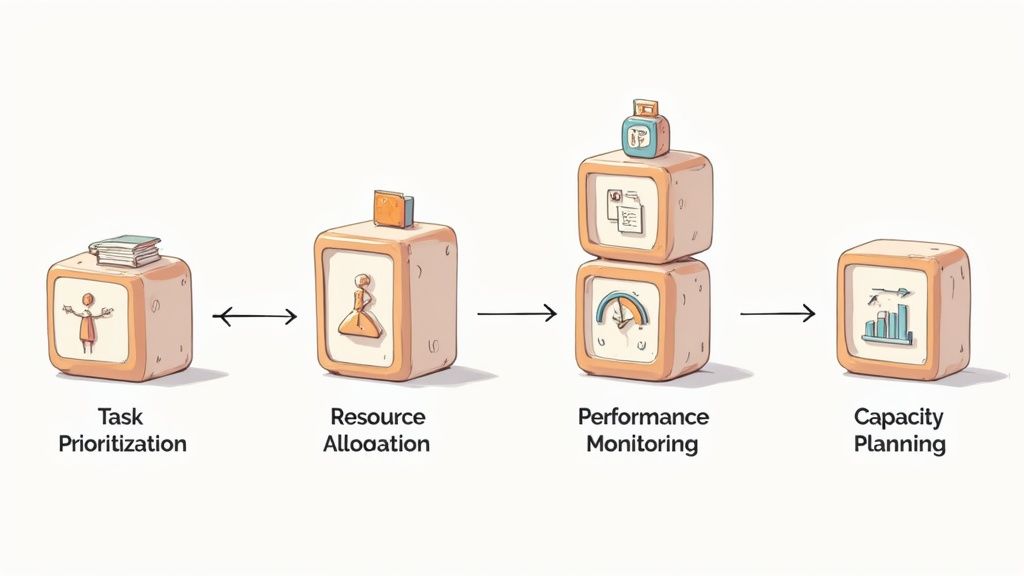
Knowing you need workload management is one thing. Actually building a system that works is another challenge entirely. A solid system isn't just a single piece of software or a new company policy—it's a combination of four key components working together to bring balance and clarity to your team.
Think of these as the blueprints for a more productive and less chaotic workplace. By focusing on Task Prioritization, Resource Allocation, Performance Monitoring, and Capacity Planning, you can build a framework that shifts your team from constantly putting out fires to proactively controlling their work.
Let’s break down each of these building blocks.
Task Prioritization: Deciding What Matters Most
The first step in wrangling any workload is figuring out what needs to be done right now. Without clear priorities, teams naturally drift toward the easiest tasks or the ones getting the most attention, not necessarily the most important ones. This is where a simple but powerful framework can make all the difference.
A great place to start is the Eisenhower Matrix, which helps you sort tasks by urgency and importance. This simple grid forces you to separate what's truly critical from what’s just making noise.
- Urgent and Important: These are the fires you need to put out immediately. Do them now.
- Important, Not Urgent: This is where your strategic, long-term goals live. Schedule time for them.
- Urgent, Not Important: These are often interruptions from others. Delegate them if you can.
- Not Urgent, Not Important: These are pure distractions. Get rid of them.
Using a framework like this creates a shared logic for decision-making, ensuring everyone is pulling in the same direction on the work that truly moves the needle.
Resource Allocation: Matching Skills to Tasks
Once you know your priorities, the next puzzle piece is assigning the right person to each task. Smart resource allocation is about more than just checking who has free time on their calendar. It’s about strategically matching skills, experience, and even interest to the work at hand.
A common mistake is to hand a complex task to the first available person instead of the most qualified one. This almost always leads to slower progress, lower-quality work, and a frustrated team member struggling without the right skills.
To get this right, you need a clear picture of your team's skills and their current commitments. This stops you from burning out your top performers while giving others a chance to step up and grow.
Performance Monitoring and Capacity Planning
Finally, a workload management system can't be static; it has to breathe. Performance monitoring is all about tracking progress against your goals—without hovering over everyone's shoulder. You can achieve this with regular check-ins, clear KPIs, and project dashboards that give you a quick, high-level view of where everything stands.
This feeds directly into Capacity Planning, which is all about looking ahead. By monitoring how things are going now and understanding your team's total available hours, you can predict future bandwidth with much greater accuracy.
This proactive approach helps you spot potential bottlenecks before they happen and make smarter decisions about taking on new projects. You can dive deeper into this critical component in our guide on what is capacity planning. Mastering it is the key to finally stop reacting to overload and start preventing it altogether.
Actionable Workload Management Best Practices
Knowing what goes into a workload management system is a good start, but putting that knowledge to work is what really makes a difference. A few proven best practices can completely change how your team gets things done, moving you away from reactive chaos and into proactive control. Think of these strategies not as one-time fixes, but as ongoing habits that create a more balanced and productive environment.
It all begins with building a culture where people feel safe to speak up. Your team members have to be comfortable flagging when their plate is too full, without worrying about being judged. This kind of transparency is the foundation of effective workload management—it lets you see an overload problem before it spirals into burnout.
Establish Clear Communication Channels
You can't balance workloads if you don't know what they are. The first step is to create dedicated spaces and times for your team to talk about their capacity and what they’re working on. This could be a standing item on the weekly meeting agenda or a specific channel in your team's communication app.
When everyone can see what others are doing, it’s much easier to spot who might have the bandwidth to help a colleague who's swamped. This isn't about micromanaging. It's about creating a shared awareness that empowers the team to support itself.
Key Insight: Workload management fails in silence. Open dialogue about capacity is not a sign of weakness—it's a requirement for sustainable high performance and a clear indicator of a healthy team culture.
This also means setting realistic deadlines from day one. When a new project lands, talk about the timeline and the effort required as a team. This collaborative approach makes sure deadlines are based on actual capacity, not just wishful thinking, which helps break the painful cycle of crunch time and stress.
Make Workload Management a Continuous Cycle
One of the biggest mistakes you can make is treating workload management as a "set it and forget it" task. It’s a continuous cycle of reviewing and adjusting. Priorities shift, unexpected tasks pop up, and team capacity can change without warning. Your approach has to be flexible enough to roll with the punches.
- Weekly Check-ins: Use a few minutes in your team meetings to do a quick scan of current workloads. Ask simple questions like, "What are your top priorities this week?" and "Are there any roadblocks?"
- Quarterly Audits: Every few months, take a step back and look at the bigger picture. Are certain people consistently overloaded? Are your internal processes creating bottlenecks?
- Encourage Feedback: Actively ask your team what’s working and what’s not with the current system. They're the ones on the front lines, so their feedback is invaluable.
This ongoing process helps you fine-tune your approach over time. It’s also interesting to see this in the broader context of how work has changed. The average American now works about 1,799 hours a year, a huge drop from the 3,150 to 3,650 hours people endured back in 1850. As you can see from these global time management patterns on MyHours.com, history shows it's not just about the number of hours worked, but how well those hours are managed. By constantly refining your methods, you ensure your team’s efforts are always pointed at what truly matters.
Selecting The Right Workload Management Tools
A brilliant workload management strategy is only as good as the technology you use to execute it. Without the right tools, even the most thoughtful plans for balancing tasks and stopping burnout before it starts can fall completely flat. This section will walk you through the software that brings workload management to life, helping you pick a solution that truly fits your team's unique rhythm and goals.
Today's workplace runs on a wide variety of tools, and understanding what workload management software actually does is the first step. These platforms are far more than glorified to-do lists; they're the central hub for visibility, collaboration, and making decisions backed by real data. They give you that clear, real-time picture of your team's capacity that's so essential for getting things right.
Key Features To Look For
When you're weighing your options, some features are non-negotiable for actually managing workloads effectively. These are the core functions that let you see who’s doing what, spot potential logjams, and make fair, informed calls about who gets the next task.
You'll want a tool that offers:
- Visual Capacity Dashboards: Think at-a-glance views of every team member's plate, often using color-coded charts to instantly show who is over, under, or just at capacity.
- Integrated Time Tracking: The ability to log hours against specific tasks and projects is a goldmine. It gives you hard data on how long work actually takes, not just how long you think it should.
- Automated Reporting: Look for customizable reports that can track key metrics like resource utilization, project progress, and budget burn without someone having to manually pull the numbers.
- Centralized Task Management: A single source of truth where every task is visible, assigned, and prioritized. This alone cuts out so much confusion and duplicate work.
These dashboards provide a clear, visual snapshot of your team’s bandwidth, empowering managers to make smarter decisions on the fly.
This screenshot gives you a great example of a typical workload view. Managers can instantly see where capacity limits are being pushed and reassign tasks to even things out.
The Growing Role Of AI
Artificial intelligence is also quickly becoming a major player in this space. AI integration has doubled, with 58% of employees now using it in some part of their workflow. While AI can certainly automate tedious tasks and help people focus, it needs to be managed carefully. The last thing you want is for it to extend workdays or create a new set of digital distractions.
As you explore these newer technologies, just remember the goal: find a balance that supports genuine productivity without adding to the digital noise.
Comparison of Workload Management Tool Types
Navigating the sea of software options can be overwhelming. To help you narrow it down, here’s a quick breakdown of the different categories of workload management tools and what they’re best suited for.
| Tool Type | Best For | Key Features | Example Platforms |
|---|---|---|---|
| Project Management Suites | Teams managing complex projects with multiple dependencies. | Gantt charts, Kanban boards, resource allocation, budget tracking. | Project management tools |
| Dedicated Resource Schedulers | Agencies and consultancies that bill by the hour. | Capacity planning, time tracking, skills matching, forecasting. | Resource scheduling software |
| Team Collaboration Hubs | All-purpose use for teams needing communication and task management. | Chat, file sharing, basic to-do lists, video conferencing. | Team collaboration apps |
| Simple Task Managers | Individuals or small teams with straightforward workflows. | To-do lists, due dates, reminders, basic collaboration. | Task management apps |
This table should give you a starting point. Think about whether your primary need is detailed project oversight, precise resource scheduling, or streamlined team communication.
Choosing a tool is less about finding the "best" platform and more about finding the right fit for your team's specific needs, whether you're an agile development squad or a creative marketing agency.
When you're trying to efficiently distribute tasks and get the most out of your team, exploring the top workforce management solutions can give you a serious edge.
Ultimately, the right software should make balancing work feel intuitive, not like you're just adding another layer of complexity. To dig a little deeper into this, it's worth learning how resource management tools streamline project success and support the whole team.
Answering Your Workload Management Questions
As you start putting workload management into practice, some common questions and roadblocks are bound to pop up. This section cuts through the confusion with straight, practical answers to the things teams wonder about most. Think of it as your go-to guide for smoothing out the kinks and getting your strategy right.
These answers are here to clear up any lingering doubts and give you the confidence to move forward.
How Do You Actually Measure Workload?
Measuring workload well is part science, part art. It’s not about just clocking hours; it’s about grasping the real effort and complexity behind the work. The best approach mixes hard data with a bit of human insight to get the full story.
Start with time tracking. This gives you a baseline—the raw data on where everyone's effort is actually going.
But that’s only half the equation. You have to pair that data with regular one-on-one check-ins. These conversations are where you find the context behind the numbers. Is a task taking longer because it’s incredibly difficult, or because of unexpected hurdles? How is the person feeling about their plate?
Effective measurement is a dialogue, not a spreadsheet. Data tells you what is happening, but conversations with your team tell you why.
Modern tools also offer visual capacity dashboards. These give you a quick, at-a-glance view of who’s stretched too thin and who has room to spare, letting managers make smart adjustments without having to micromanage every little thing.
What's The Difference Between Workload and Project Management?
This is a big one, but the difference is actually pretty simple. Project management is all about the project. Workload management is all about the people.
Project management is the nitty-gritty of steering a specific project from kickoff to completion. It’s about hitting deadlines, managing tasks, staying on budget, and making sure the project achieves its goals. Success is measured by getting the project done right.
Workload management takes a much wider view. It looks at an individual’s or a team’s total capacity across all projects, routine tasks, and other responsibilities. The main goal here is to keep the work distribution fair and sustainable to prevent burnout and keep everyone performing at their best.
- Project Management delivers the project.
- Workload Management protects the team.
Think of it like this: a project manager makes sure the train gets to its destination on time. A workload manager makes sure the engine doesn't overheat and the crew doesn’t collapse from exhaustion on the journey.
How Can I Start With a Small Team?
For small teams, the secret is to keep it simple. Focus on clear communication before you even think about complex tools. You don't need a pricey software suite to get started. The immediate goal is just to create a shared, visible understanding of the team's capacity and what's on everyone's plate.
A fantastic first step is to set up a shared digital Kanban board. A simple tool is all you need to get all the team's tasks visualized in one central spot.
Then, start doing brief daily stand-up meetings. These quick, 10-minute check-ins naturally create transparency around who's doing what, what's done, and where people are stuck. This one habit can often flag potential overload issues long before they become serious problems.
What's The First Step to Fix Chronic Team Burnout?
If your team is already deep in burnout territory, the absolute first step is to stop guessing and start measuring. You need to conduct a workload audit. This gives you a clear, data-driven picture of where everyone’s time and energy are really going.
For one full week, ask everyone on the team to track their tasks and the time they spend on them. It might feel like a hassle, but it removes assumptions and gives you an objective foundation to work from.
Once the week is up, hold a transparent team meeting to go over the findings together. The goal isn't to point fingers but to collectively spot the biggest time-wasters, process bottlenecks, and low-value tasks that are draining everyone's energy. From there, you can work as a group to re-prioritize, looking for quick wins by killing, automating, or delegating tasks to bring some immediate relief.
Ready to gain clear visibility into your team's capacity and eliminate burnout for good? DeskCove provides the tools you need to monitor productivity, track time effortlessly, and make data-driven decisions. Start managing workloads effectively with DeskCove today.